
Desk Phone vs Softphone: What Should a Business Choose?
This guide compares desk phones and softphones on cost, reliability, call quality and remote work, then shows how to pick the right one for each role in your team.
Both make the same business calls through the same cloud phone system. The difference is the device, and that changes cost, setup, where people can work and what happens when something fails. Many teams end up using both, matched to each role.
This guide compares the two side by side, then shows how to choose for each role in your team. If you're new to softphones, our guide on what a softphone is covers the basics first.
Every fact in this guide links to its source. We last checked them on 23 November 2026.
Key takeaways
- A softphone is software, so it goes wherever your laptop or mobile goes.
- A desk phone is hardware, so it stays put and doesn't depend on a laptop.
- Both depend on your network, so neither works well on a weak connection.
- Most teams mix both, with softphones for most staff and desk phones for shared spots.
What is the difference between a desk phone and a softphone?
The main difference is that a desk phone is a physical device, while a softphone is an app. Both connect to a cloud phone system over the internet, so they can make and take the same calls.
Here's what each one is:
Desk phone: a handset with a keypad and screen that plugs into your office network. It's also called an IP phone or a hard phone. Many desk phones take power through the network cable. This uses Power over Ethernet, a standard IEEE first published in 2003.
Softphone: a calling app that runs on a computer, tablet or mobile phone. You talk through a headset or the device's own microphone. Browser softphones use WebRTC, a W3C standard that lets a web page handle voice, so there's nothing to install.
Under the hood, both often use the same signaling standard, SIP, to set up calls. That's why one phone system can run desk phones and softphones side by side.
Desk phone vs softphone: how do they compare side by side?
Desk phones and softphones differ most on cost, setup, where people can work and what happens when something breaks. The table below compares them on the points businesses weigh most.
Table 1: Desk phone vs softphone at a glance
| Factor | Desk phone | Softphone |
|---|---|---|
| Upfront cost | A handset per desk | A headset per person |
| Setup | Plug in and configure | Sign in |
| Where it works | One desk | Anywhere with internet |
| Updates | Firmware, by IT | Automatic, in the app |
| Uses the computer | No | Yes |
| CRM and call tools | Limited, by model | Usually built in |
| Shared by several people | Easy | Harder |
Each row hides a trade-off. The sections below explain the ones that matter most.
Which one costs less, a desk phone or a softphone?
A softphone usually costs less, because it runs on devices your team already has. You only need a headset for each person. With desk phones, you buy or lease a handset for every desk, and someone has to set up and maintain them.
Count four kinds of cost before you decide:
- Hardware: handsets for desk phones, headsets for softphones.
- Setup time: configuring and shipping phones, versus sending a sign-in link.
- Replacement: desk phones last longer, but broken ones need a spare on hand.
- IT time: firmware updates and moves for desk phones, app support for softphones.
Moves change the sums too. A desk phone has to be unplugged, carried and set up again when someone changes desks. Softphones move with the person, at no cost.
To compare for your own team, ask your provider for the handset and headset prices it supports. Then multiply by the number of people in each role. Our guide on business phone number cost covers the monthly side of the bill.
Which one is more reliable?
Neither is more reliable by default: a desk phone and a softphone fail in different ways. Both rely on your internet connection, so a poor network hurts both.
Here's how each one usually breaks:
- Power cut: desk phones on network power stop when the office network loses power. A laptop softphone keeps going on battery, if the internet still works.
- Internet outage: both stop. A mobile softphone can switch to mobile data.
- Computer problems: a slow or crashed laptop takes a softphone down with it. A desk phone doesn't care.
- Busy network: large downloads on the same connection can cause choppy audio on both.
Call quality depends far more on the network than on the device. Our guide on VoIP call quality issues explains what causes choppy or delayed audio, and how to fix it.
One rule applies to both. Many cloud phone services, including HyperDial, don't support emergency calls, so keep another way to reach emergency services. HyperDial's terms of service (clause 8.1) say this, and ask you to tell your team.
Which one is better for remote and hybrid teams?
A softphone is better for remote and hybrid teams, because it works anywhere with a stable internet connection. Staff sign in from home, a client site or a hotel and use the same business number.
A desk phone ties a number to one spot. Staff who split their week between home and office would need two phones, or would miss calls on the days they're away. With a softphone, calls follow the person, not the desk.
A softphone also keeps the business number off personal mobiles. Staff call from the app, so customers never see their private number. Our guide on business vs personal phone numbers explains why that matters.
When is a desk phone still the better choice?
A desk phone is still the better choice for fixed, shared or always-on spots. It also suits people who make calls all day without a computer. In these places, a dedicated handset is simpler.
Good fits for a desk phone include:
- Reception desks: anyone covering the front desk can pick up, with no sign-in.
- Shared spaces: a warehouse wall, a meeting room or a shop counter.
- Staff without a computer: people who move around and need a phone at one station.
- Heavy phone users who prefer a handset: some people simply work better with one.
For these spots, a desk phone saves people from logging in, charging headsets or leaving a laptop open. It also keeps working if a shared computer is slow or switched off.
How do you choose between a desk phone and a softphone?
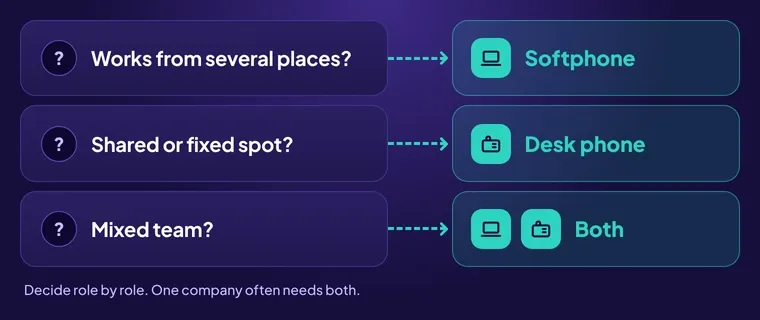
You can choose between a desk phone and a softphone in three steps. Decide role by role, because one company often needs both.
Step 1: List each role and where it works
Write down each role in your team and where those people take calls. Note whether they work at one desk, move around the office, work from home or travel.
Also note who shares a phone. A reception line covered by three people is different from a sales rep who owns their calls.
Step 2: Check your network, power and budget
Next, check that your network can carry calls well. A browser softphone like HyperDial needs about 100 kbps per call, and a stable connection matters more than speed.
Then check power. If you choose desk phones that run on network power, confirm your office switches can supply it. Finally, price handsets and headsets for the number of people in each role.
The common mistake happens here: teams buy desk phones for everyone without testing the network first. Choppy audio then gets blamed on the phones, when the real problem is the connection.
Step 3: Pilot with one team, then roll out
Give one team softphones and headsets for two weeks. Keep desk phones where they clearly fit, like reception. Ask the team about call quality, comfort and any missed calls.
Then roll out role by role. Most businesses end up with softphones for most staff and a few desk phones for shared spots.
Can a business use desk phones and softphones together?
Yes, most cloud phone systems let a business use desk phones and softphones together on the same numbers. Calls can ring on both, and staff can switch between them.
A mixed setup usually looks like this:
- Softphones for most staff: sales, support and managers who work from anywhere.
- Desk phones for shared spots: reception, warehouse or meeting rooms.
- One number, many devices: a call can ring on a desk phone and a softphone at once.
What makes this work is routing. The phone system decides which devices ring and in what order, whatever the device. Our guide on call routing strategies explains the common options.
How does HyperDial fit desk phone and softphone setups?
HyperDial is a browser-based softphone, so it suits teams that want to call from any computer without phones to set up. According to its voice calling page, reps need only a browser and a headset.
Here's what that means in practice:
- No install: there's no app to download and no desk phone to set up.
- Any location: staff sign in from the office, home or anywhere with a stable connection.
- Light on bandwidth: about 100 kbps per call, with stability mattering more than speed.
- Built-in tools: routing, recording and CRM sync run in the same place, as the routing page shows.
There are honest limits to know. HyperDial's voice page doesn't describe support for physical desk phones, so ask the team before you plan a mixed setup. Its terms of service (clause 3.5) also say you provide the internet connection, devices and headsets. Call quality depends on your network, too.
What should you do next?
List each role in your team and where those people take calls. Give softphones to people who work from several places, and keep desk phones for shared or fixed spots. Then test your network and pilot with one team. To start, see HyperDial's voice calling, compare plans on the pricing page or try HyperDial free.
Sources


