
How to Forward Business Calls to a Mobile Phone
Away from your desk a lot? Learn how to get every business call on your mobile, choose the right forwarding setup, and keep your personal number private when you call customers back.
This guide compares the three methods and explains each type of forwarding. It then walks you through a setup that keeps business calls apart from your personal line.
What is business call forwarding?
Business call forwarding is a phone feature that sends calls from your business number to another number, such as an employee's mobile. The caller dials your usual number, and the call rings somewhere else without them having to do anything.
Forwarding isn't new. The ITU, the UN agency for global telecom standards, describes the classic forms in Recommendation Q.732.2. They are forwarding unconditional, on busy and on no reply. Cloud phone systems build on those basics with time rules, teams and reports.
What are the ways to forward business calls to a mobile?
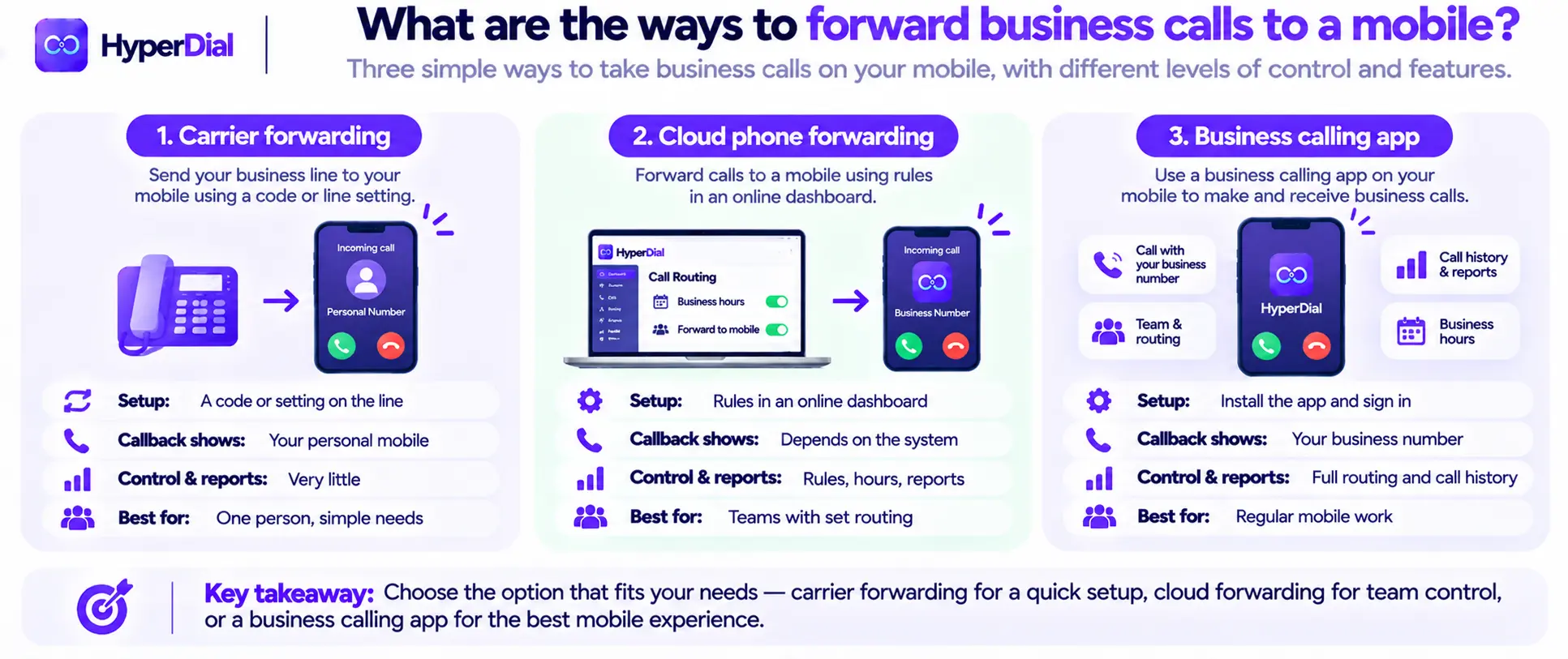
There are three main ways to forward business calls to a mobile: through your carrier, through a cloud phone system, or with a business calling app. They differ most in control, caller ID and records:
Table 1: Ways to get business calls on a mobile
| Method | How you set it up | Number shown when you call back | Control and reports | Best for |
|---|---|---|---|---|
| Carrier forwarding | A code or setting on the line | Your personal mobile | Very little | One person, simple needs |
| Cloud phone forwarding | Rules in an online dashboard | Depends on the system | Rules, hours, reports | Teams with set routing |
| Business calling app | Install the app, sign in | Your business number | Full routing and call history | Regular mobile work |
Carrier forwarding is the quickest to switch on. The codes and settings vary by carrier, so check your provider's instructions. It works, but every callback you make comes from your personal number.
Cloud phone forwarding sends calls from your business number to a mobile using rules you set online. You can add business hours, backups and several people.
A business calling app skips forwarding entirely. The business number rings in an app on your mobile, so you answer and call back as the business.
What types of call forwarding can you use?
Call forwarding types differ in when a call moves to the mobile. Most systems offer some or all of these:
Always (unconditional): every call goes straight to the mobile, useful when you're away all day.
When busy: calls move to the mobile only when the main line is already on a call.
When unanswered: the main line rings first, then the call forwards after a set number of seconds.
Time-based: calls forward only at set times, like evenings, weekends or holidays.
Sequential: phones ring one after another in a set order until someone answers.
Simultaneous: several phones ring at once, and the first person to pick up takes the call.
For most small teams, "when unanswered" plus time-based rules covers the common cases. The desk or laptop rings first, and the mobile only picks up what would otherwise be missed.
How do you forward business calls to a mobile phone?
You forward business calls to a mobile phone by choosing your method, setting the forwarding rules, and testing what callers and customers see. Follow these three steps:
- Choose your method and destination. Decide between carrier forwarding, cloud forwarding or a business calling app, and pick which mobile or team should receive the calls.
- Set when calls forward, with hours and a backup. Choose always, busy, unanswered or time-based rules, add business hours, and name a backup person or voicemail.
- Test the call and the callback. Call your business number from another phone, answer on the mobile, then call back to check which number the customer sees.
The most common mistake happens at step 2: forwarded calls that nobody answers drop into the employee's personal voicemail. Customers then hear a personal greeting, and the message never reaches the business. Set the forwarding timeout so unanswered calls return to a business voicemail or a backup person first.
What number do customers see when you forward calls?
When a call is forwarded to you, you usually see the customer's number, not your own business number. The bigger issue is what customers see when you call them back.
If you return the call from your personal mobile, the customer sees your personal number, and they may save it instead of the business line. A business calling app avoids this, because callbacks go out from the business number. Always check with a test call, since what shows depends on the carrier and the system.
Should you use call forwarding or a business calling app?
Use call forwarding for occasional or temporary needs, and a business calling app when people regularly work from their mobiles. The right choice depends on how often calls go mobile and how many people share the number:
Choose carrier forwarding if you're one person who needs office calls on your mobile now and then.
Choose cloud forwarding if a team shares a number and you need rules for who gets calls, and when.
Choose a business calling app if people take business calls on the move every day and need to call back as the business.
HyperDial takes the app approach. Its local phone numbers ring on your team's laptops and phones alongside their personal numbers, so nobody needs a second handset or a forwarding code. HyperDial's voice calling runs in a browser or on a phone, and callbacks show your business number. The same works for toll-free numbers, so a support line can ring the on-call person's mobile too.
What should you plan for before forwarding business calls?
Before you forward business calls, plan for cost, after-hours boundaries and what happens to call records. Forwarding is easy to switch on, but these details decide whether it works long term:
- Cost: some carriers bill forwarded minutes, so check your plan before you forward every call.
- Voicemail: make sure missed calls reach a business voicemail, not a personal one.
- Working hours: without time rules, staff get business calls at night and on days off.
- Records: basic forwarding rarely keeps call history, so missed calls go unseen.
- Coverage: a weak mobile signal can drop forwarded calls, so add a backup.
- Staff changes: if customers save a personal number, the relationship can leave with the employee.
- Account security: protect the account that controls forwarding with a strong password and two-step verification.
A cloud system covers most of this in one place. HyperDial's call routing sets a calling order and a backup team, with business hours and holiday calendars per queue. Its call analytics shows total, answered and missed calls, so nothing slips through on a mobile.
What should you do next?
Decide how often your business calls need to reach a mobile and who should take them. For occasional needs, set up simple forwarding and test it today. If your team works on the move every day, try a business calling app instead. When you're ready, compare plans on the pricing page or try HyperDial free.
Sources


