
How to Improve Business Call Reliability During Peak Hours
Busy hours break calls in two places, the line and the queue, and this guide shows you how to protect both.
Most guides on busy periods focus only on staffing. That's half the problem. A peak can also fill your internet connection, overload office Wi-Fi, and expose routing rules that were never tested at volume. This guide covers both layers, with a capacity check you can run before your next busy day.
Key takeaways
- Reliability has two layers. Calls must connect cleanly, and someone or something must answer them.
- Size your network for peak calls at once, not for an average hour.
- Every queue needs a named fallback, so busy agents never mean a ringing phone nobody answers.
- Test before the peak, because a busy day is the worst time to find a broken route.
What does business call reliability mean during peak hours?
Business call reliability is the share of calls that connect, stay connected with clear audio, and get handled without the caller giving up. Peak hours test it harder than any other time, because more calls compete for the same network, the same platform and the same agents.
It helps to split reliability into two layers, because each one fails in its own way and needs its own fix.
The connection layer: does the call get through clearly?
The connection layer is everything that carries the call. That includes your internet connection, router, office Wi-Fi, headsets and computers, plus the phone platform and carrier networks behind it. When this layer struggles, you hear it. Audio turns choppy, voices lag, one side goes silent, or calls drop halfway through.
Peak hours stress this layer because many calls run at once. A connection that handles five calls easily can struggle with twenty, especially if the same line also carries video meetings, file uploads and software updates.
The answer layer: does someone pick up?
The answer layer is how calls are queued, routed and answered once they arrive. It includes your phone menu, queues, routing rules, overflow, callbacks, and the people or AI agents taking calls. When this layer struggles, callers notice in a different way. They wait too long, hear endless ringing, reach voicemail, or hang up.
A call that connects perfectly but rings out unanswered is still a reliability failure from the caller's point of view. That's why the two layers need to be planned together.
Why do business calls fail when volume peaks?
Business calls fail at peak times because the extra volume finds the weakest point in either layer. It's usually one of five causes, and each one leaves a recognizable symptom.
The internet connection fills up
Every call uses a steady stream of data in both directions. When many calls run at once alongside other traffic, the connection runs out of room, and voice packets arrive late or not at all. Callers hear this as robotic audio, gaps or delays.
Upload speed is usually the bottleneck, since many business connections offer far less upload than download. Video meetings and cloud backups running at the same time make it worse.
Wi-Fi and devices can't keep up
Wi-Fi is shared, and it gets noisier when an office fills up. Agents far from the access point, or on a crowded network, are the first to report bad audio. Old headsets and laptops running many browser tabs add their own problems.
These issues often look random, because they affect some agents and not others. A pattern by desk location or device is the giveaway.
The platform or carrier hits a limit
Some phone plans and trunks limit how many calls can run at the same time. When you reach that limit, extra callers hear a busy tone or the call fails to connect. Carrier-side problems, such as a regional outage, can cause the same symptom for everyone at once.
This is the least common cause, but the most serious, because it blocks calls completely. Check your provider's limits before a planned peak, and know where its status page is.
Routing wasn't built for volume
Routing rules that work on a quiet day can break under pressure. A queue with one qualified agent stalls the moment that person is busy. Menus with no overflow leave callers waiting with no way out. Hours set for the whole company, rather than per queue, can send calls to an empty team.
These failures don't show up in testing, because tests rarely happen at peak volume. They show up as long waits and hang-ups in one queue while others stay quiet.
Not enough people at the right moment
Even with perfect technology, calls wait when there aren't enough agents. Most teams staff to the daily average, but calls arrive in clusters: after a campaign, at lunchtime, or the morning after a holiday. Our guide on reducing call abandonment explains how to staff to the busy interval instead of the average.
How much network capacity do you need for peak call volume?
The network capacity you need is your peak number of calls at once, multiplied by the data each call uses. Add room for everything else on the line. HyperDial's voice page says around 100 kbps per concurrent call is plenty, and that a stable connection matters more than raw bandwidth.
Use this simple formula to check your connection before a busy period:
Voice capacity needed = peak calls at once × about 100 kbps, in both directions
Then leave generous headroom for video meetings, browsing and uploads that run at the same time. This table shows the voice share for common team sizes, using that per-call figure:
Table 1: Voice bandwidth at peak, using about 100 kbps per call
| Calls at the same time | Voice bandwidth needed | Check in particular |
|---|---|---|
| 5 | About 0.5 Mbps | Wi-Fi coverage at every desk |
| 10 | About 1 Mbps | Upload speed during meetings |
| 20 | About 2 Mbps | Router load and voice priority |
| 50 | About 5 Mbps | A second connection for failover |
Bandwidth is only part of the picture. Delay matters too. The ITU's G.114 recommendation on one-way transmission time, approved in 2003, is the standard reference for how much delay a voice call can tolerate. A connection with plenty of bandwidth but unstable delay will still sound worse than a modest, steady one.
Our guide on VoIP call quality issues explains jitter, latency and packet loss in more detail.
How do you improve business call reliability during peak hours?
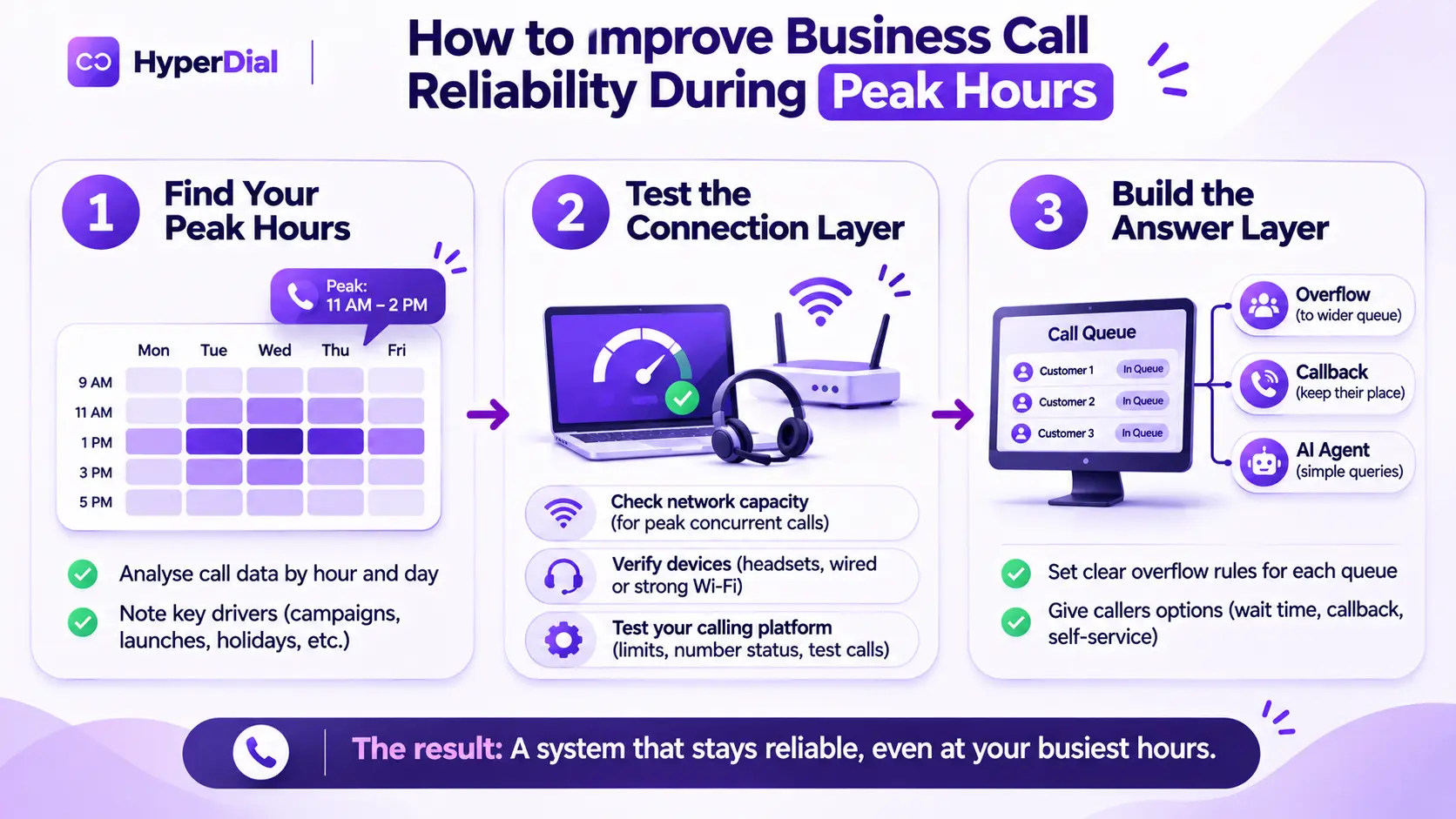
You improve business call reliability by finding your real peaks and testing the connection layer before them. Then you build an answer layer that never leaves a call unhandled. Follow these three steps before your next busy period.
Step 1: Find your real peak hours and what drives them
A peak is any period when calls arrive faster than your usual setup can handle. Some are predictable, like Monday mornings, lunch hours or the day after a holiday. Others follow your own actions, such as a marketing email, a price change or a product launch. A few come from problems, like an outage that sends every customer to the phone at once.
Pull at least a month of call data and look at calls by hour and day, not daily totals. A heatmap of busy hours shows the clusters an average hides. Then mark upcoming events on the calendar: campaigns, renewals, seasonal dates. Each one is a peak you can prepare for instead of react to.
The mistake we see most happens here: planning around the daily average. A team that's comfortable at the average is often overwhelmed for two hours a day, and those two hours are when most callers give up.
Step 2: Stress-test the connection layer before the peak
Start with the network. Count how many calls you expect at once during your busiest hour, and check that your connection can carry them, using the table above. Run the check while a video meeting is also running, because that's what peak hours really look like.
Next, remove the weak links agents can't see. Move high-volume agents to wired connections where you can, or close to a strong access point. Ask whoever manages your router to give voice traffic priority over downloads and video, a setting often called quality of service (QoS). Replace headsets that cause repeated complaints, and restart computers before a long shift.
Finally, check the platform. Confirm any limit on calls at the same time, and know where your provider's status page is. Then make test calls from outside the office on every main number. If one number has started to get blocked or flagged, find out now, not on launch day. Our guide on why business calls fail to connect covers number and carrier issues.
Step 3: Build the answer layer so no call goes unhandled
Every queue needs a plan for the moment every agent is busy. Overflow rules should name exactly where a call goes after a set wait: a wider queue, a callback, an AI agent or an after-hours path. A queue without overflow is the most common reason callers hear endless ringing at peak times.
Give callers a reason to stay or a way out. Tell them the expected wait, offer a callback that keeps their place, and keep phone menus short so they reach the queue faster. Simple requests, like order status or opening hours, can be answered without an agent at all.
Then add people where the data says you need them. Move flexible staff onto the phones for the busy hours, and cross-train a few agents to cover more than one queue. Agree in advance who steps in if the queue grows faster than expected. Our guide on reducing missed inbound calls covers overflow and coverage options in more depth.
What should you watch while a peak is happening?
During a peak, watch the signals that tell you which layer is failing, so you fix the right thing quickly. Audio complaints point to the connection layer. Waits and hang-ups point to the answer layer. This table maps the common symptoms:
Table 2: Peak-hour symptoms and what they point to
| What you notice | Layer | Likely cause | First fix |
|---|---|---|---|
| Choppy or robotic audio | Connection | Network full or unstable | Pause heavy uploads, prioritize voice |
| One agent with bad audio | Connection | Wi-Fi, headset or computer | Move to wired, swap device |
| Calls fail or callers hear a busy tone | Connection | Platform or carrier limit | Check status page and call limits |
| One queue waiting long | Answer | Too few agents in that queue | Open overflow to a wider queue |
| Callers hanging up | Answer | Wait too long, no way out | Offer callbacks, share wait time |
| Calls ringing out | Answer | No overflow rule | Add a named fallback |
Keep one person responsible for watching these signals during the peak. They don't need to take calls. Their job is to spot a failing queue or a network problem early and make the change before callers give up. For a deeper look at audio problems, see our guide on dropped calls.
What should you review after a peak?
After a peak, review what happened while the details are fresh, so the next busy period goes better. A short review within a day or two is enough. These are the questions worth answering:
- Which hour was worst, and was it the one you expected? Compare the real peak against your plan.
- How many calls were missed or abandoned, and in which queue? Look for the queue that broke first.
- Did any audio or connection problems appear? Note which agents, devices or locations were affected.
- Did overflow and callbacks work as designed? Check that callbacks were returned within the time you promised.
- What will you change before the next peak? Pick one or two fixes, not ten.
Our guide on how to track unanswered calls shows how to separate missed, abandoned and unanswered calls in your data.
How does HyperDial keep calls reliable at peak times?
HyperDial runs calls in the browser, routes overflow to a named destination, and shows live queue data, so both layers can be managed from one place.
What HyperDial does for the connection layer
The connection layer is kept light, so calls need little more than a browser, a headset and a stable connection. These details come from HyperDial's voice page:
- No desk phones: agents need a browser and a headset, with no softphone to install and no desk phone to provision.
- Light on bandwidth: around 100 kbps per concurrent call, with the note that a stable connection matters more than bandwidth.
- Uptime target: 99.9% platform uptime on paid plans. This is a target, not a historical average, and contractual terms sit in the order form.
- Status page: live platform status is published at status.hyperdial.io.
What HyperDial does for the answer layer
The answer layer makes sure every call has somewhere to go, and that you can see the queue as it builds. These details come from HyperDial's call routing and analytics pages:
- Overflow that names a destination: calls go to overflow, a callback or the after-hours path, and are never silently dropped.
- Callbacks: callers hold their place and get called back instead of waiting on the line.
- Priority callers: renewals and high-intent callers don't wait behind everyone else.
- Busy-hour heatmap: call analytics shows total, answered and missed calls, with a heatmap of the busiest hours.
- Live floor view: shows what the queue is doing and which agents are on calls or idle.
When the queue gets deep, HyperDial's AI agents answer the overflow under the same routing rules. They hand over to a rep with the transcript when a person is needed.
One honest limit: HyperDial's public pages don't list a maximum number of calls at the same time, codec details or failover design. If those matter for a large planned peak, ask before the event.
What should you do next?
Pull last month's call data and find your two busiest hours. Count how many calls ran at the same time in those hours, and check your connection against the table above. Then make sure every queue has a named overflow route before your next campaign or busy day. To see how this works in HyperDial, explore call routing or try HyperDial free.
Sources


