
What is a Softphone? How it Works and Why Teams Use One
Your business phone number doesn't have to live on a desk anymore. Many teams now work from home, from the office, or from both.

Your business phone number doesn't have to live on a desk anymore. Many teams now work from home, from the office, or from both. In Gallup's May 2025 survey of US workers whose jobs can be done remotely, 51% were hybrid and 28% were fully remote. A phone bolted to an office desk doesn't fit that kind of week.
A softphone solves this by turning your laptop or phone into your business line. It uses VoIP (voice over internet protocol) to send your voice as data over the internet. Most softphones use SIP, the Session Initiation Protocol, to start and end each call. Browser-based softphones also use WebRTC, a web standard that lets a browser send live audio. You don't need to know how any of this works to use one, but it explains why a softphone only needs a device, a headset and a good internet connection.
In this guide, you'll learn:
- What a softphone is, and how it works step by step
- The three types of softphones, and how they compare to desk phones
- The benefits and downsides of using a softphone
- Which features matter, and how to choose one for your team
- How to set up a softphone and fix the most common problems
What is a softphone?
A softphone is a phone that runs as software instead of hardware. The name is short for "software phone." It shows a dial pad, a contact list and call buttons on your screen, and it uses your device's microphone and speakers, or a headset, for sound.
You can call any phone number with a softphone, including mobiles and landlines. The person you call doesn't need a softphone or any special app. To them, it's a normal phone call from your business number.
A few related terms often get mixed up. The table below shows how they fit together.
Table 1: Softphone and related terms
| Term | What it is |
|---|---|
| VoIP | The technology that carries voice over the internet |
| Softphone | The app you use to make VoIP calls |
| SIP | The protocol that starts, manages and ends a call |
| WebRTC | The web standard that lets a browser send live audio |
| Business phone system | The full service: numbers, routing, voicemail and reports |
How does a softphone work?
A softphone works by turning your voice into small packets of data and sending them over the internet to your phone provider. The provider then connects the call to the person you're calling. Here's what happens on each call:
- You sign in. You open the softphone app or browser tab and log in to your business phone account.
- You dial a number. You type the number, click it in your CRM, or pick a contact.
- The call is set up. The softphone uses SIP or WebRTC to tell your provider who you're calling.
- Your voice becomes data. The app turns your voice into data packets and sends them over the internet.
- The provider connects the call. Your provider passes the call to the regular phone network, so it rings on any phone.
A softphone doesn't need much internet speed. HyperDial, for example, says about 100 kbps per call is plenty, and a stable connection matters more than raw speed, as noted on its voice calling page.
What are the types of softphones?
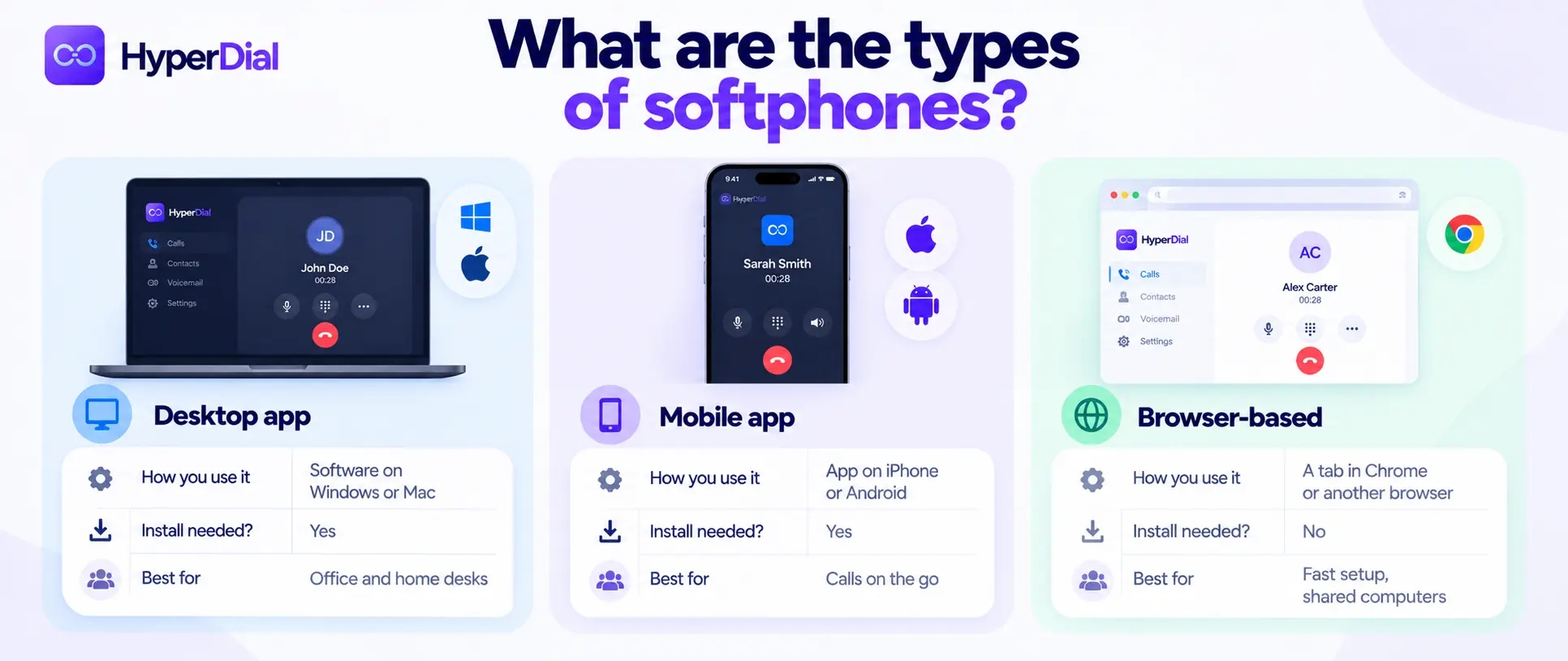
There are three main types of softphones: desktop apps, mobile apps and browser-based softphones. They all make calls over the internet, but they differ in how you install and use them.
Table 2: Types of softphones
| Type | How you use it | Install needed? | Best for |
|---|---|---|---|
| Desktop app | Software on Windows or Mac | Yes | Office and home desks |
| Mobile app | App on iPhone or Android | Yes | Calls on the go |
| Browser-based | A tab in Chrome or another browser | No | Fast setup, shared computers |
Browser-based softphones are the newest type. Because they run in a browser tab, IT teams don't have to install or update anything on each computer. New team members can start calling as soon as they sign in.
What is the difference between a softphone and a desk phone?
The main difference is that a softphone is software on a device you already own, while a desk phone is a separate piece of hardware. Both can make the same business calls. The table below compares them.
Table 3: Softphone vs desk phone
| Softphone | Desk phone (IP phone) | |
|---|---|---|
| Hardware | Your computer or phone | A handset you buy or lease |
| Setup | Sign in to an app or browser | Plug in, connect and configure |
| Where it works | Anywhere with internet | Usually one desk |
| Extra features | Recording, CRM, transcripts | Fewer, depending on the model |
| Updates | Automatic | Firmware updates by IT |
| Power | Needs a charged device | Powered by the office network |
Choose a softphone if your team works from more than one place, or you want calls linked to your CRM.
Choose a desk phone if someone needs a dedicated phone at a fixed spot, like a reception desk or a lobby.
Many businesses use both on the same phone system. A receptionist might keep a desk phone, while sales reps use a softphone.
What are the benefits of a softphone?
The main benefits of a softphone are lower costs, more freedom to work anywhere and faster setup. Here's why businesses switch:
- Lower hardware costs: you use the laptops and phones your team already has.
- Work from anywhere: your business number goes wherever your device goes.
- Fast setup: new team members can make calls on their first day.
- Privacy: customers see your business number, not your personal mobile number.
- Easy to grow: add or remove users in minutes, without buying new phones.
- More features: many softphones add recording, transcripts and CRM sync.
What are the disadvantages of a softphone?
The main disadvantage of a softphone is that it depends on your internet connection and device. A weak connection or a dying battery can hurt call quality or end a call. Keep these limits in mind:
- Internet quality matters: slow or unstable Wi-Fi can cause choppy audio or dropped calls.
- Devices need power: if your laptop or phone dies, so does your phone line.
- Headsets help a lot: built-in laptop mics pick up background noise and echo.
- Firewalls and VPNs can block audio: office networks sometimes block the ports calls need.
- Emergency calls need a location: in the US, the FCC's 911 rules require VoIP providers whose users move around to send a usable location with 911 calls. Keep your address up to date in your phone system.
Most of these are easy to fix with a good headset, a stable connection and a quick check of your network settings.
What features should a business softphone have?
A good business softphone does more than make calls: it helps your team handle calls well and keeps records without extra work. Look for these features:
- Business numbers: local, toll-free or international numbers, and the option to keep your current number.
- Call transfers and hold: pass calls to a teammate without losing the caller.
- Voicemail with transcription: read voicemails instead of listening to each one.
- Call recording and transcripts: review calls for training, quality and follow-up.
- CRM integration: log calls, notes and outcomes in tools like Salesforce or HubSpot.
- Manager tools: let managers listen in, coach a rep or join a call.
- Reports: see call volume, missed calls and busy hours.
HyperDial's integrations page lists the CRMs and helpdesks it connects to, and its manager tools show how coaching works on live calls.
Who uses softphones?
Any team that makes or takes business calls can use a softphone, but some teams get more out of it than others. These are the most common users:
- Sales teams use click-to-call and a dialer to reach more leads in less time.
- Customer support teams answer calls from a queue and see customer details during the call.
- Remote and hybrid workers keep one business number at home and in the office.
- Global teams use local numbers in other countries so customers can call them easily.
- Small businesses get a professional business line without buying phone hardware.
How do you set up a softphone?
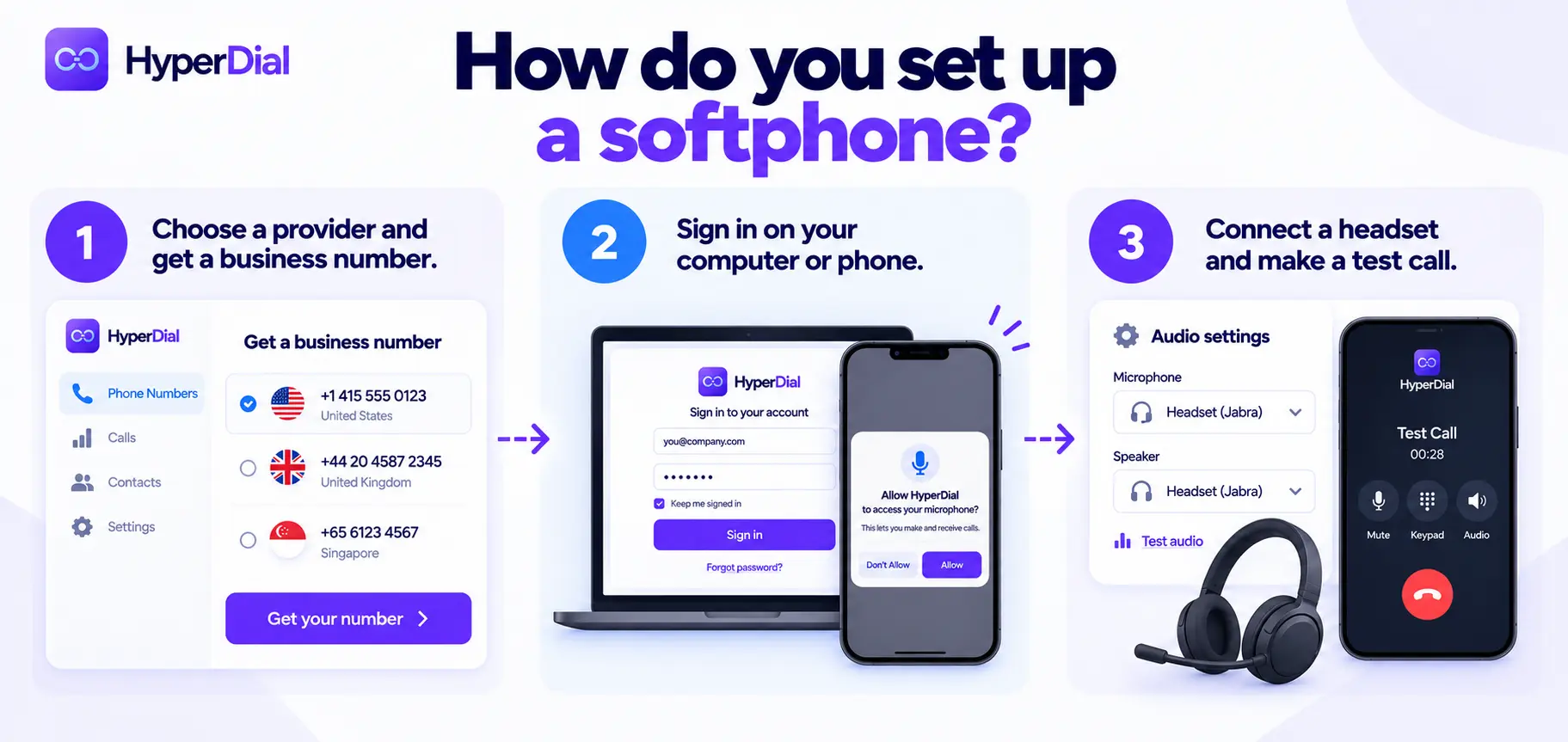
You set up a softphone by choosing a provider, signing in on your device and testing your audio. Most teams are making calls in under an hour. Follow these three steps:
- Choose a provider and get a business number. Pick a business phone system that includes a softphone, then choose a new number or move your current one.
- Sign in on your computer or phone. Open the app or browser tab, log in, and allow access to your microphone when asked.
- Connect a headset and make a test call. Select your headset in the audio settings, then call a colleague or your own mobile to check both sides can hear.
The most common mistake happens at step 2: people block the microphone pop-up by accident. Your call then connects but sends silence, so the other person can't hear you. HyperDial's getting started guide walks through setup in more detail.
How do you fix common softphone problems?
Most softphone problems come from the microphone, the headset or the network. Try these fixes first:
- They can't hear you: check that your browser or app has microphone permission.
- You hear nothing: make sure the right headset is selected in the audio settings.
- The headset stopped working: unplug it, plug it back in, then select it again.
- Audio is choppy: move closer to your router, or switch from Wi-Fi to a wired connection.
- Audio only goes one way: test the call on a phone hotspot. If it works there, your office firewall or VPN is likely blocking audio.
HyperDial's help guide on fixing one-way audio lists the network ports your IT team may need to open.
How do you choose the right softphone for your business?
The right softphone fits the devices your team uses, works with your other tools and gives you the numbers you need. Ask these questions before you choose:
- Does it work on your team's devices? Check for desktop, mobile and browser options.
- Can you keep your current number? Make sure the provider supports number porting.
- Does it connect to your CRM? Calls should log automatically to the right record.
- Does it record and transcribe calls? This matters for sales coaching and support quality.
- How is call data protected? Look for encryption, access controls and clear retention settings.
- What does it really cost? Compare the price per user, plus numbers, minutes and add-ons.
How does HyperDial work as a browser-based softphone?
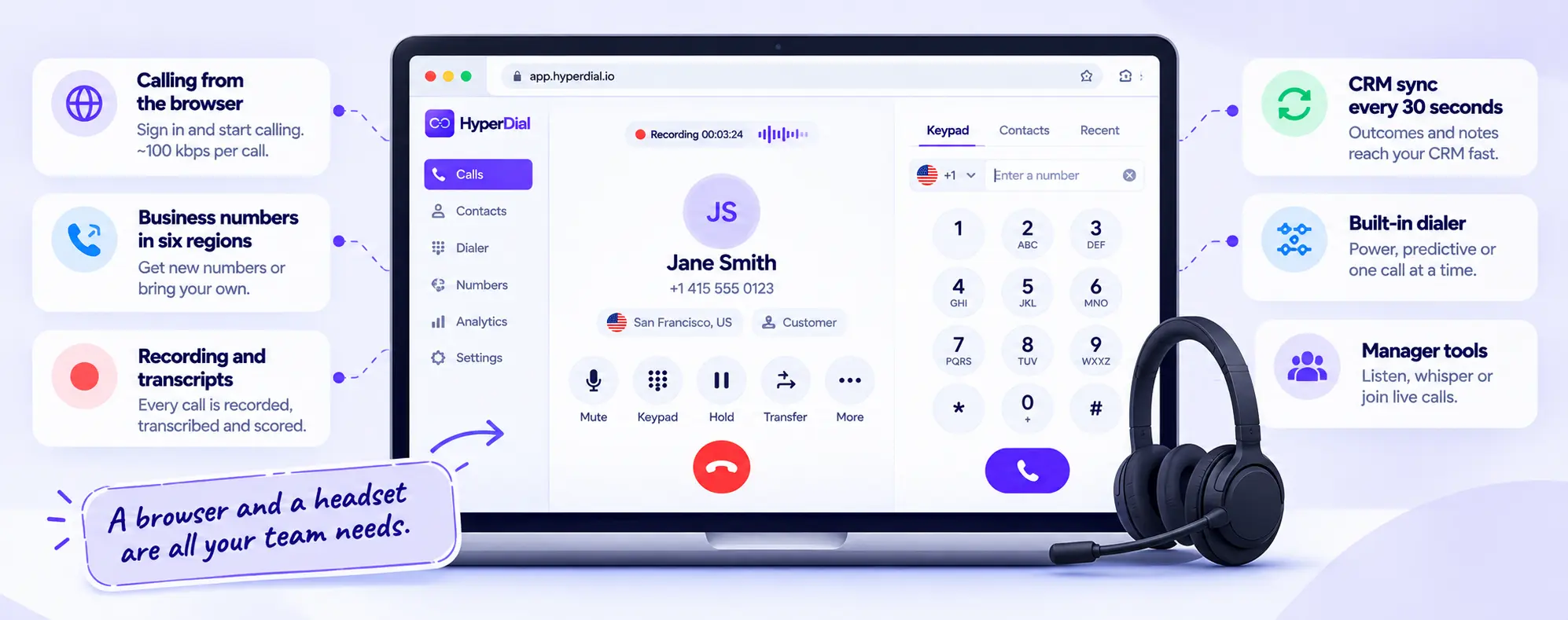
HyperDial runs in your web browser, so your team needs only a browser and a headset to make and take business calls. There's no softphone app to install and no desk phone to set up. Here's what's included:
- Calling from the browser: reps sign in and start calling, with about 100 kbps per call needed.
- Business numbers in six regions: get new numbers or bring your own, with free number porting.
- Recording and transcripts: every call is recorded, transcribed and scored, with retention set per campaign.
- CRM sync every 30 seconds: outcomes and notes reach your CRM before the rep's next call.
- Built-in dialer: power, predictive or one call at a time.
- Manager tools: managers can listen to a live call, whisper to the rep, or join the call.
There are limits to know. HyperDial needs a stable internet connection, and office firewalls must allow its audio traffic. Calls are encrypted in transit and at rest, and SOC 2 Type II is still in progress, as HyperDial's security page states.
What should you do next?
If your team still depends on desk phones, try a softphone for one team first. Sign in, connect a headset and make a few test calls to see how it fits your day. To see how HyperDial turns any browser into a business phone, compare plans on the pricing page or try HyperDial free.
Sources


