Most IVRs are edited once and then feared. This one is a flow: intent on the left, queues on the right, and every branch labelled in the language your ops team actually uses.
Change a flow without a support ticket
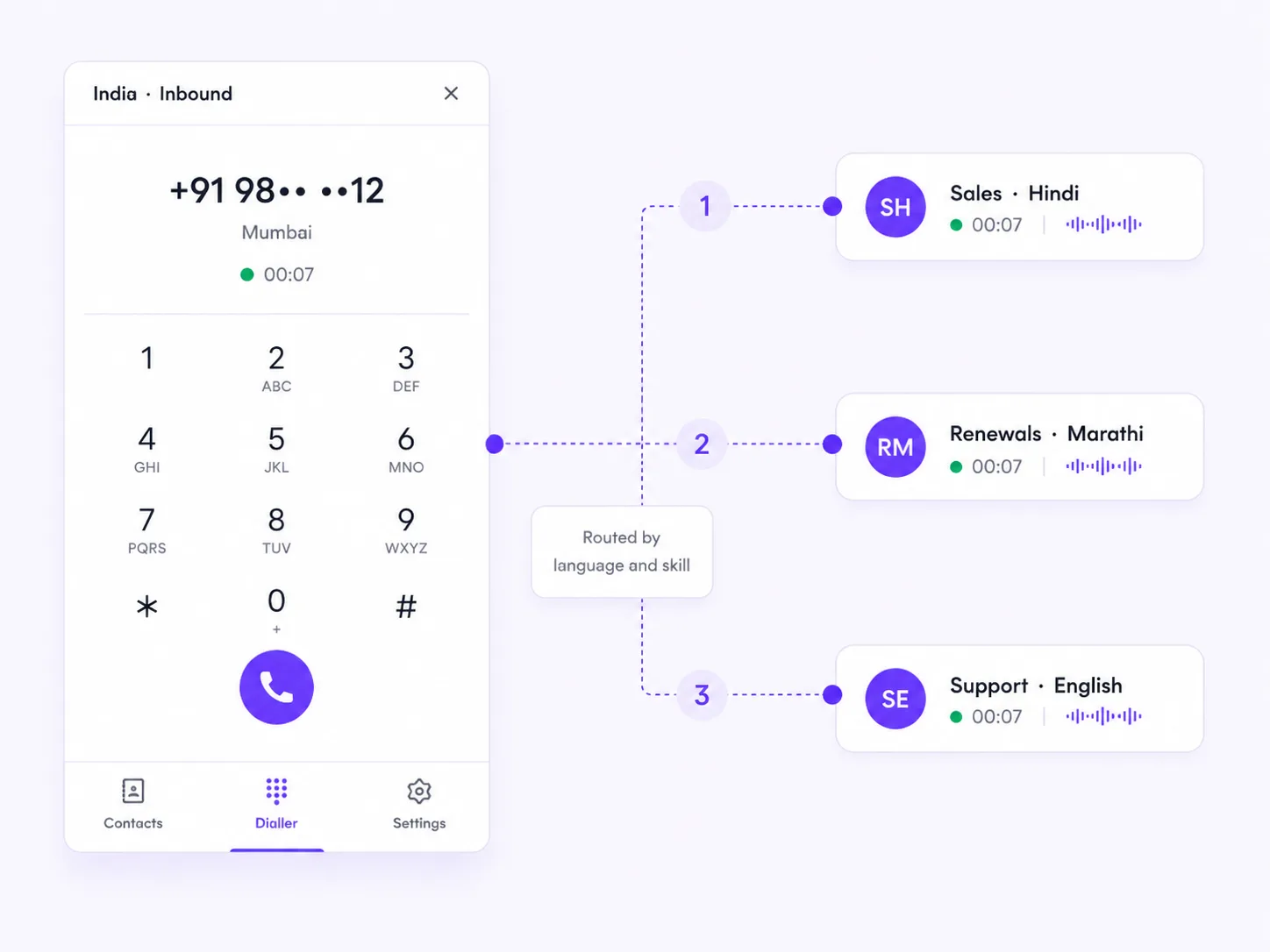
A caller says why they are calling and lands in the right queue. Behind that, the same flow still supports the dull essentials — hours, holidays, overflow, and the escalation path when nothing matches.
A path that answers, books and follows up — not a voicemail box.
Route by the number dialled, the caller's region, or both.
Renewals and high-intent callers do not wait behind everyone else.
A returning caller reaches the person who handled them last, where that helps.
Hold your place and get called back instead of waiting on the line.
Every flow edit is versioned, so a bad change is one click away from undone.
That is the point of building it as a readable flow. Changes are versioned, so a bad edit is one click from undone and you can see who made it.
They finish on the version they started on. The new version applies to calls that arrive after you publish.
Yes — language is a routing skill alongside product, region and seniority, so a Hindi-speaking caller reaches somebody who can help them.
Whatever you have said should happen: overflow to another queue, offer a callback that holds the caller's place, or hand to the after-hours path. What it never does is drop the call silently.
AI communication platform that connects your calls, learns what wins, and runs across your channels.
sales@hyperdial.io