
How to Route Customer Calls to the Right Agent Faster
Most misrouted calls come down to one of three decisions, and this guide shows you how to get each one right.
Picture a billing question that lands with a technical agent. The agent transfers it, the caller waits again, then explains the problem a second time. Nobody did anything wrong. The call was simply routed by availability instead of by need. This guide covers the signals that reveal what a caller needs and the main routing strategies. It also shows how to set them up and how to tell whether they're working.
Every fact in this guide links to its source, and we last checked them on 12 November 2026.
Key takeaways
- Routing makes three decisions: which queue, which agent in it, and what happens if nobody is free.
- Skills only work if they're accurate, so build them from real call data, not job titles.
- A routing setup without overflow isn't finished. Every queue needs a named fallback.
- Transfers and repeat calls are the clearest signs that calls are reaching the wrong agent.
What does call routing actually decide?
Call routing is the set of rules that decides where an incoming call goes, from the moment it connects until someone answers. Most teams think of it as one choice, but it's really three separate decisions. Each one fails in a different way, so it helps to understand and check them one at a time.
The software that makes these decisions is often called an automatic call distributor (ACD). It holds waiting calls in queues and matches them to available agents using the rules you set. The ACD only follows instructions, though, so the quality of the routing comes down to how well each of the three decisions below is defined.
Decision 1: Which queue does the call join?
The first decision sorts the call by why the person is calling, such as a billing question, a technical fault or a new purchase. A queue is simply a waiting line for one type of call, served by the agents who can handle it. Get this decision right, and every later decision gets easier.
The system can only sort a call if it knows the reason, which is why the signals in the next section matter so much. When this decision goes wrong, you'll see it as transfers: the caller reaches someone quickly, but it's the wrong someone. Agents then spend part of every shift passing calls along instead of solving them.
Decision 2: Which agent in that queue picks it up?
The second decision chooses one agent from everyone in the queue who's free. Simple setups pick whoever is next in line or has been waiting longest. Smarter setups look at how skilled each agent is with that call type, and sometimes at who helped the caller last time.
When this decision goes wrong, calls reach the right team but not the right person. A new agent gets a complex case while a specialist sits idle, or a returning customer has to explain their history to a stranger. You'll usually see it in longer calls and a lower share of issues solved on the first call.
Decision 3: What happens if nobody answers in time?
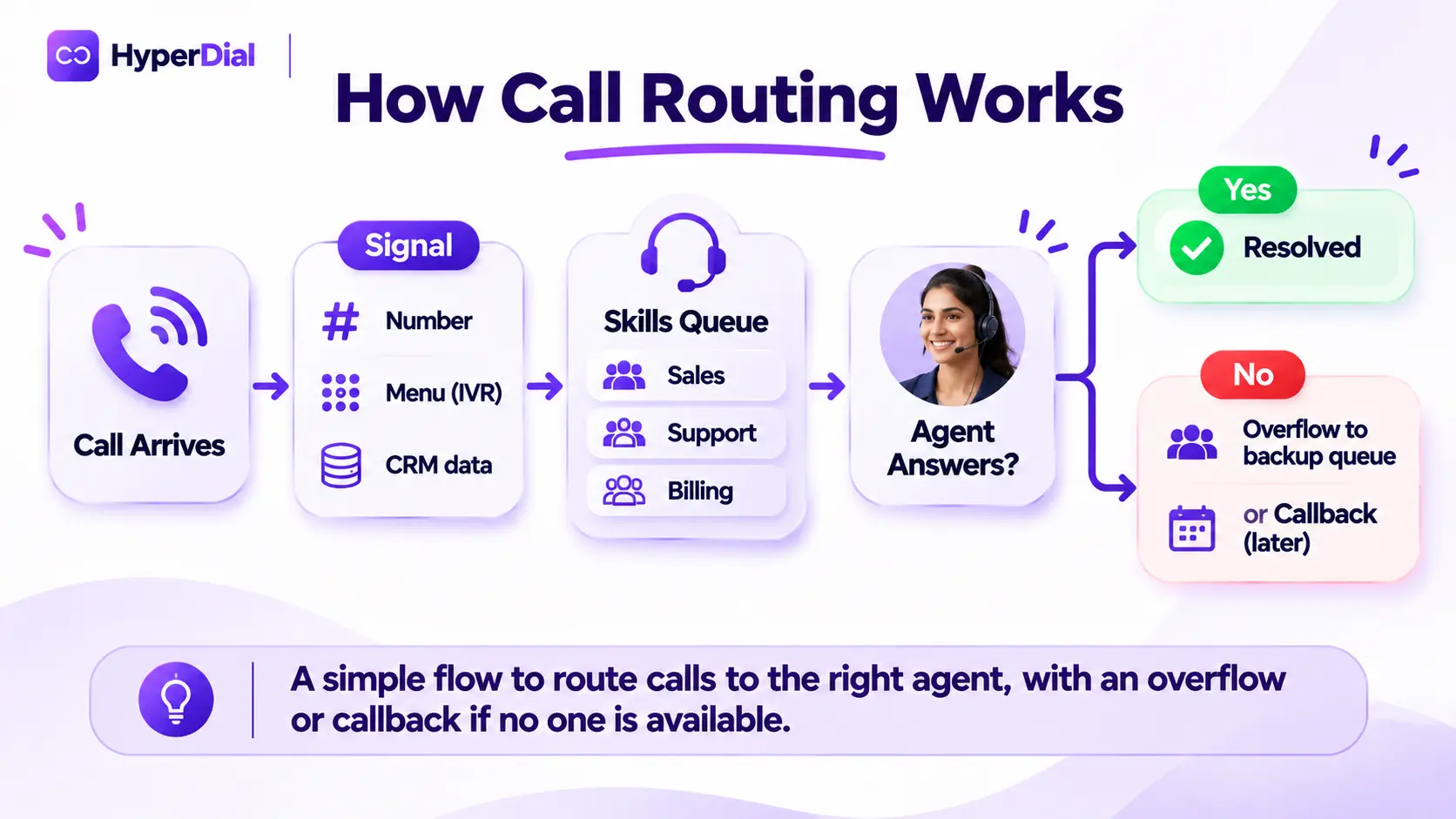
The third decision covers the moment every queue eventually hits: nobody free to answer. Overflow rules decide where the call goes next, such as a wider queue, a callback, voicemail or an after-hours path. Without them, the caller simply waits until they give up.
This is the decision teams forget most often, because routing works fine on a quiet day. It shows up during busy hours, holidays and sick days, as callers hanging up in the queue. A routing setup isn't finished until every queue has a named answer to "and if nobody picks up?"
How does a call find the right agent?
A call finds the right agent when your system knows enough about the caller before anyone picks up. That knowledge comes from a handful of signals, and the best setups combine two or three of them. This table shows the main signals and what each one tells you:
Table 1: The signals that tell your system why someone is calling
| Signal | What it tells you | How you capture it |
|---|---|---|
| Number dialed | The department or campaign | A separate number for each team |
| Caller's region | Language, time zone, local team | The caller's number |
| Menu choice or stated intent | The reason for the call | An IVR or voice menu |
| CRM record | Account type, value, open tickets | A CRM lookup by caller number |
| Call history | Who helped them last | Past call logs |
| Time of day | Which team is working | Business hours per queue |
The number dialed is the most underrated signal. A caller who rings your sales line has already told you what they want, without pressing a single key. Our guide on different phone numbers for departments explains how to set that up.
Menus are the most common signal, and the easiest to overdo. Each extra layer adds wait time and another chance to pick the wrong option. Our guide on what an IVR is covers how to keep menus short.
Which call routing strategies should you know?
Call routing strategies are the rules that decide which agent gets a call once it's in a queue. Most teams combine two or three of them. This table compares the strategies you'll come across most often:
Table 2: Common call routing strategies compared
| Strategy | How it works | Best for | Watch out for |
|---|---|---|---|
| Skills-based | Matches call type to agent skills | Mixed or technical queries | Stale skill profiles |
| Priority | Moves key callers up the queue | Renewals, high-value accounts | Others wait longer |
| Language | Routes by the caller's language | Multilingual customers | Too few speakers at peak |
| Region | Routes by caller location | Local teams, time zones | Region isn't always intent |
| Time-based | Changes the route by hours and holidays | Shifts, global teams | Forgotten holiday calendars |
| Round robin | Rotates calls evenly | Small, equal-skill teams | Ignores skill differences |
| Longest idle | Picks the agent free the longest | Fair workload in one queue | Ignores skill differences |
| Ring all | Rings several agents at once | Very small teams | Agents race or ignore calls |
| Returning caller | Sends repeat callers to their last agent | Account managers, open cases | Delays if that agent is busy |
| Overflow | Moves calls on after a set wait | Every queue | Missing or vague fallbacks |
Two of these do most of the work in practice. Skills-based routing gets the call to someone who can solve it, and overflow makes sure it gets to someone at all. The others shape the order and fairness within those two.
Which call routing strategy fits your team?
The right call routing strategy depends mainly on how many agents you have and how different your call types are. Use these points as a starting point:
- Ring all or round robin: best for a small team where everyone can handle every call.
- Number-based routing: best when sales and support need different people, and each can have its own number.
- Skills-based routing: best when calls need different knowledge, such as billing, technical and onboarding.
- Priority routing: best when some callers carry more weight, such as renewals or high-intent leads.
- Region, language or time-based routing: best when you serve customers across countries, languages or time zones.
- Returning-caller routing: best when customers have an ongoing relationship with one agent or an open case.
Whatever you choose, add overflow to every queue. Small teams especially need it, because one busy agent can leave a queue with nobody free.
How do you set up call routing to reach the right agent?
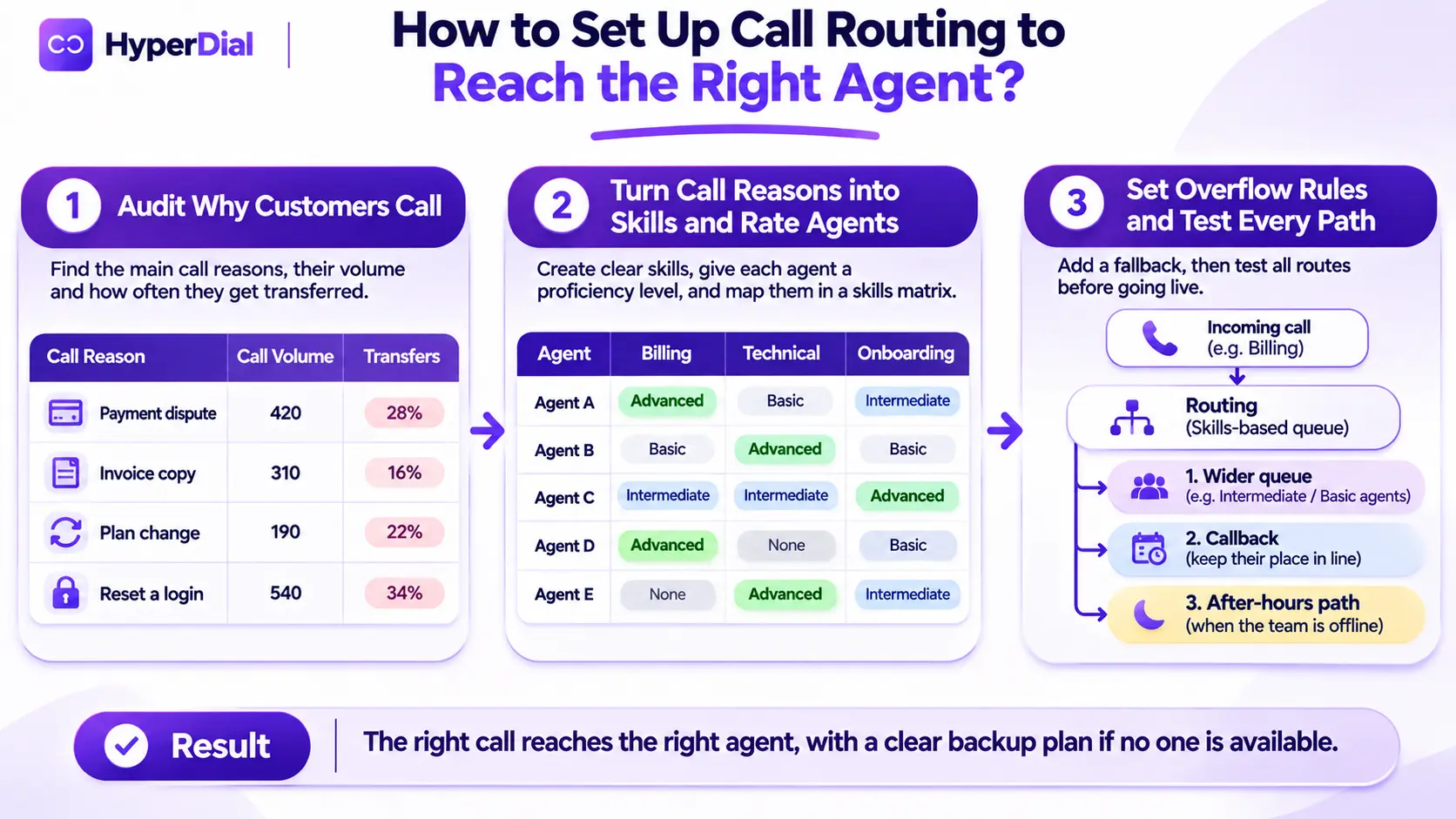
You set up call routing by learning why people call, mapping those reasons to skilled agents, then adding a fallback and testing every path. The order matters. Most routing problems start when teams build queues around their org chart instead of around the calls they actually get.
Step 1: Audit why customers call
A call reason is the specific problem a caller wants solved, such as "dispute a charge" or "reset a login". It's not the department that usually handles it. If your billing team handles payment disputes, invoice copies and plan changes, those are three call reasons, not one.
Pull a few weeks of data from wherever your calls are already labelled: menu choices, call tags, wrap-up codes or agent notes. Group the calls into a short list of reasons. Then note two numbers for each one: how many calls it gets, and how many end in a transfer. A high transfer count is the clearest sign that a reason is currently landing with the wrong people.
Keep the list short. A reason that only comes up a handful of times a week rarely needs its own queue. Let a broader queue take it instead, so you don't create a queue with nobody in it.
Step 2: Turn each call reason into a skill and rate your agents
A skill is a specific problem an agent can solve, named so clearly that anyone sorting calls would file each one in the same place. "Refunds for damaged orders" works as a skill. A label like "Customer care" doesn't, because it hides several different problems behind one name. Vague skills are the main reason calls still reach the wrong person after skills-based routing goes live.
Next, give each agent a proficiency level for each skill. A proficiency level is a simple rating, such as Basic, Intermediate or Advanced, that reflects how well the agent actually resolves that call type. The system then rings the highest-rated available agent first and moves to lower ratings only when the queue gets busy.
The mistake we see most happens here: rating agents by job title or seniority instead of results. A senior agent who rarely handles billing shouldn't be first in the billing queue. Base ratings on what each person actually resolves, using a few weeks of call outcomes, and update them when people train or change roles.
A skills matrix puts those ratings in one grid. Here's an example for a small support team:
Table 3: Example skills matrix for a five-person team
| Agent | Billing | Technical | Onboarding | Language |
|---|---|---|---|---|
| Agent A | Advanced | Basic | Intermediate | English |
| Agent B | Basic | Advanced | Basic | English, Spanish |
| Agent C | Intermediate | Intermediate | Advanced | English |
| Agent D | Advanced | None | Basic | English, French |
| Agent E | None | Advanced | Intermediate | English |
Each column becomes a queue. Agents rated Advanced ring first, Intermediate next, and Basic only when the others are busy. Every call type here has at least two agents who can take it, so one absence doesn't break a queue.
Step 3: Set overflow rules, then test every path
Overflow is the rule that moves a waiting call somewhere else after a set time, so no caller sits in a queue with nobody coming. A routing setup without overflow isn't finished, however good the skills are. Strong overflow plans have three levels:
- A wider queue first, such as agents rated Intermediate or Basic on that skill.
- A callback next, so the caller keeps their place without staying on hold.
- An after-hours path last, for when the whole team is offline.
Set the wait before each move from your own answer-time target, not a number copied from elsewhere. Our guide on reducing call abandonment shows how wait time, callbacks and staffing fit together.
Finally, call every route yourself before you switch it on. Pick each menu option, call from a number your CRM knows and one it doesn't, and call outside business hours and on a holiday date. Most routing bugs only show up on the path nobody tested.
What mistakes send calls to the wrong agent?
The mistakes that send calls to the wrong agent usually come from routing rules that were set once and never reviewed. These are the ones we see most often:
Table 4: Common call routing mistakes and how to fix them
| Mistake | What happens | Fix |
|---|---|---|
| Too many skill groups | Queues with one agent and long waits | Merge rare call types |
| Skills set by job title | Calls reach agents who can't resolve them | Rate on real results |
| Skills never updated | New skills go unused, gaps stay hidden | Review after training or role changes |
| No overflow | Callers wait or hang up | Name a fallback for every queue |
| Deep phone menus | Callers press the wrong option or quit | Keep menus to a few options |
| Hours not set per queue | Calls ring an empty team | Set hours and holidays per queue |
Too many skill groups is the sneakiest of these. Splitting calls finely feels precise, but a queue with one qualified agent is a queue that stalls whenever that person is busy.
How do you know your call routing is working?
You know your call routing is working when calls are resolved on the first attempt, transfers are rare, and callers aren't hanging up in the queue. These metrics show it, and each one points to a different problem:
Table 5: Call routing metrics and what a bad number means
| Metric | What it measures | A bad number usually means |
|---|---|---|
| First call resolution | Issues solved on the first call | Calls reach agents who can't solve them |
| Transfer rate | Calls passed to another agent | Wrong queue or wrong agent |
| Average speed of answer | Time until an agent picks up | Too few agents in a queue |
| Abandonment rate | Callers who hang up waiting | Missing or slow overflow |
| Repeat call rate | Same caller, same issue, again | Problem not fully resolved |
First call resolution (FCR) is the one to watch most closely. SQM Group's FCR benchmark research puts the industry average at 71%, with 80% or higher counted as world-class. Its research also found that every 1% improvement in FCR brings a 1% improvement in customer satisfaction.
If you want a formal framework, ISO 18295-1, published in 2017, sets out requirements for customer contact centres, including performance measures. Track your numbers per queue, not just overall, because one badly routed queue can hide behind several good ones.
How does HyperDial route calls to the right agent?
HyperDial routes calls by skill, number dialed and caller region, with overflow rules that name where every call goes instead of dropping it. Here's what HyperDial's call routing includes:
- Skills-based routing: on language, product, region and seniority.
- Number and region: route by the number dialed, the caller's region, or both.
- Priority: renewals and high-intent callers don't wait behind everyone else.
- Intent-based menus: callers say why they're calling instead of pressing keys, and every flow edit is versioned so a bad change can be undone.
- Returning callers: a returning caller reaches the person who handled them last, where that helps.
- Overflow and callbacks: calls go to overflow, a callback or the after-hours path, and callers can hold their place and get called back.
- Hours and holidays: set per queue and per region.
When the queue gets deep, HyperDial's AI agents answer the overflow under the same routing rules. They hand over to a rep with the transcript when a caller asks for a person or the question goes off-script. Calls are logged to Salesforce, HubSpot, Zoho CRM, LeadSquared, Freshdesk and Zendesk through HyperDial's integrations.
One honest limit: HyperDial's routing page doesn't describe ring strategies such as round robin or longest idle. If those matter to your team, ask about them before you set up.
What should you do next?
Pull a few weeks of call logs and list the top reasons people call. Count how many of those calls ended in a transfer, because that's your routing gap. Then map each reason to a queue with at least two skilled agents, and give every queue a named fallback. To see how this works in HyperDial, explore call routing or try HyperDial free.
Sources


