
What to Test Before Switching Business Phone Providers
Test calls on the happy path only, and you’ll find out what breaks when customers start calling.
A demo shows you what a phone system can do on the vendor's network, with the vendor driving. Your switch will run on your internet connection, with your call flows, your CRM and your busiest Monday morning. The gap between those two is where switching business phone providers go wrong. This guide gives you the full test list, a three-step pilot plan, and what to check on the day your number moves.
Every fact in this guide links to its source, and we last checked them on 16 November 2026.
Key takeaways
- Test on your network, not the vendor's. Call quality depends on your connection, Wi-Fi and devices.
- Pilot on a temporary number first, so a problem never touches your main line.
- Walk every call path, including after-hours, holidays and overflow.
- Never cancel the old service early. Keep it live until the new provider confirms the port is complete.
Why should you test before switching business phone providers?
You should test before switching business phone providers because your phone number is one of the few things customers can't work around when it breaks. A website bug annoys people. But when a main number rings out, reaches the wrong team or shows as spam, you lose calls straight away. Often nobody notices for days.
Testing also protects you from problems that only show up in your environment. Your firewall, your home-working reps, your menu options and your CRM fields are specific to you. A provider can be excellent in general and still need changes before it works for your team. Finding that out on a pilot costs an afternoon. Discovering it after porting costs customers.
What should you test before you switch?
You should test eight areas before you switch: audio, inbound routing, outbound calling, integrations, recording, reporting, failure handling and the porting plan. This table shows what to test in each and what a pass looks like:
Table 1: What to test before switching phone providers
| Area | What to test | A pass looks like |
|---|---|---|
| Audio quality | Calls from office and home networks | Clear audio, no echo or delay |
| Inbound routing | Every menu option, queue and hours rule | Each call reaches the right team |
| Outbound calling | Caller ID on mobiles and landlines | Your number shows, not "spam" |
| Integrations | Calls logged in your CRM or helpdesk | Right record, right fields, no duplicates |
| Recording | Recording, announcements, playback | Every call recorded where expected |
| Reporting | Answered, missed and abandoned counts | Numbers match a manual tally |
| Failure handling | Agent offline, internet down, no answer | Calls go to a named fallback |
| Porting plan | Numbers, documents, cutover time | Written plan and confirmed date |
Each of these areas can fail independently, so test them separately. A provider with perfect audio can still log calls to the wrong CRM record, and that's just as costly for a sales team.
Call quality on your real network
Call quality depends mostly on the network the call runs over, so test it on yours. Make calls from the office, from at least one home connection, and on the Wi-Fi people actually use. Then start a large download or a video call at the same time, because that's what a busy afternoon looks like.
Listen for choppy audio, echo and delay. Delay is the hardest to notice in a quick test, so hold a real two-way conversation rather than just saying "can you hear me". The ITU's G.114 recommendation on one-way transmission time is the standard reference for how much delay a voice call can tolerate. Our guide to VoIP call quality issues explains what each symptom points to.
Every inbound call path
Every inbound call path is a promise that a caller ends up somewhere useful. Call your test number and press every menu option. Let a call ring with nobody answering, call outside business hours, and change the system date or holiday calendar to test a public holiday.
Write each path down as you test it: what you pressed, who rang, and what happened if nobody picked up. Most switching problems are a path nobody tested, such as a menu option pointing at a team that no longer exists. Our guide on call routing strategies covers how to design paths that don't leave callers stranded.
Outbound calls and caller ID
Outbound calls need to show the right number and reach people. Call a few mobiles and landlines on different networks, and check what the person you're calling sees. Your business number should appear, not "unknown", "private" or a spam warning.
Test transfers and conference calls too, because they often behave differently from simple calls. If your team does outbound sales, ask the provider how it protects numbers from being flagged. Our guide on why a business number gets marked as spam explains what to look for.
Integrations and call data
Integrations are where a switch quietly breaks a sales or support process. Place a few test calls to and from known contacts, then check your CRM or helpdesk. The call should appear on the right record, with the right owner, direction, duration and outcome, and without duplicates.
Check how quickly the data appears, and whether changes in the CRM flow back to the phone system. A sync that works for one test call can still fail at volume, so run a batch of calls during the pilot, not just one.
Recording, reporting and admin
Recording, reporting and admin are easy to skip in a trial and painful to fix later. Confirm that recordings start when expected, that any announcement plays, and that managers can find and play a recording quickly. Then compare the system's answered and missed call counts with a manual tally for one day.
Check the admin side as well. Add and remove a user, change a menu option, and update business hours. If a simple change needs a support ticket, you'll feel that every week after the switch.
What happens when something fails
Failure handling is the test most teams skip, and the one customers notice first. Log a rep out mid-shift, disconnect a laptop from the internet, and let every agent in a queue ignore a call. Each time, check where the call goes.
A good setup sends the call to a named fallback: another team, a callback, voicemail or an after-hours message. Poor setups let it ring out. Ask the provider where its status page is, and how it tells customers about outages. Our guide on dropped calls and how to fix them covers the most common call failures.
How do you test a new phone provider before switching?
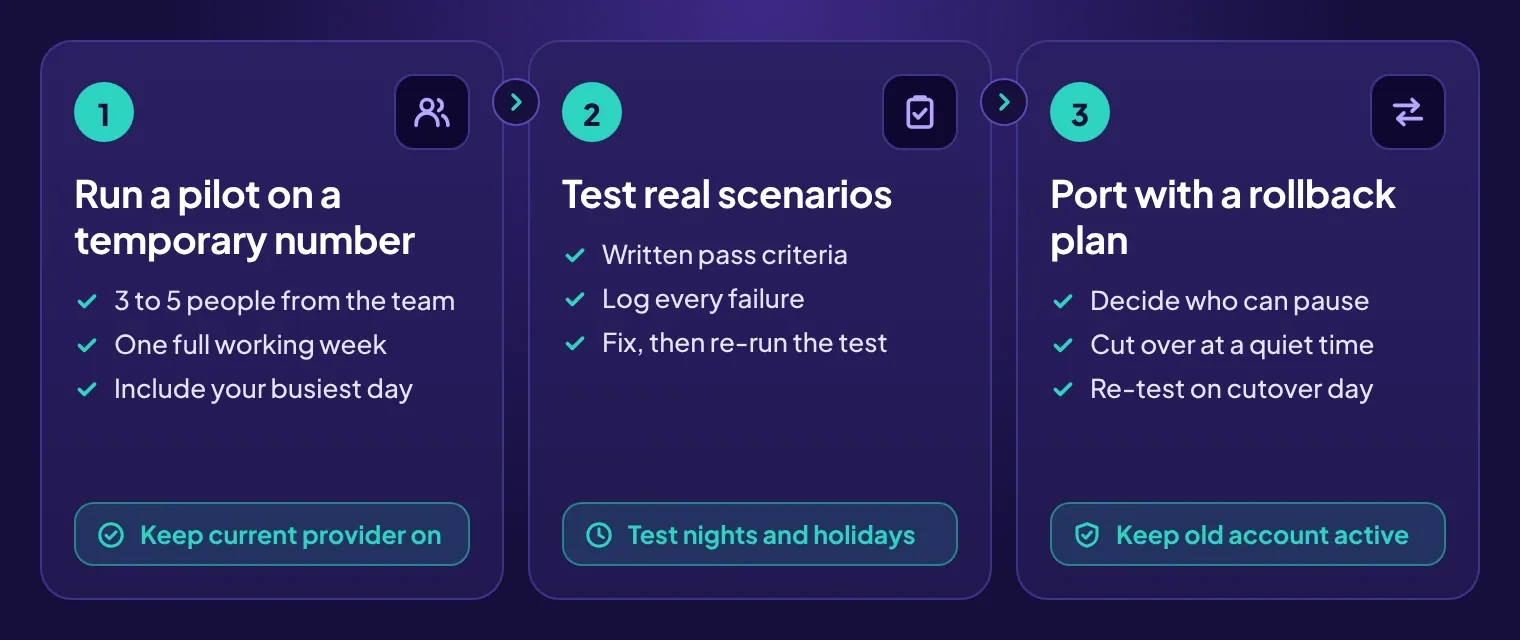
You test a new phone provider by running a pilot on a temporary number with real scenarios and pass criteria. Then you port with a rollback plan. Follow these three steps.
Step 1: Run a pilot on a temporary number with a small group
A pilot is a short trial of the new system with real users and real calls, before any existing number moves. Set up a temporary number on the new system. Then pick three to five people who represent your team: a seller, a support agent, a manager and a remote worker.
Run the pilot for at least one full working week, including your busiest day. Short trials miss the problems that only appear under real load, such as Monday call spikes or a rep's home connection in the late afternoon. Keep your current provider running as normal throughout.
Step 2: Test real scenarios against written pass criteria
A pass criterion is a simple, written description of what "working" means for each test. Use the table above as a starting point, and add your own. "A website call reaches the sales queue within three rings" is easier to judge than "routing works".
Turn the criteria into a short test script and give it to the pilot group. Ask them to note every failure with the time, what they did and what happened. Fix or escalate each failure with the provider before moving on, and re-run the test once it's fixed.
The mistake we see most happens here: testing only the happy path. Teams check that calls connect and audio is clear, then discover after porting that after-hours calls ring an empty office. Test the paths for nights, holidays and nobody answering with the same care as the main menu.
Step 3: Port with a rollback plan, then re-test on cutover day
Number porting moves your existing number from one provider to another, so customers keep dialing the same digits. The ITU describes how countries run it in its E.164 Supplement 2 on number portability, last updated in June 2020. Our guide to what number porting is explains the process step by step.
Before you submit the port, write down your rollback plan. Note who decides to pause, where calls will be forwarded if something breaks, and who to contact at each provider. Book the cutover for a quiet time, not the start of your busiest week. Keep the old account active until the new provider confirms the port is complete, because cancelling early can release the number.
What should you test on cutover day?
On cutover day, re-test the essentials on the real number as soon as the port completes, because a ported number can behave differently from the pilot. Run through this short list straight after the switch:
- Call the main number from a mobile and a landline, on different networks if you can.
- Walk every menu option and queue on the real number, not the pilot one.
- Make outbound calls and check the caller ID people see.
- Check the CRM or helpdesk for the first few real calls.
- Call after hours that evening to confirm the out-of-hours route.
- Confirm every number moved, including old campaign and fax numbers.
Keep someone watching calls closely for the first few days. Problems that show up in the first week are much easier to fix while both providers still remember the port.
What questions should you ask a new provider before you commit?
Before you sign, ask a new provider how it handles the risky parts of a switch. Its answers show how the switch will actually go. These questions separate a provider that's ready from one that's still selling:
Table 2: Questions to ask before switching phone providers
| Question | Why it matters |
|---|---|
| Can we test on a temporary number first? | Lets you pilot without risking your main line |
| What do you need to port our numbers? | Missing details are the top cause of delays |
| How is the cutover scheduled? | You want a time that suits your team |
| What happens if the port fails? | You need a known way back |
| Where is your status page? | You'll need it on day one |
| Can we export our call data later? | Protects you if you ever leave |
Ask for the answers in writing, especially porting timelines and fees. Our guide on business phone number cost covers the charges to check before you sign.
How does HyperDial make it easier to test before switching?
HyperDial lets you start on a free plan and test on a new number. You port your existing numbers once you're happy, with the cutover scheduled with you. Here's what helps at each stage:
- Free plan for the pilot: the free Base plan has no expiry, as shown on the pricing page. You pay only for the numbers and minutes you use.
- Nothing to install: reps need a browser and a headset, and around 100 kbps per concurrent call, as described on HyperDial's voice page.
- Routing to test: HyperDial's call routing sets hours and holidays per queue and sends unanswered calls to overflow, a callback or the after-hours path.
- Integrations to check: calls sync with Salesforce, HubSpot, Zoho CRM, LeadSquared, Freshdesk and Zendesk through HyperDial's integrations.
- Data to compare: call analytics show total, answered and missed calls, so you can check them against your own tally.
When you're ready to move, HyperDial's porting guide explains the request. You submit the number, upload a recent bill and sign a generated letter of authorization. The number keeps ringing at your current provider until a cutover that takes a few seconds and is scheduled with you. It also warns that cancelling the old account before the port completes releases the number to the carrier's pool.
One honest limit: HyperDial's porting guide doesn't describe a separate testing step before cutover. Run the pilot on a new HyperDial number first, then port your main number once every test passes.
What should you do next?
List every number you use today and every call path a customer can take. Then turn the test table above into a short script with pass criteria for your team. Set up a temporary number and run a one-week pilot with three to five people before you port anything. To pilot on HyperDial, start with the free Base plan on the pricing page or try HyperDial free.
Sources


