
What are Call Logs and What are They Used for?
Your call log already knows which customers you missed, who never got a callback, and when your team is stretched thin. Here’s how to read it.
Who called the sales line yesterday afternoon? Did anyone call them back? How long did customers wait before someone picked up? If your team can't answer these questions in a few seconds, you're missing what your call logs can tell you.
Every business call leaves a trail of useful data. On your personal phone, that's the "Recents" list. In a business phone system, it's a full record of who called, who answered, how long the call lasted and what happened next. Used well, call logs help you follow up faster, coach your team and plan staffing around real call patterns.
In this guide, you'll learn:
- What a call log is, and how it differs from call history and call recordings
- What information a business call log includes
- Why call logs matter, and who uses them
- Manual vs automatic call logging, and how to set up automatic logging
- Which features to look for, and how to keep call logs secure
What is a call log?
A call log is a record of the calls a phone or phone system makes and receives. Each row in the log is one call, with details such as the number, time, duration and whether the call was answered. Call logs record details about the call, not the conversation itself.
US telecom rules use a similar idea. The FCC's rules for phone carriers define call detail information as the number called or calling, plus the time, location or duration of a call. A business call log starts with those basics and adds what your team needs, like the agent, the outcome and notes.
People often use a few related terms in the same way. The table below shows how they differ.
Table 1: Call log vs call history vs call recording vs call detail record
| Term | What it is | Includes the conversation? |
|---|---|---|
| Call log | Business record of every call, with outcomes | No, but can link to a recording |
| Call history | Basic list of recent calls on one phone | No |
| Call recording | Audio file of the call | Yes |
| Call detail record (CDR) | Carrier's technical record of a call | No |
What information does a call log include?
A business call log includes the basic facts of each call, plus details about how it was handled. Simple phones only show the number, time and duration. A business phone system captures much more, as shown below.
Table 2: Common fields in a business call log
| Field | What it tells you |
|---|---|
| Date and time | When the call started and ended |
| Direction | Inbound or outbound |
| Phone number and caller ID | Who called, or who you called |
| Call type or status | Answered, missed, abandoned, voicemail or not connected |
| Duration | How long the call lasted |
| Wait time | How long the caller waited before someone answered |
| Agent or team | Who handled the call |
| Transfers | Whether the call moved to another person or team |
| Outcome | What happened, like "demo booked" or "issue solved" |
| Recording and transcript | A link to the audio and the written text |
Some systems also add tags, notes, a call summary and the campaign or phone number the caller dialed. The more fields your log captures automatically, the less your team has to type.
Why are call logs important for businesses?
Call logs are important because they turn every call into a record you can search, measure and act on. Without them, details live in people's heads or scattered notes. Here's what businesses use call logs for:
- Following up with customers: see who called, what they needed and whether anyone called back.
- Tracking team performance: compare call volume, talk time and outcomes for each rep.
- Planning staffing: spot your busiest hours and days, and schedule people to match.
- Catching missed calls: find unanswered and abandoned calls before the customer goes elsewhere.
- Settling disputes: check when a call happened, how long it lasted and who handled it.
- Supporting compliance: keep a clear record of contact with customers in regulated industries.
- Making better decisions: see which campaigns, phone numbers or regions bring in the most calls.
For example, if most calls to your sales line come from one area code, that tells you where demand is. A local phone number for that area can make it easier for those customers to reach you.
Who uses call logs?
Anyone who makes or manages business calls uses call logs, but each role uses them differently. These are the most common users:
- Sales reps check past calls before calling a lead back, so they don't repeat questions.
- Support agents look up a customer's last call to see what was promised.
- Team managers review call volume, missed calls and outcomes to coach their team. HyperDial's manager tools show this alongside a live view of the floor.
- Operations and compliance teams use logs to check that calls follow company and legal rules.
- Business owners use them to see how the phone line performs as a whole.
Manual vs automatic call logging: which is better?
Automatic call logging is better for most businesses, because it captures every call without anyone typing. Manual logging still works for very small teams with only a few calls a day. The table below compares the two.
Table 3: Manual vs automatic call logging
| Manual call logging | Automatic call logging | |
|---|---|---|
| How it works | Someone types details into a spreadsheet | The phone system records every call |
| Accuracy | Prone to typos and missed calls | Exact times and durations |
| Time needed | A few minutes per call | None |
| Search and reports | Hard to sort and compare | Built-in filters and dashboards |
| Best for | A handful of calls a day | Any team with regular call volume |
The time adds up fast with manual logging. For example, if a rep spends 2 minutes writing up each of 40 calls a day, that's 80 minutes a day of typing instead of talking to customers.
Choose manual logging if you take only a few calls a week and don't need reports.
Choose automatic logging if you have more than one person on the phones, need to track missed calls, or want call data in your CRM.
How do you set up automatic call logging?
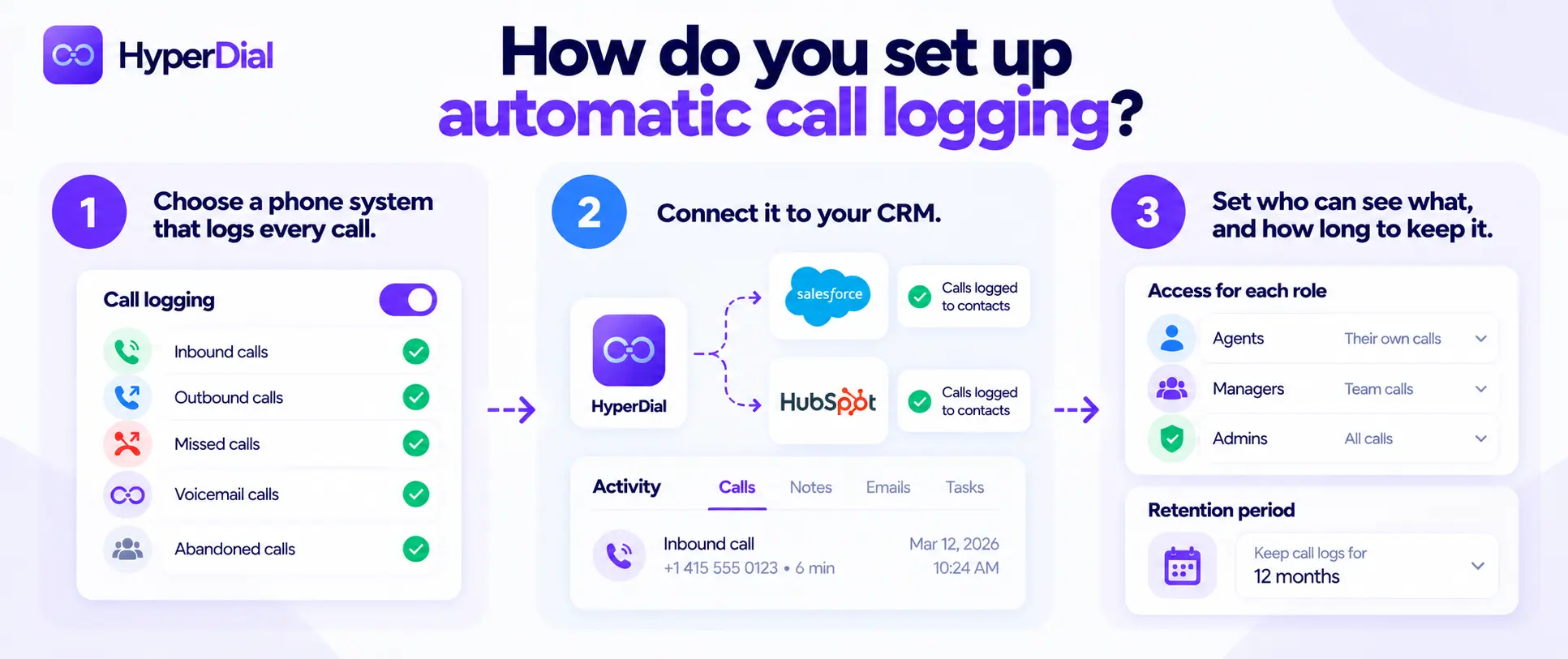
You set up automatic call logging by using a business phone system that records every call and connects to your other tools. Most cloud phone systems include it. Follow these three steps:
- Choose a phone system that logs every call.Make sure it records inbound, outbound, missed and abandoned calls, not just answered ones.
- Connect it to your CRM.Link the phone system to tools like Salesforce or HubSpot, so each call appears on the right customer record.
- Set who can see what, and how long to keep it.Give each role the right access, and choose how long to store call logs and recordings.
The most common mistake happens at step 1: teams only log answered calls. Missed and abandoned calls then vanish from the log, which hides the customers you most need to call back.
What features should call logging software have?
Good call logging software makes call data easy to find, understand and share. Look for these features:
- Search, sort and filter: find calls by date, number, agent, call type or outcome in seconds.
- Call types: tag each call as answered, missed, abandoned, voicemail or not connected.
- Dashboards and reports: see call volume, missed calls and busy hours at a glance.
- CRM sync: send each call, its outcome and notes to the right customer record automatically.
- Recordings and transcripts: open the audio and text right from the call log.
- Export and API: move call data into spreadsheets, reports or other tools.
- Access controls and audit logs: decide who sees which calls, and track who opened or exported them.
HyperDial's integrations page lists the CRMs and helpdesks it connects to, including Salesforce, HubSpot, Zoho CRM, Freshdesk and Zendesk.
How do you use call logs to improve your calls?
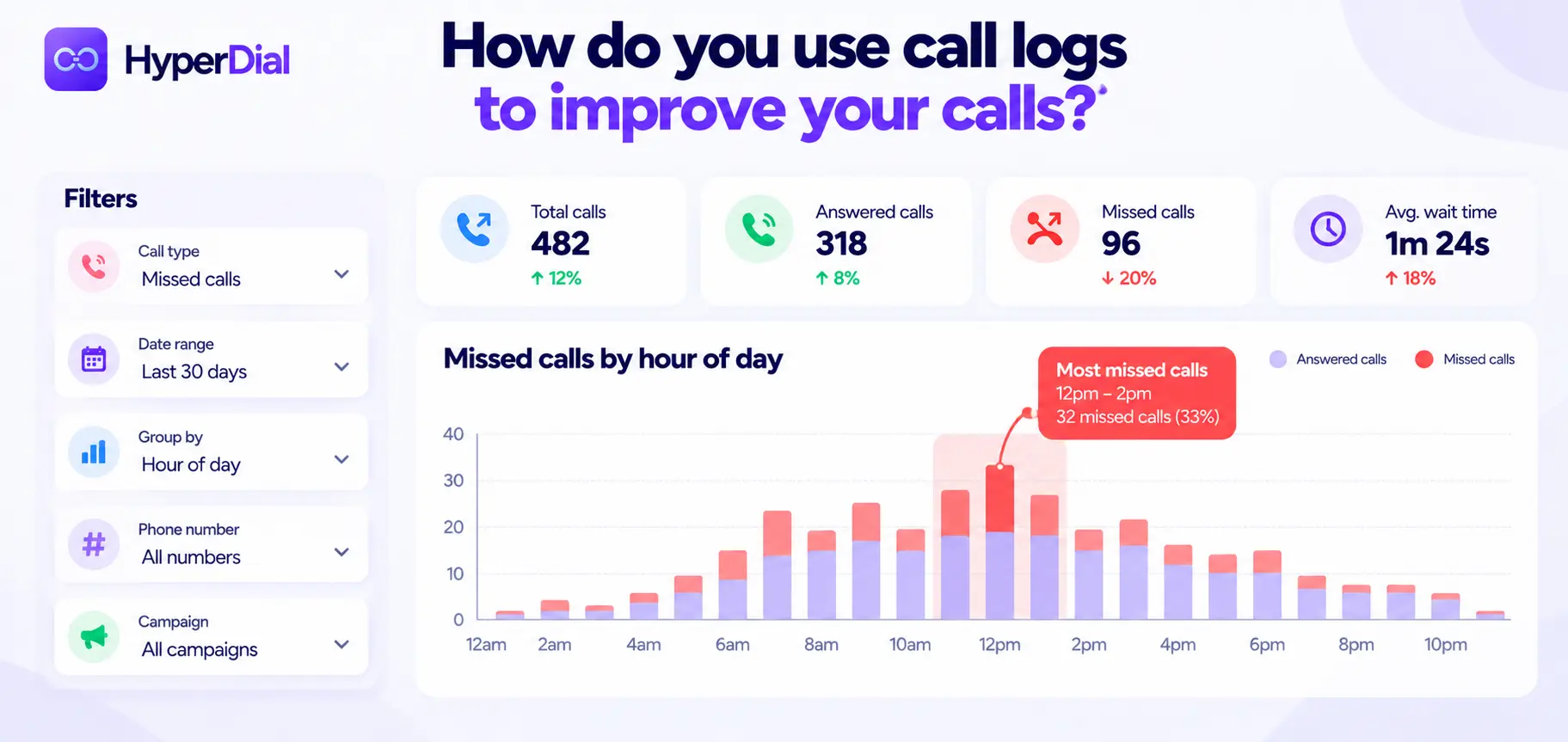
You use call logs by asking clear questions and filtering the log to answer them. A few simple filters show most of what you need. Try these:
- Missed calls by hour: filter for missed and abandoned calls, then group by time of day to find gaps in cover.
- Calls with no callback: list missed calls with no outbound call to the same number afterward.
- Longest waits: sort inbound calls by wait time to see where callers are stuck.
- Calls by phone number or campaign: compare which numbers or ads bring in the most calls.
- Calls per rep: compare volume, talk time and outcomes to spot who needs help.
Review these once a week, fix the biggest gap, then check the log again the next week. HyperDial's call analytics shows total, answered and missed calls, plus a heatmap of your busiest hours.
How do you keep call logs secure?
You keep call logs secure by limiting who can see them, encrypting the data and deleting it when you no longer need it. Call logs hold phone numbers, call times and sometimes recordings, so they're sensitive customer data. Follow these basics:
- Give access by role: reps see their own calls, managers see their team, and admins see everything.
- Encrypt the data: call logs and recordings should be encrypted in transit and at rest.
- Set a retention period: decide how long to keep logs and recordings, then delete them on time.
- Track access: keep an audit log of who viewed, exported or deleted call data.
- Remove card details: make sure card numbers spoken on calls are removed from recordings and transcripts.
Phone carriers have their own rules too. In the US, the FCC's CPNI rules say a carrier can only share call details over the phone if the customer gives a password first.
How does HyperDial log calls?
HyperDial logs every call automatically, then records, transcribes and syncs it to your CRM. Here's what each call record includes:
- Recording and transcript: recording is on by default, and every call is transcribed with timestamps that link back to the audio, as shown on HyperDial's voice calling page.
- Outcome in your CRM: the call outcome and next step are written to the CRM record when the call ends, with two-way sync every 30 seconds.
- Tags on every call: objection, intent and outcome are tagged automatically.
- Search across every call: HyperDial's conversation intelligence lets you search by phrase, tag, outcome, rep, campaign or date across the whole archive.
- Exports, webhooks and an API: call data, recordings and events can go to your own tools.
There are a few limits to know. Retention is set per campaign, so you choose it when you set up each campaign. SOC 2 Type II is still in progress, as HyperDial's security page states.
What should you do next?
Open your current call log and check three things: does it show missed calls, the agent who handled each call, and the outcome? If not, it's time for automatic call logging that syncs to your CRM. To see how HyperDial logs, records and syncs every call, compare plans on the pricing page or try HyperDial free.
Sources


