
Why is Your Business Number Marked as Spam? How to Protect Caller Reputation
Your number isn’t being flagged for what you say on the call but for how you dial, and this guide shows you how to spot it, fix it and keep it from coming back.
This guide covers why legitimate numbers get flagged, how to check yours, and which fixes actually work. It also shows how to keep your caller reputation healthy, so the warning doesn't come back next month.
What does it mean when a business number is marked as spam?
A spam label is a warning that a phone network or call-blocking app shows before someone answers your call. It might read "Spam Likely", "Potential Spam" or "Scam Likely", depending on who applied it. Some apps go further and send the call straight to voicemail.
Here's what most businesses don't realize. The label isn't a single verdict stored in one place. Each mobile network and each caller ID app scores numbers with its own data, and those scores update on their own schedules. Your number can look clean on one phone and flagged on the next. There's usually no notice either, so most teams only find out when answer rates fall or a customer mentions it.
A label also isn't proof you did anything wrong. Reassigned numbers, honest mistakes by the people you called, and plain misclassification all cause false flags.
Why is your business number marked as spam?
Your business number gets marked as spam when its calling pattern looks like the patterns spam callers leave behind. These are the most common causes:
- Sudden volume spikes: a new campaign that jumps from a few dozen calls a day to hundreds looks like a robocall run.
- Lots of short or unanswered calls: many calls that end in a few seconds suggest people hang up the moment they hear you.
- Silent or abandoned calls: when a dialer connects a call before a rep is free, the person hears silence and often reports it.
- Complaints and blocks: every "report as spam" tap feeds the scoring, even when the caller simply didn't recognize you.
- Calling people who don't expect you: old, bought or unchecked lists raise complaint rates fast.
- Too many attempts: calling the same person again and again in a short window reads as harassment.
- Inherited history: a recycled number can carry a bad score from its previous owner.
Spoofing is the odd one out. Scammers sometimes fake a real business number on their own calls, and the complaints land on you. If customers say they got calls you never made, tell your phone provider straight away.
How can you tell if your number is flagged?
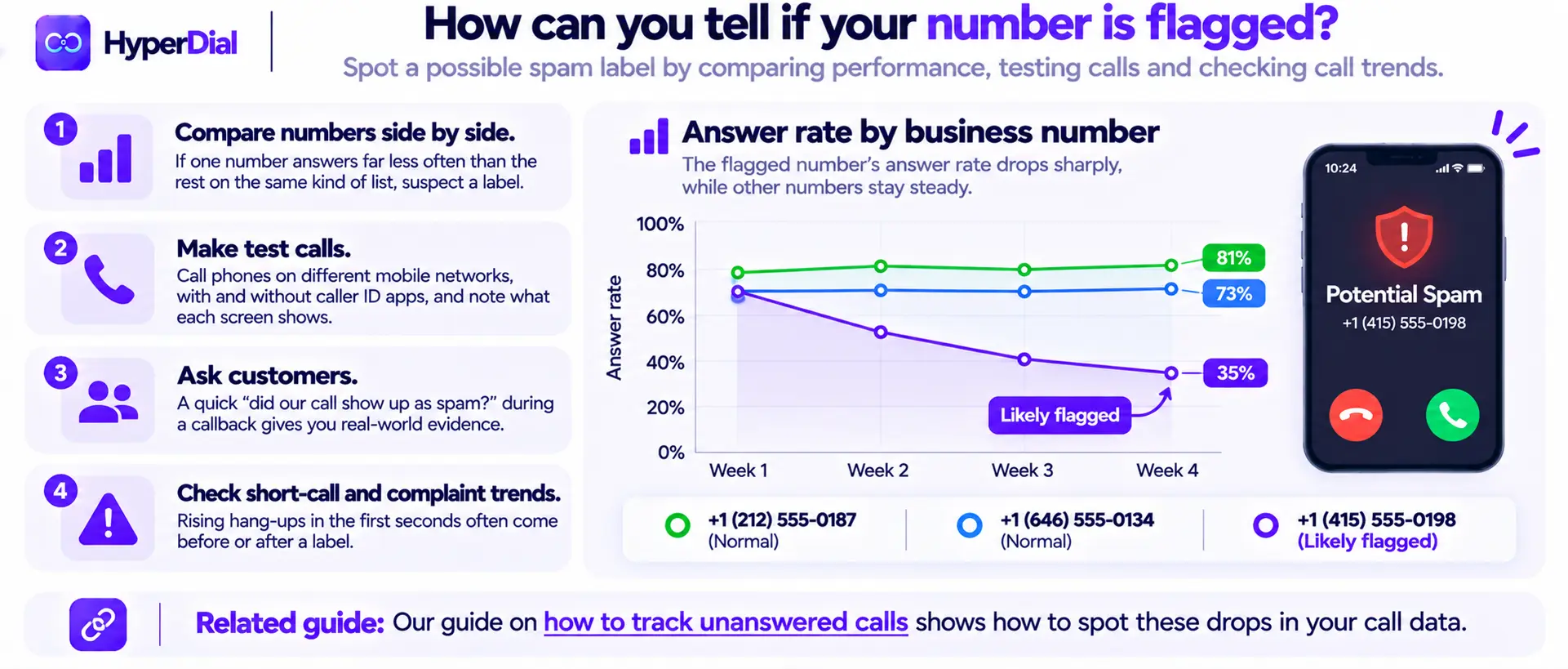
The fastest sign your number is flagged is a drop in answer rate on one number while other numbers calling similar contacts hold steady. That comparison matters, because a weak list or a bad calling hour lowers every number at once.
Use these checks together:
- Compare numbers side by side. If one number answers far less often than the rest on the same kind of list, suspect a label.
- Make test calls. Call phones on different mobile networks, with and without popular caller ID apps installed, and note what each screen shows.
- Ask customers. A quick "did our call show up as spam?" during a callback gives you real-world evidence.
- Check short-call and complaint trends. Rising hang-ups in the first seconds often come before or after a label.
Our guide on how to track unanswered calls shows how to spot these drops in your call data.
Which fixes actually protect caller reputation?
Caller reputation is protected by four different tools that are often confused: call authentication, number registration, branded caller ID and label remediation. Each one solves a different problem, and none of them replaces good calling habits. Here's how they compare:
Table 1: Caller reputation tools and what each one really does
| Tool | What it does | What it doesn't do | Use it when |
|---|---|---|---|
| Call authentication | Proves the call really came from your number | Remove an existing label | Always, where your network supports it |
| Number registration | Tells analytics firms who owns the number | Guarantee a clean score | Before any outbound campaign |
| Branded caller ID | Shows your business name on screen | Fix a bad calling pattern | Customers don't recognize your number |
| Label remediation | Asks a network or app to review a label | Stop the label coming back | A clean number was wrongly flagged |
Think of it like a credit file. Authentication proves who you are, registration fills in your details, and branded caller ID puts your name on the envelope. Remediation is the dispute letter, and it only sticks if your behavior matches what you claim.
Does call authentication remove a spam label?
No, call authentication doesn't remove a spam label, because it proves identity rather than intent. Frameworks such as STIR/SHAKEN build on the IETF's RFC 8224 standard for authenticated identity in SIP. They sign each call so the receiving network knows it really came from your number. A fully verified number can still be flagged if people keep hanging up or reporting it.
How do you fix a business number marked as spam?
You fix a business number marked as spam by confirming the scope, fixing the cause, then requesting a review and watching the results. Follow these three steps:
- Confirm which numbers are flagged, and where. List every outbound number. Then use test calls and answer-rate data to see which ones show a warning, and on which networks or apps.
- Find and fix the cause before you ask for removal. Review volume, short calls, attempts per contact, list quality and caller ID for the weeks before the label appeared. Change one thing at a time.
- Request a review and keep monitoring. Submit the network's or app's review form with proof that you own the number. Recheck answer rates and test calls every week.
The most common mistake happens at step 2: teams swap in a brand-new number and keep calling the same way. With no history to protect it, the new number gets flagged even faster. Fix the pattern first, or the label simply moves to the next number.
How long does it take to clear a spam label?
Clearing a spam label has no fixed timeline, because each network and app runs its own review. Some respond quickly, while others take weeks, and nobody can guarantee removal. Your answer rate is the real test, so keep tracking it after you submit a request.
How do you protect caller reputation before it drops?
You protect caller reputation by calling people who expect you, at a pace and frequency that feels normal, from numbers they recognize. These habits do the most work:
- Call with consent and clean lists. Remove wrong, disconnected and opted-out numbers before every campaign.
- Pace to real connect rates. Never let a dialer connect calls faster than reps can pick them up.
- Cap attempts and respect hours. Set a limit per contact, and only call within local business hours.
- Grow volume gradually. Ramp a new number up over days instead of starting at full speed.
- Leave a clear voicemail. Say who you are and why you called, so the next call gets answered.
- Keep one purpose per number. Give sales its own numbers, so a flagged sales line never touches your support number.
That last habit protects the number customers rely on most. Our guide on separate phone numbers for sales and support explains how to split them.
Should you rotate numbers to avoid spam labels?
Rotate across a small, stable pool of numbers to spread volume, but don't keep swapping in fresh numbers to dodge labels. Spreading calls keeps any single number from looking like a robocaller. Constant churn does the opposite: brand-new numbers with no history and high volume are exactly what spam filters look for. Keep each number in the pool long enough to build a track record, and retire it only when its reputation can't recover.
How does HyperDial help protect your number reputation?
HyperDial builds reputation safeguards into how calls are paced, which numbers dial, and who gets called. Spam flagging is a real risk on any dialer, so these protections are part of the setup rather than paid extras.
Here's what's included:
- Pacing on real connect rates: HyperDial for outbound tunes power and predictive pacing to each campaign's true connect rate. It also rotates a pool of numbers rather than hammering one.
- Local presence: reps call from local phone numbers that match the region being called, so the call looks familiar.
- Calling windows and opt-outs: HyperDial's SMS and calling policy screens do-not-call registers before dialing. Calls outside the set window are queued, and one opt-out applies across every channel.
- Abandoned-call limits: predictive pacing stays within abandoned-call limits where a regulator sets them, which cuts down on silent calls.
- Answer-rate tracking: call analytics shows total, answered and missed calls, plus campaign health from dialed to booked.
For inbound lines, toll-free numbers can sit alongside your outbound pool, so support stays separate from sales calling.
What should you do next?
Pull answer rates for each outbound number from the last month and look for the one that dropped. Test-call it on a few networks, fix the cause, then request a review. Going forward, ramp new numbers slowly and keep sales and support apart. When you're ready, compare plans on the pricing page or try HyperDial free.


