
How to Reduce Outbound Calling Costs without cutting call volume
Your reps didn’t cost too much this month; the calls nobody answered did.
Cutting dials is the easy way to shrink a phone bill, and it shrinks your pipeline with it. The better target is cost per conversation: what you spend for every real exchange with a prospect. Bring that number down and you can keep the same volume, or even raise it, on the same budget. This guide shows you how to measure it, where the money leaks, and three steps to fix it.
Every fact in this guide links to its source, and we last checked them on 16 November 2026.
Key takeaways
- Measure cost per conversation, because cost per dial rewards dialing more and talking less.
- Rep time is the cost to protect. Every unanswered ring and manual voicemail uses paid time.
- Fix waste before the dial with clean data, calling windows, attempt caps and healthy numbers.
- Some cuts backfire, such as over-aggressive pacing or cheap routes that hide your caller ID.
What makes outbound calling expensive?
Outbound calling is expensive because you pay for every attempt, while only a fraction of attempts become conversations. The phone bill is only one line. These are the costs that make up a team's real spend:
- Rep time: salaries for every minute spent dialing, waiting, leaving voicemails and logging calls.
- Software seats: the dialer, phone system and CRM licenses each rep needs.
- Call minutes: carrier charges for connected time, including calls that reach voicemail.
- Phone numbers: monthly charges for every caller ID in your pool.
- Lead data: what you paid for the list, which is wasted when a number is wrong.
- Compliance risk: the cost of calling someone who opted out, or calling outside permitted hours.
Look at these together before you cut anything. A cheaper minute rate saves little if reps still spend half their day on calls nobody answers. Compare your per-minute charges with what one hour of rep time costs, and start with whichever is bigger.
How do you measure outbound calling costs?
You measure outbound calling costs by dividing your total outbound spend by the number of real conversations it produced. That gives you cost per conversation, the number that tells you whether calling is getting cheaper or just quieter.
Cost per conversation = total outbound cost for a period ÷ conversations in that period
Agree what counts as a conversation first, such as a connected call with the right person that lasts past a minimum talk time. Then compare it with the other cost metrics teams often use:
Table 1: Outbound cost metrics and what each one hides
| Metric | How to work it out | What it hides |
|---|---|---|
| Cost per dial | Cost ÷ dials | Rewards dials nobody answers |
| Cost per connect | Cost ÷ live answers | Counts wrong people and quick hang-ups |
| Cost per conversation | Cost ÷ real conversations | Best single view of waste |
| Cost per meeting | Cost ÷ meetings booked | Mixes calling cost with pitch and offer |
Here's a simple example. A team makes 10,000 dials in a month and has 400 conversations. If the same spend produces 500 conversations next month, cost per conversation falls by 20%, with no drop in dials. That's the goal of this guide.
Where does outbound calling money leak?
Outbound calling money leaks wherever a rep spends paid time on something that can't become a conversation. Each leak has a sign you can spot in your call data and a first fix:
Table 2: Common outbound cost leaks, their signs and first fixes
| Leak | Sign in your data | First fix |
|---|---|---|
| Wrong or stale numbers | Many disconnected or wrong-person calls | Clean the list before loading it |
| Calling at the wrong time | Answers fall in certain hours | Dial only in each prospect's local hours |
| Flagged caller ID | One number's answers drop suddenly | Rest it and spread volume across a pool |
| Waiting on unanswered rings | Long ring time before no answer | Power or parallel dialing with a ring limit |
| Manual voicemails | Reps repeat the same message all day | Voicemail drop |
| Endless retries | Many attempts per lead, few connects | Cap attempts, then switch channel |
| After-call admin | Long wrap-up between calls | Log calls to the CRM automatically |
| Missed callbacks | Prospects call back and reach no one | Route callbacks to the rep who called |
Most teams have three or four of these at once. Fix the biggest one first, measure for two weeks, then move to the next.
How do you reduce outbound calling costs in 3 steps?
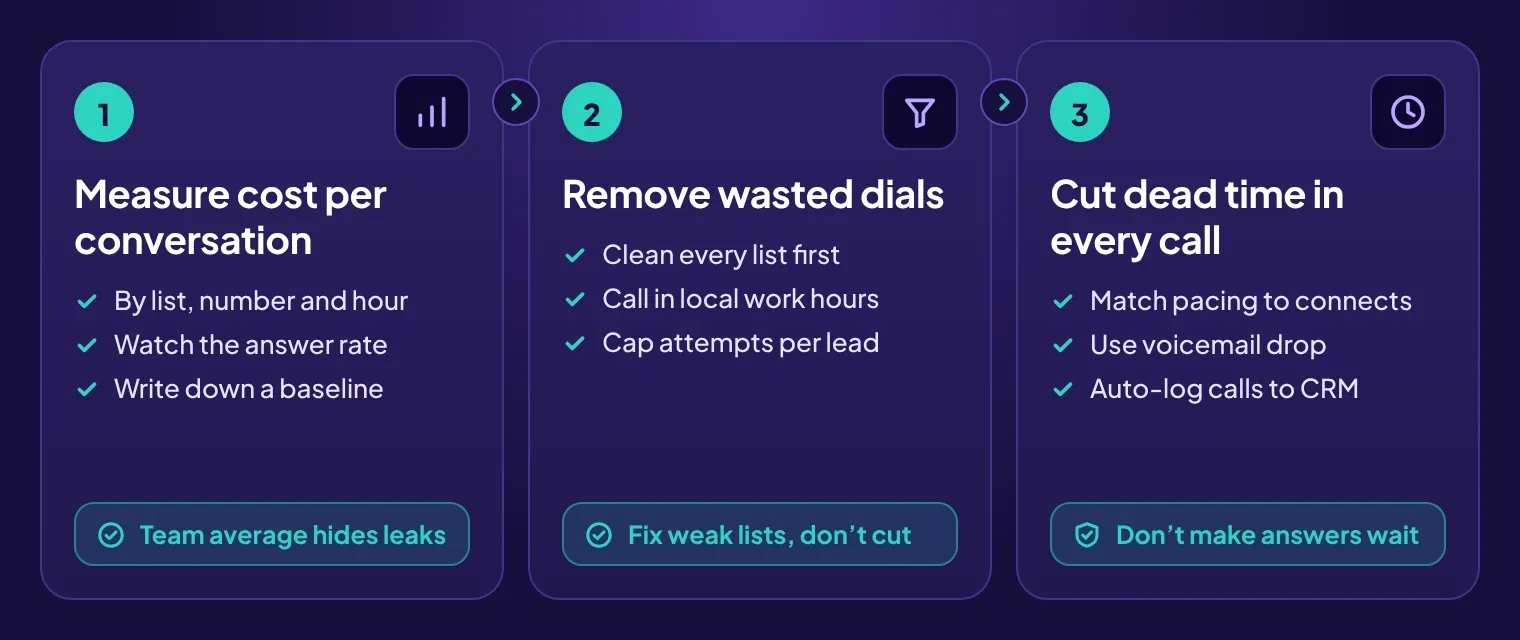
You reduce outbound calling costs by measuring cost per conversation, removing waste before the dial and removing dead time inside each call. These three steps keep your dial count steady while each dial does more work.
Step 1: Measure cost per conversation by list, number and hour
Start with last month's data and work out cost per conversation for the whole team. Then break it down by lead list, caller ID, rep and hour of day. The team average hides the problem. One stale list or one flagged number can drag the whole figure up.
Look at answer rate alongside it. Phone networks track the same idea as the answer seizure ratio, one of the measures defined in the ITU's E.425 recommendation on internal automatic observations. A falling answer rate on one number or list, with everything else steady, points straight at the leak. Our guide to improving outbound call connect rates explains how to read answer rate in more detail.
Write down your baseline before you change anything. Without it, you can't tell which fix worked.
Step 2: Remove wasted dials before they're made
The cheapest dial is the one you never had to make, because it was never going to connect. Clean every list before it goes into the dialer: remove duplicates, numbers in the wrong format and anyone who has opted out. Call new inbound leads first, while they're still interested. Research in Harvard Business Review on the short life of online sales leads (March 2011) found most companies don't respond nearly fast enough.
Next, dial only in each prospect's local working hours, and cap attempts per lead. After a set number of tries, switch to email or a text instead of dialing again. Keep your caller IDs healthy too. A flagged number keeps costing you dials while answers quietly fall. Our guide on why a business number gets marked as spam shows the warning signs.
The common mistake here is cutting whole lists to save money. That lowers volume, which is what you're trying to protect. Fix the data on a weak list before you drop it.
Step 3: Cut the dead time inside every call
Dead time is the paid time a rep spends on a call attempt without talking to anyone. Match your dialer pacing to each campaign's real connect rate, so reps aren't waiting between calls. Our guide to power dialer vs predictive dialer explains which mode suits which list.
Use voicemail drop, so a rep leaves a prerecorded message in seconds and moves on. Log every call to your CRM automatically, so wrap-up doesn't eat the time you saved. When prospects call back, send them to the rep who called, not a general queue. Our guide to callback management covers how to do that.
Watch for this mistake: pushing predictive pacing so hard that answered calls wait for a free rep. The prospect hears silence and hangs up. That wastes the most expensive thing you have, a live answer, and it can hurt how your number is labeled.
Which cost cuts backfire?
Some cost cuts lower the bill this month and raise your cost per conversation next month. Avoid these:
- Cheaper routes that hide your caller ID: if your number doesn't display, fewer people answer, so each conversation costs more.
- Over-aggressive pacing: silent pauses after "hello" turn live answers into hang-ups.
- One number for every call: heavy use on a single caller ID makes it easier to flag.
- Dropping calling windows: dialing late or early wastes attempts and risks complaints.
- Cutting coaching: reps who handle objections well need fewer calls per meeting.
Each of these saves money on one line of the budget and spends more on another. Judge every change by cost per conversation, not by the invoice alone.
How does HyperDial help keep outbound calling costs down?
HyperDial puts the controls that cut wasted dials and dead time in one place, and it doesn't add a margin to call minutes. Here's what each part does:
- Pacing and voicemail drop: HyperDial for outbound tunes predictive and power pacing to each campaign's real connect rate. Voicemail drop turns a no-answer into seconds rather than about a minute.
- Retries and caller IDs: retry rules tell a bad time of day apart from a bad lead. Local presence and a rotated pool of numbers help protect your reputation.
- Calling windows and opt-outs: time-zone aware dialing windows are on every plan. The SMS and calling policy covers do-not-call screening before dialing and opt-outs across channels.
- Less admin: calls sync with Salesforce, HubSpot, Zoho CRM, LeadSquared, Freshdesk and Zendesk through HyperDial's integrations.
- Clear costs: the pricing page says HyperDial doesn't add a margin to call minutes, and invoices are itemized.
- Data to measure: call analytics show total, answered and missed calls, so you can track your baseline.
Two honest limits. Under HyperDial's fair usage policy, calls placed by a predictive dialer are always charged at usage fees. A sustained answer rate under 15% is also flagged for review. Parallel dialing is also a paid add-on, not part of the base plans.
What should you do next?
Pull last month's call data and work out cost per conversation by list, number and hour. Pick the biggest leak from the table above and fix it first, then measure again after two weeks. Keep your dial count steady while you do, so you can see the saving. To test these controls on your own campaigns, compare plans on the pricing page or try HyperDial free.
Sources


