
Dropped calls: why business calls drop and how to fix them
Tired of calls cutting off mid-conversation? This guide shows how the exact moment a call drops points to the cause, and gives you three simple steps to fix it for good.

You know the moment. A customer is halfway through explaining their problem, the line goes quiet, and the call is gone. Now they have to call back, wait again and repeat everything, and some of them won't bother.
The good news is that dropped calls are rarely random. Note when a call drops, who it drops for and which network they were on, and the cause usually shows itself. This guide walks you through exactly that, in plain English.
In this guide, you'll learn:
- What a dropped call is, and how it differs from a missed or abandoned call
- The most common causes on internet phone systems and mobile phones
- How the timing of a drop points you to the cause
- How to fix dropped calls in three steps
- How to stop the next one from costing you a customer
What is a dropped call?
A dropped call is a call that disconnects on its own after it has connected, before either person chooses to hang up. The call was working, and then the connection between the two sides broke.
It helps to separate dropped calls from two problems that look similar in a report:
- Dropped call: the call connected, then ended by itself.
- Missed call: the phone rang but nobody answered.
- Abandoned call: the caller hung up while waiting, often on hold or in a queue.
Each one needs a different fix. Missed calls are about staffing and routing, and abandoned calls are about wait times. Dropped calls are almost always technical, which is why they need their own checklist. If missed calls are your bigger worry, our guide on how to track unanswered calls covers that side.
What is a call drop rate?
Call drop rate is the share of connected calls that ended on their own. Work it out like this: dropped calls ÷ connected calls × 100. If 6 of 400 connected calls dropped this week, your call drop rate is 1.5%.
Track it every week, for each team. A sudden jump tells you something changed, like a new router, a new VPN or a busier office, often before anyone complains.
Why do business calls drop?
Business calls drop when something between the two callers stops passing the call along long enough for the call to give up. On internet phone systems, also called VoIP, that "something" is usually one of these:
- An unstable internet connection: short outages or lost data break the call, even when your speed test looks fine.
- A weak upload connection: your voice travels out as well as in, so poor upload speed drops calls.
- Router and firewall settings: some routers rewrite or close call connections they don't recognize.
- A VPN: sending calls through a distant VPN server adds delay and one more place to break.
- Weak or crowded Wi-Fi: walls, distance and busy networks cause gaps that end calls.
- The device or app: an old app, a headset that disconnects or a laptop that falls asleep.
- The other side: sometimes the problem is the caller's signal or network, not yours.
Let's look at the ones that cause the most trouble.
Is your internet speed the problem?
Speed is rarely the problem on its own, because a stable connection matters far more than a fast one. HyperDial's voice calling needs around 100 kbps per call, which almost any business connection can handle.
What breaks calls is instability: bits of your voice arriving late, out of order or not at all. Uneven arrival is called jitter, and too much of it makes calls choppy before they drop. Big uploads, video meetings and backups on the same connection make it worse.
Can your router or firewall drop calls?
Yes, and it's one of the most common causes on office networks. Many routers have a feature called SIP ALG (SIP Application Layer Gateway) that tries to help internet calls by rewriting them. It often gets it wrong, and calls drop or lose audio.
Firewalls cause a similar problem. They keep a call's connection open for a set time when it looks quiet, then close it. If that timer is shorter than your calls, they drop at the same point every time. HyperDial's guide to fixing one-way audio lists the ports to allow: outbound UDP 10000 to 20000 and STUN port 3478.
Do VPNs and Wi-Fi cause dropped calls?
They can, especially for remote teams. A VPN sends every call through a server that may be far away, which adds delay and gives the connection another place to break. Testing one call with the VPN off is the quickest way to know. If that fixes it, ask IT for a split tunnel so calls skip the VPN.
Wi-Fi drops calls when the signal is weak, when many people share it, or when you walk between access points. A wired connection is the most reliable choice for anyone on the phone all day. If Wi-Fi is the only option, sit close to the router and avoid moving around mid-call.
Why do calls drop on a mobile phone?
Calls drop on mobile phones mostly because of the cell signal: the phone loses contact with the tower, or the network can't hand the call to the next tower in time. These are the usual causes:
- Weak signal: basements, lifts, thick walls and remote areas.
- Moving between towers: the call can drop during the handover while you drive or walk.
- Busy networks: stadiums, train stations and events crowd the local tower.
- SIM or software issues: a worn SIM, outdated phone software or wrong network settings.
- Leaving Wi-Fi mid-call: a Wi-Fi call can drop as you walk out of range.
Simple fixes go a long way. Restart the phone, update its software, turn on Wi-Fi calling indoors, and try another SIM if the drops follow one phone. For business calls indoors, a softphone app on a good Wi-Fi network often holds up better than a weak cell signal. Our guide to what a softphone is explains how that works.
How can the timing of a dropped call tell you the cause?
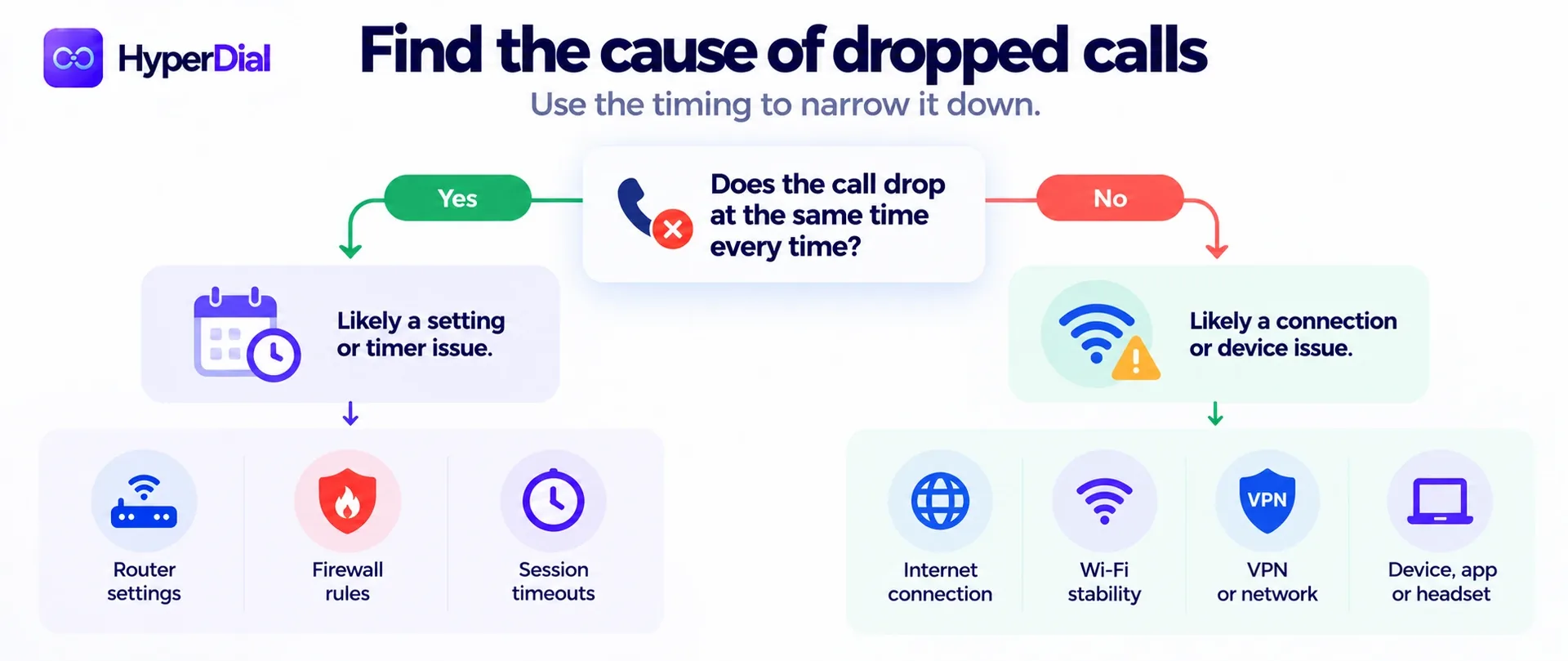
The moment a call drops is your best clue. Calls that drop at the same point every time point to a setting, while calls that drop at random point to the connection. Use this table to narrow it down:
Table 1: What the timing of a dropped call tells you
| When the call drops | Likely cause | Check first |
|---|---|---|
| About 30 seconds in | Call setup never confirmed | SIP ALG, firewall |
| Same minute every time | Quiet connection closed | Firewall timeouts |
| At random times | Unstable internet or Wi-Fi | Wired test, other traffic |
| Only for remote staff | VPN or home network | Test with VPN off |
| Only for one person | Device, app or headset | Swap headset, update app |
| For everyone at once | Internet or provider outage | Provider status |
That 30-second pattern is worth knowing. Under the SIP standard most internet phone systems use, the side that answers waits for a short confirmation that the call connected. If it never arrives, the call ends after 64 times a half-second base timer, which is 32 seconds by default (IETF RFC 3261). A router quietly blocking that confirmation causes exactly this drop.
Longer fixed times, such as 15 or 30 minutes, often point to a timer too. SIP session timers check that a call is still alive, with 30 minutes as the recommended default (IETF RFC 4028). If the check gets blocked along the way, the call is treated as over.
How do you fix dropped calls?
You fix dropped calls by spotting the pattern, testing the call on a different network, and fixing the one thing that test points to. Follow these three steps:
- Spot the pattern. Note when calls drop, who they drop for, and which network and device they were on. Pull the call details from your phone system so you work from facts, not memory.
- Test on a different network. Make the same kind of call over a phone hotspot or a wired connection, with any VPN turned off. If the drops stop, the problem is your network, not the phone system.
- Fix the cause and check again. Turn off SIP ALG, allow your phone system's ports, lengthen firewall timeouts, fix Wi-Fi or update the app. Then watch your drop rate for a week to be sure it's gone.
The most common mistake happens at step 3: people change everything at once, the drops stop, and nobody knows what fixed them. Change one thing at a time, so you know what worked if the problem comes back.
In HyperDial, every call has a call ID under Reports → Call detail. Send that ID to support with the time and what happened, and they can look at that exact call.
How can you stop calls from dropping in the first place?
You stop most dropped calls by giving voice its own space on your network and having a backup plan for the drops that happen anyway. These habits work for most teams:
- Use wired connections for people who are on calls all day.
- Turn on QoS (Quality of Service) on your router so voice goes ahead of downloads and video.
- Turn off SIP ALG unless your provider tells you otherwise.
- Keep apps, browsers and headsets updated, and stop laptops sleeping during shifts.
- Check your drop rate weekly so you catch changes early.
- Add a backup internet line if phones are central to your business.
Planning for the call that drops anyway matters just as much. Set up overflow to a backup team and offer callbacks, so customers aren't left stuck. Whether customers dial one of your toll-free numbers or a local number, HyperDial's call routing can send them to a backup team or a queue callback.
Why do dropped calls hurt your business?
Dropped calls cost you more than one conversation. The customer has to call back, wait again and repeat their story, with less patience than before. Some won't call back at all, and you may never know who they were.
They hurt your team as well. Agents lose time redialing and re-explaining, and sales reps lose momentum on calls they worked hard to get. On outbound calls, a prospect who gets cut off may not answer a second time.
There's one more kind of drop to watch. When a dialer connects more calls than your reps can take, it hangs up on people, and to the customer that feels exactly like a dropped call. HyperDial's predictive dialing paces calls to your real connect rate and slows down rather than dropping people, as described on the voice calling page.
What should you do right after a call drops?
Call the customer back straight away. Your business should make the callback, because the customer can't know whether to wait or redial. Start with a short apology, pick up where you left off, and log the drop so it shows up in your tracking.
How does HyperDial help with dropped calls?
HyperDial gives you a setup with fewer parts to break, plus the tools to trace drops and recover from them. Here's what you get:
- Browser calling: reps call from a browser and a headset, with no softphone to install or desk phone to set up.
- Light on bandwidth: around 100 kbps per call, so a stable connection matters more than a fast one.
- Clear network checks: the help center lists the ports and tests that fix most audio problems.
- A call ID for every call: share it with support to look into a specific drop.
- Call reports: call analytics shows total, answered and missed calls, with a busiest-hours heatmap.
- A safety net: overflow, backup teams, callbacks and an AI agent for after-hours calls.
There are honest limits too. HyperDial can't fix a weak internet line, a crowded Wi-Fi network or a router setting on your side. The steps in this guide fix those, and the troubleshooting section of the help center walks you through the checks.
What should you do next?
Pick the last three calls that dropped and write down when they dropped, who was on them and which network they used. Run one test call on a different network, then fix the cause it points to. If you want a phone system with fewer moving parts and a clear record of every call, try HyperDial free or compare plans on the pricing page.
Sources


