
Can a US Business Number Ring on a Phone Outside the United States?
Your US number can ring in Bengaluru. Your US customers will never know, unless your rep calls them back from a +91 mobile.
This matters for any team that sells to US customers from somewhere else: a founder in London, a support team in Bengaluru, a rep who travels. Customers dial a familiar US number and never need to know where you are. This guide compares the two methods, explains what each costs, and covers the rules that still apply when you answer from abroad.
Every fact in this guide links to its source, and we last checked them on 18 November 2026.
Key takeaways
- Answering in an app works anywhere with stable internet and avoids a second call leg.
- Forwarding to a foreign number works without data, but each leg is usually charged.
- Not every destination is supported, so check your provider's list before you rely on it.
- US rules still apply to calls you make to US customers, wherever you sit.
How can a US business number ring outside the United States?
A US business number can ring outside the United States because a virtual number isn't tied to a physical line or a SIM card. The call arrives over the internet, and your provider sends it wherever you've told it to. There are two main ways to set that up.
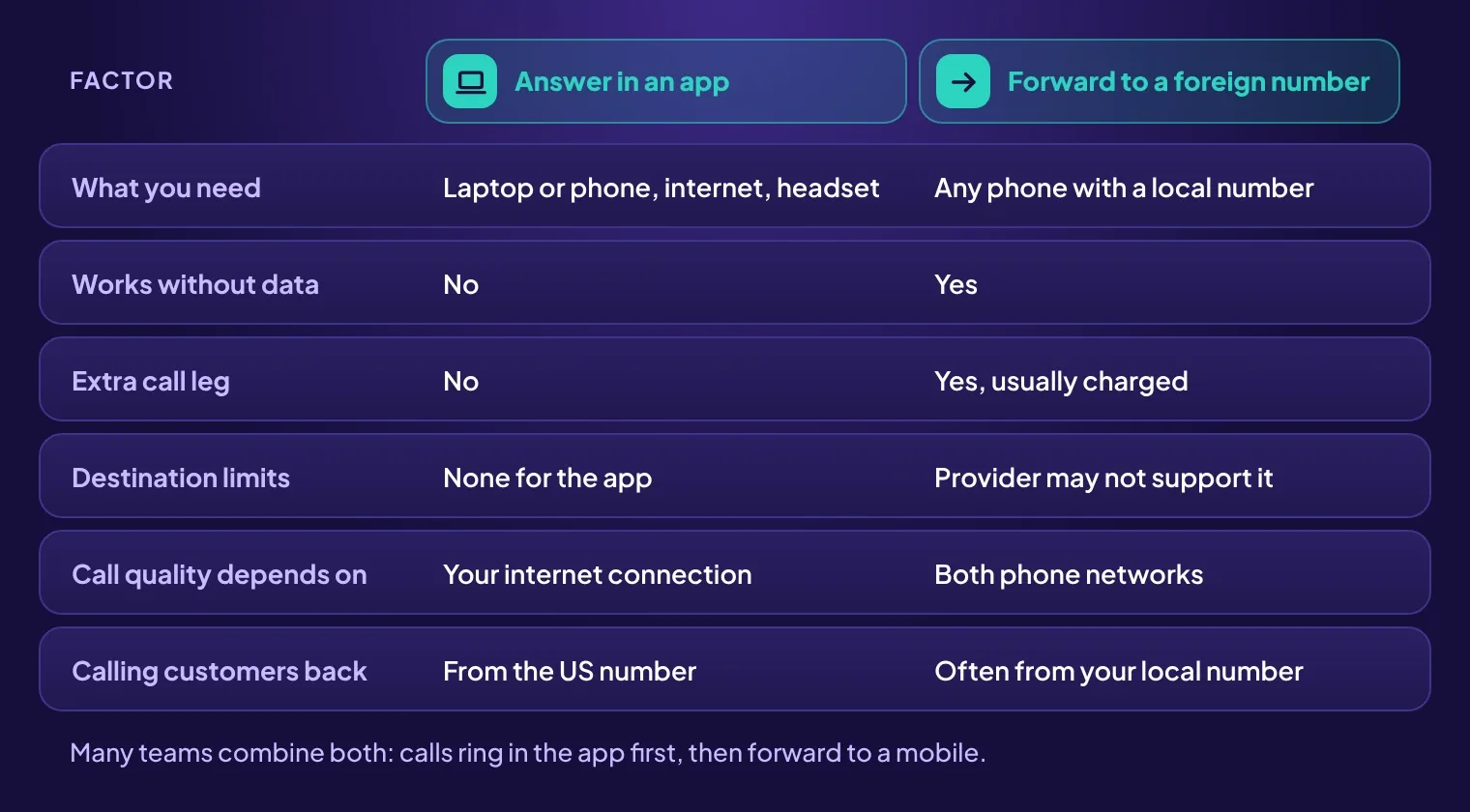
This table compares them:
Table 1: Two ways to answer a US business number from abroad
| Factor | Answer in an app | Forward to a foreign number |
|---|---|---|
| What you need | Laptop or phone, internet, headset | Any phone with a local number |
| Works without data | No | Yes |
| Extra call leg | No | Yes, usually charged |
| Destination limits | None for the app | Provider may not support it |
| Call quality depends on | Your internet connection | Both phone networks |
| Calling customers back | From the US number | Often from your local number |
Many teams combine the two. Calls ring in the app first, then forward to a mobile if nobody answers. Our guide on forwarding business calls to a mobile explains how ring order and fallbacks work.
Is it better to answer in an app or forward calls abroad?
Answering in an app is usually better for a team that works abroad every day, while forwarding suits occasional travel or places with weak internet. Use this rule of thumb:
Choose the app if your team has stable internet, calls US customers back, or needs call recording and logs.
Choose forwarding if someone uses a basic phone, internet is unreliable, or calls are too rare for cost to matter.
Choose both if you want the app as the main path and a mobile as a backup when nobody answers.
The app has one big advantage beyond cost: calling back. When a rep returns a call from the app, the customer sees your US number. A forwarded call answered on a foreign mobile tempts reps to call back from that mobile, which shows an international number your customer may not answer.
How much does it cost to receive US calls abroad?
Receiving US calls abroad costs whatever your provider charges for the incoming call, plus the cost of any forwarding leg. Answering in an app keeps the call on the internet, so there's usually only the one incoming leg to pay for. Forwarding to a foreign number adds a second, international leg.
HyperDial's terms of service state that "calls forwarded to an external number are treated as two separate legs, and each leg is charged". They also say unlimited calling allowances don't cover forwarding to PBXs or multiple lines. International calls are billed at the rates shown in the platform, and the pricing page says calling outside your plan's market bills at that destination's rate.
So before you set up forwarding, check three things:
- Supported destinations: whether your provider forwards to the country you're in at all.
- The per-minute rate for that destination, for both mobiles and landlines.
- Whether forwarded minutes count against any included allowance.
Some providers only forward US numbers to US and Canadian destinations and expect you to use their app abroad. Others support most countries at different rates. Ask before you print the number on your website.
How do you set up a US business number to ring abroad?
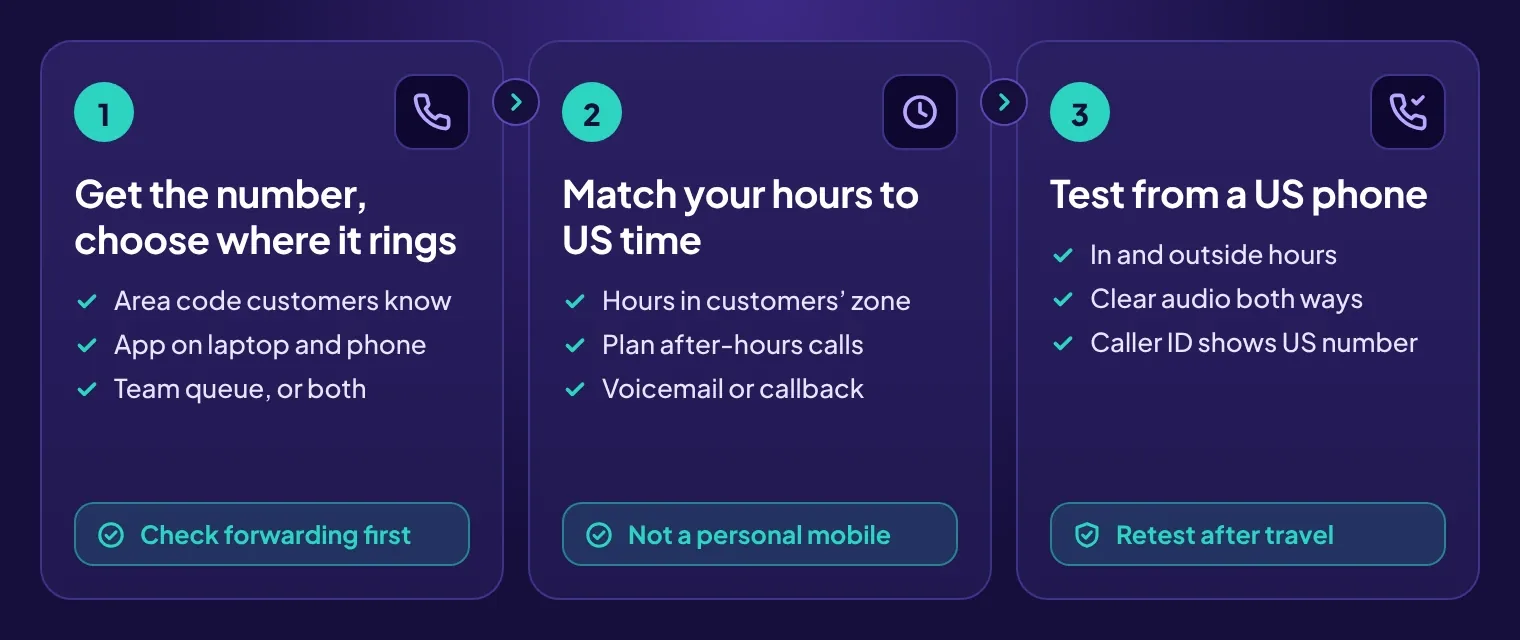
You set up a US business number to ring abroad by choosing where it rings, matching US hours and testing from a US phone. These three steps take most teams less than a day.
Step 1: Get the number and choose where it rings
Start with a US number in the area code your customers recognize. Then assign it to the devices that should ring: the calling app on each person's laptop and phone, a team queue, or both. If you plan to forward, add the foreign number as a backup and confirm with your provider that the destination is supported.
Our guide on how to get a US phone number walks through choosing a number. If your company is registered outside the US, our guide on what a non-US company needs before activating a US business number covers the checks.
Step 2: Match your hours to US time zones
A team in London or Bengaluru works hours that may not overlap with US customers. Set business hours on the number in the time zone of your customers, not your team. Then decide what happens outside those hours: voicemail, a callback request, or a colleague in another time zone.
The common mistake here is forwarding to a personal mobile that's switched off or out of signal at night. Its own voicemail answers, and the customer hears a stranger's greeting in another language. Send after-hours calls to your business voicemail or a queue instead. Our guide on handling business calls after hours covers the options.
Step 3: Test from a US phone
Ask someone in the US, or use a US test line, to call the number during and outside business hours. Check that the right devices ring, the audio is clear both ways, and voicemail is your business greeting. Then call a US phone from the app and check the caller ID shows your US number, not a foreign one.
Repeat the test whenever someone travels or changes devices. A setting that worked from the office may behave differently on hotel Wi-Fi.
Will call quality suffer when calls travel abroad?
Call quality can suffer when calls travel abroad, mainly because distance adds delay and a weak connection adds dropouts. The ITU's G.114 recommendation suggests keeping one-way delay below 150 milliseconds for most conversations. Long international routes eat into that budget before your own connection adds anything.
You can't shorten the distance, but you can control the rest. Use a wired connection or strong Wi-Fi, a headset rather than laptop speakers, and close video calls and large downloads during call blocks. HyperDial's voice page says around 100 kbps per concurrent call is plenty, and a stable connection matters more than raw speed.
Our guide on keeping VoIP calls clear for remote teams has a full checklist, and common VoIP call quality issues explains how to diagnose problems.
What rules apply when you answer US calls from abroad?
The rules that apply depend on what you do with the number. Answering calls is simple, but calling US customers back, recording calls and emergency calling all carry obligations. These are the points to plan for:
- Emergency calls: don't rely on a virtual number for 911. HyperDial's terms state that its services don't support calls to emergency services. The FCC's interconnected VoIP 911 rules also require providers to warn users that 911 may be limited when equipment moves.
- Calling US customers: US telemarketing rules apply wherever your team sits, including calling hours of 8 a.m. to 9 p.m. in the customer's local time. The Do Not Call rules are in the FCC's telemarketing rules.
- Recording calls: some US states require every party's consent to recording. Play a recording announcement on every call.
- Sanctions: HyperDial's terms require that you and your users aren't located in a comprehensively sanctioned country or region.
- Your own country's rules: some countries restrict internet calling, so check the rules where your team works.
None of this stops a team abroad from using a US number. It just means building the checks into your setup rather than relying on each person to remember. This guide isn't legal advice, so check your obligations with an adviser.
How does HyperDial help teams answer US numbers abroad?
HyperDial issues US numbers to teams anywhere, and the numbers ring in the app on whichever laptops and phones you assign. Here's what's included, as described on HyperDial's US local numbers page and US numbers page:
- No US address for calling: calling-only US local numbers need no documents and no US address.
- Any US area code: local numbers in any area code, plus toll-free numbers in the 800, 833, 844, 855, 866, 877 and 888 ranges.
- Rings anywhere: each number rings in the app on the laptops and phones you assign, and forwarding to any device is included.
- Trusted caller ID: outbound US calls are signed with STIR/SHAKEN attestation to lower the risk of spam labels.
- Routing and hours: HyperDial's numbers can be pointed at any call flow, with hours set per queue.
- Clear costs: numbers and minutes are billed at carrier cost and itemized, as the pricing page shows.
Two honest limits. HyperDial's services don't support emergency calls, so keep another way to reach them. Forwarding to an external number is charged as two legs. HyperDial's pages also don't list supported international forwarding destinations, so confirm yours first.
What should you do next?
Decide how your team will answer: in the app, by forwarding, or both. Confirm your provider supports your forwarding destination and check the rate. Then set business hours in your customers' time zone and test from a US phone. To see the numbers available, visit HyperDial's US numbers page, compare plans on the pricing page or book a demo.
Sources


