
What Happens to Business Calls After Office Hours?
Your office closes, but your phone keeps ringing: learn where those after-hours calls go today and how to make sure every caller still gets an answer.
This short guide shows what usually happens to after-hours calls, the options you can choose from, and how to set them up so no caller is left guessing.
What happens to business calls after hours by default?
By default, business calls after hours does whatever your phone line does when nobody picks up. On a basic line, that means it rings out, drops into a general voicemail box, or reaches a mailbox that's already full. The caller gets no idea when you'll be back or whether anyone will call.
Nothing is wrong with closing for the night. The problem is a missing plan. Callers who hear silence often assume you're closed for good, or simply call the next business on their list. Our guide to tracking unanswered calls shows how to spot how many of these calls you're missing today.
What are your options for after-hours business calls?
You have five common options for after-hours calls, and most businesses mix two or three of them. Each one gives the caller a different experience:
Table 1: After-hours call options compared
| Option | What the caller gets | Best for | Trade-off |
|---|---|---|---|
| Voicemail | Leaves a message | Low call volume | Many callers won't leave one |
| On-call phone | A real person | Urgent calls | Staff wake-ups, on-call rota |
| Answering service | A live agent taking messages | Steady night volume | Ongoing cost, less product knowledge |
| AI agent | Answers, books or hands off | Routine requests | Needs approved scripts |
| Callback queue | A promised call next morning | Non-urgent sales and support | Someone must own the callbacks |
The right mix depends on what your callers need at night. A plumber needs a person for burst pipes. Software companies may only need a clear greeting and a callback.
How do you set up after-hours call handling?
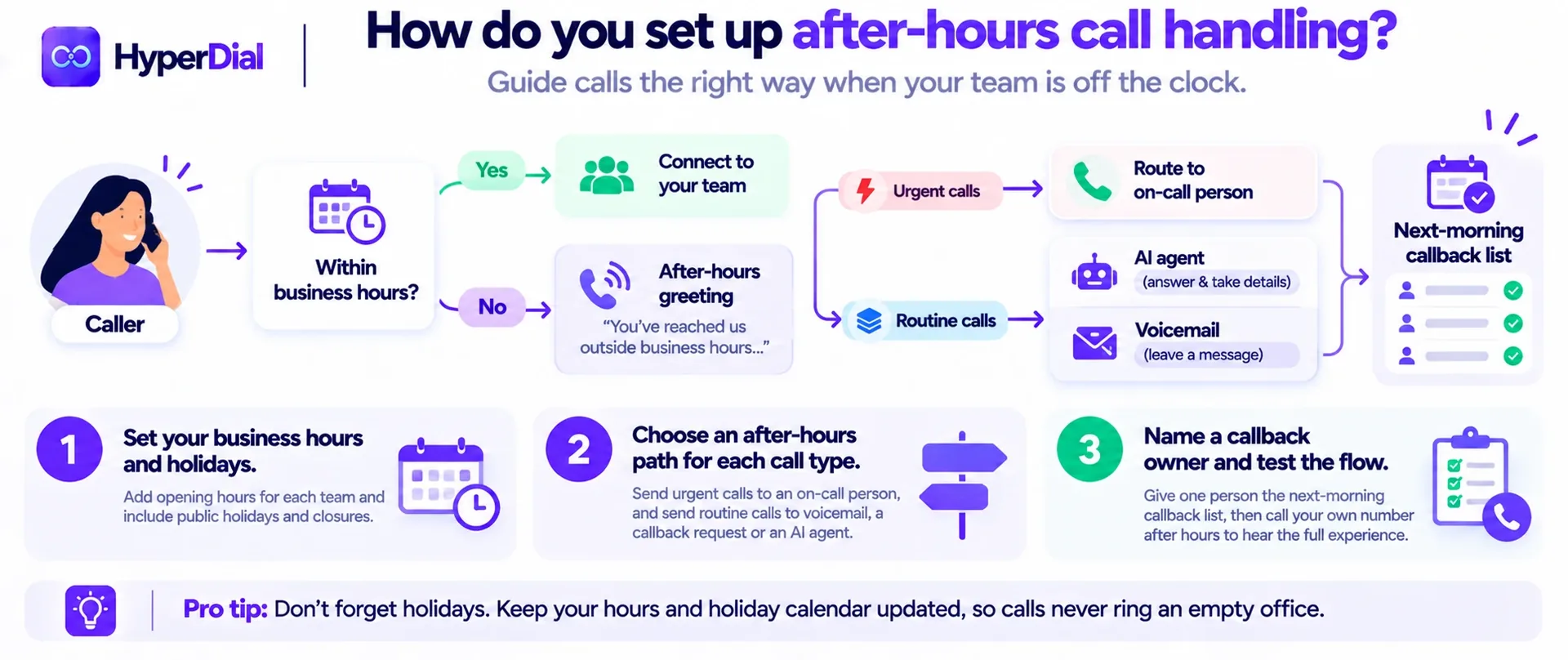
You set up after-hours call handling by telling your phone system when you're open, deciding where each type of call goes, and naming who follows up. Follow these three steps:
- Set your business hours and holidays. Add opening hours for each team and add public holidays and closures, so the system knows exactly when "after hours" starts.
- Choose an after-hours path for each call type. Send urgent calls to an on-call person, and send routine calls to voicemail, a callback request or an AI agent.
- Name a callback owner and test the flow. Give one person the next-morning callback list, then call your own number after hours to hear exactly what customers hear.
The most common mistake happens at step 1: teams set weekday hours but forget holidays, so the line rings an empty office on a public holiday. HyperDial's call routing keeps business hours and holiday calendars per queue and per region, and overflow rules always name where a call goes next.
What should an after-hours greeting say?
An after-hours greeting should tell callers they reached the right business, when you're open, and what happens next. Keep it under 30 seconds and include these points:
- Your business name, so callers know they dialed correctly.
- Your opening hours, including weekends if they differ.
- How to get urgent help, such as pressing a key to reach the on-call person.
- What happens to a message, for example "we'll call you back by 10am."
- Another way to reach you, like your website or email.
Here's a simple example: "Thanks for calling [Business]. We're open Monday to Friday, 9am to 6pm. For an urgent issue, press 1. Otherwise, leave your name and number and we'll call you back by 10am tomorrow."
How should you handle urgent calls after hours?
Urgent calls after hours should reach a person, while everything else can wait for a callback. Decide what "urgent" means for your business before you build the routing. Use this simple rule:
Route to an on-call person if the issue gets worse or costs the customer money before morning, like an outage, a leak or a safety issue.
Route to an AI agent or callback if the caller wants a quote, a booking, a status update or general information.
Route to voicemail if volume is low and a next-morning reply is fine for everyone who calls.
Language and region can matter too. HyperDial's routing can route by the number dialed, the caller's region, or both, so callers in another time zone can reach a team that's still working.
What should happen the next morning?
The next morning, someone should work through every after-hours message and missed call before new calls pile up. Speed matters here: research published in Harvard Business Review on how fast companies respond to online sales leads found that most companies don't respond nearly fast enough. A short checklist keeps your follow-up consistent:
- Check voicemails and callback requests first thing, before the phones get busy.
- Call back urgent and sales calls first, then routine support.
- Log what each caller needed, so you can spot patterns.
- Review missed calls by hour each week to see if you need later cover.
HyperDial's call analytics shows total, answered and missed calls, so you can see how many calls arrive after hours and when.
What should you do next?
Call your own business number tonight and listen to what a customer hears. Then set your hours and holidays, pick a path for urgent and routine calls, and name your callback owner. When you're ready, try HyperDial free or compare plans on the pricing page.
Sources


