
Should You Put Your Phone Number on Your Website?
A phone number on your website is a promise that someone will answer, and this guide shows you how to keep it.
The real question isn't whether to show a number. It's which number, where, and what happens when someone dials it. We've seen businesses add a phone number to every page, then send half the calls to a voicemail nobody checks. This guide covers when a visible number helps, where to place it and how to set it up. It also shows how to make sure the calls it brings in get answered.
Every fact in this guide links to its source, and we last checked them on 13 November 2026.
Key takeaways
- A visible number builds trust, especially for buyers comparing several providers.
- Only show a number you can answer, or have a plan for the calls you can't.
- Use one main number everywhere, so customers and search engines see the same details.
- Make it tap-to-call on mobile, with the country code in the link.
Should you put a phone number on your website?
You should put a phone number on your website if customers ever need to ask questions before or after they buy. It also reassures visitors that a real business is behind the page. For most service businesses, B2B companies and local firms, that's almost everyone.
Visitors notice when a number is missing. KoMarketing, Huff Industrial Marketing and BuyerZone surveyed 262 B2B buyers for their B2B Web Usability Report, published in April 2015. Of those buyers, 44% said missing contact information or a phone number would make them leave a vendor's website. More than half, 54%, said missing contact details reduced a vendor's credibility.
When a visible phone number helps
A phone number helps most when the purchase is complex, expensive, urgent or personal. Someone choosing a supplier, booking a repair or comparing software plans often has one question they can't answer from the page. A quick call settles it, and the business that picks up first is often the one that wins the work.
It also signals that a real, reachable company is behind the website. Even visitors who never call feel more confident seeing a number in the header, because it shows the business isn't hiding.
When a visible phone number can hurt
A phone number can hurt when nobody answers it. Anyone who calls, waits and hits a full voicemail box trusts you less than one who never saw a number. Answering calls also costs time, so a business that sells mainly through self-service may prefer to steer people to chat or a help center first.
Sole traders face a different problem. If you're with a client all day, every ringing phone is an interruption. The answer usually isn't to hide the number, but to set clear hours and give callers a callback option or a message they can trust.
| Situation | Show the number? | Why |
|---|---|---|
| Complex or high-value sales | Yes, prominently | Buyers want to ask before committing |
| Local services and trades | Yes, prominently | Customers often call to book |
| Urgent support or repairs | Yes, prominently | Callers need help now |
| Self-service software | On the contact page | Most answers live in help docs |
| One-person business | Yes, with clear hours | Set expectations and offer callbacks |
Where should your phone number go on your website?
Your phone number should go where visitors look for it and where they're most ready to act. The top-right of the header is the convention most visitors expect, and the contact page is the first place many will check. These are the placements that matter most:
| Placement | Why it works | Tip |
|---|---|---|
| Header, top right | Visible on every page | Keep it short and tappable |
| Contact page | Where visitors look first | Add hours and the team it reaches |
| Pricing, quote and booking pages | Visitors are close to deciding | Place it near the main button |
| Checkout or order pages | Reassures hesitant buyers | Point it to sales or support |
| Footer | Expected on every page | Repeat the same number |
| Mobile sticky call button | One tap from anywhere | Show it on small screens only |
On pages where visitors are close to buying, put the number right beside the main call to action. Someone about to request a quote may have one last question. A number next to the button keeps them on the page instead of sending them off to search.
Where else should the same number appear?
The same number should appear everywhere customers find your business, not just your website. Search engines and customers both notice when details don't match. Keep it consistent across these places:
- Google Business Profile. Google's guidelines for representing your business ask for a number that connects to your individual location and is under the business's direct control. They also recommend a local number over a central call center line whenever possible.
- Email signatures. Every team member's signature should carry the same main number.
- Social media profiles. Update contact buttons and bios on every channel you use.
- Invoices, quotes and packaging. These sit on customers' desks long after the sale.
- Directory listings. Old listings with an outdated number send calls to nowhere.
How do you add a phone number to your website the right way?
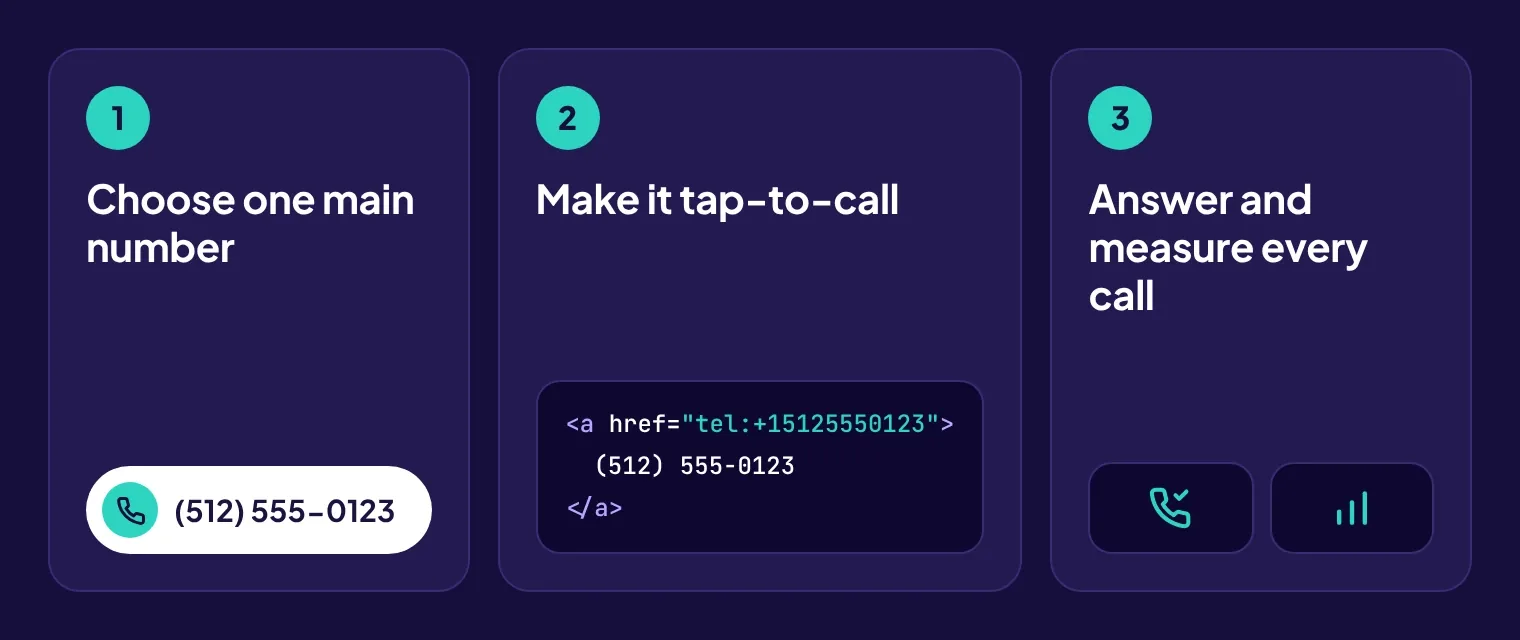
You add a phone number to your website the right way by choosing one main number and coding it so it can be tapped to call. Then you make sure every call it brings in gets answered. Follow these three steps.
Step 1: Choose one main number and the right number type
Your main website number is the one most customers will dial, so choose it carefully. It should be a business number, not a personal mobile, and it should ring a team or a queue rather than one person's desk. That way, calls still get answered when someone is on leave or moves on.
Next, choose the number type that matches your customers. A local number suits businesses serving one city or region, because callers recognize the area code. By contrast, a toll-free number suits businesses serving a whole country, because the call is free for the caller. Many businesses show one main number and route calls to sales or support from there. Our guide on local vs toll-free numbers explains the trade-offs.
The mistake we see most happens here: publishing an owner's personal mobile number to get started quickly. It works until the business grows, and then every customer has a number you can't route, share or keep separate from your private life. Our guide on business vs personal phone numbers covers why that matters.
Step 2: Format and code the number so it's tap-to-call
A tap-to-call number is a phone number written as a link, so visitors on mobile can tap it and start a call. It uses the tel: link format, defined in RFC 3966, The tel URI for Telephone Numbers, published in December 2004. Global numbers in a tel: link start with a plus sign and the country code, and the link can't contain spaces.
Show the number in the format your customers are used to reading, but put the full international version in the link. For example, a header link to tel:+15125550123 can display as (512) 555-0123. Visitors read the familiar format, while their phone dials the full number.
You can also add your number to your page's structured data, the code that helps search engines understand your business. Google's local business structured data guide lists the telephone property as recommended and advises including the country code and area code. Make sure the number in your structured data matches the one on the page and on your Google Business Profile.
Step 3: Make sure every call gets answered and measured
A number on your website is a promise that someone will pick up. Before you publish it, decide where calls go during business hours, after hours, and when everyone is busy. A simple setup routes calls to a team, sends overflow to a callback or a backup queue, and plays a clear after-hours message.
Then test it like a customer would. Tap the number on a phone, call from a desktop link, and call outside business hours. Check that the right people ring, that voicemail works, and that missed calls show up somewhere your team will see them. Our guide on reducing missed inbound calls covers the options in more depth.
Finally, measure what the number brings in. Track how many calls come from the website, how many are answered, and how many turn into sales or bookings. If calls spike after you add the number, that's a sign visitors wanted to talk, and your answer rate becomes the number to watch.
Should you use a different number on your website for tracking?
You can use a separate website number to track calls, but keep your main number consistent where search engines and customers look. Tracking numbers help you see which pages or campaigns drive calls. They also create a risk: if different numbers appear in different places, customers and search engines may not know which one is really yours.
Here's how to use tracking numbers without causing confusion:
- Keep one main number on your Google Business Profile and directory listings, so your business details stay consistent.
- Use separate numbers for campaigns, such as a print ad or a landing page, where you want to know exactly what drove the call.
- Route every number to the same team, so customers get the same service whichever number they dial.
- Don't send callers through numbers you don't control. Google's guidelines require the number to be under the business's direct control.
If you're unsure, start with one number everywhere and measure website calls through your phone system's call logs. Our guide on how many phone numbers a business needs helps you decide when extra numbers are worth it.
What mistakes should you avoid with the phone number on your website?
The mistakes to avoid are the ones that make a visible number harder to use or easier to distrust. These are the ones we see most often:
| Mistake | What happens | Fix |
|---|---|---|
| Number as an image | Can't be tapped, copied or read by search engines | Use real text in a tel: link |
| No country code in the link | Calls fail from some phones or abroad | Start the link with + and the country code |
| Different numbers everywhere | Customers and search engines get confused | One main number on all listings |
| No hours shown | Callers ring an empty office | Add hours next to the number |
| Calls go to one person's phone | Calls missed when they're away | Route to a team or queue |
| Old number left on listings | Calls go to a dead line | Audit listings when you change numbers |
Most of these take minutes to fix, and each one removes a reason for a visitor to give up. Our guide on why business calls fail to connect covers what to check when calls aren't getting through.
How does HyperDial help you answer the calls your website brings in?
HyperDial gives you a business number for your website and routes every call to the right team. Overflow, callbacks and after-hours rules stop calls from ringing out. Here's what you can set up:
- Local and toll-free numbers: HyperDial offers local phone numbers in 130+ countries, plus toll-free numbers set up per market.
- Calls on mobile, without a personal number: US local numbers ring in the HyperDial mobile app alongside your personal number. You never have to publish your private mobile.
- Routing by number dialed: HyperDial's call routing routes calls by the number dialed, the caller's region or both. A campaign number and your main number can reach different teams.
- Hours, overflow and callbacks: business hours and holidays are set per queue. Calls go to overflow, a callback or the after-hours path instead of being silently dropped.
- AI agents for overflow: HyperDial's AI agents answer when the queue is deep and hand over to a rep with the transcript.
- Answered and missed calls: call analytics show total, answered and missed calls, with a heatmap of the busiest hours.
You can start on the free Base plan, which has no expiry. You pay only for the numbers and minutes you use, as shown on the pricing page.
One honest limit: HyperDial's public pages don't describe dynamic number insertion, the method some tools use to show a different tracking number to each website visitor. If you need that, confirm how it would work before you set it up.
What should you do next?
Open your website on a phone and try to call your business in one tap. Check that the number is in the header, on the contact page and beside your main buttons, and that it matches your Google Business Profile. Then call it outside business hours to hear what customers hear. To get a business number with routing built in, compare plans on the pricing page or try HyperDial free.
Sources
- KoMarketing, Huff Industrial Marketing and BuyerZone, B2B Web Usability Report (April 2015; survey Oct to Nov 2014, 262 respondents, archived PDF)
- Google Business Profile, Guidelines for representing your business
- RFC 3966, The tel URI for Telephone Numbers (December 2004)
- Google Search Central, Local business structured data


