
What is a Business Phone System?
Not sure what a business phone system actually does, or which type fits your team? This guide explains how one works, the main types and features, and how to set one up without buying any desk phones.
Most businesses today run their phone system in the cloud, so calls work on laptops and mobiles with no desk phones or wiring. This guide explains how a business phone system works, the main types, the features that matter, and how to choose one for your team.
What does a business phone system do?
A business phone system lets several people handle calls on shared company numbers, with rules that decide who answers and what happens next. It turns a single phone line into something a whole team can work from.
In day-to-day use, a business phone system handles these jobs:
- Gives you business numbers, like local or toll-free numbers, so customers never see personal mobiles.
- Routes every call to the right person, team or phone menu, based on time, caller or topic.
- Lets many people call at once, so one busy line doesn't block the next caller.
- Handles calls in progress, with hold, transfer, conference and voicemail.
- Records what happened, with call logs, recordings and reports.
That last point is easy to underrate. A personal phone shows you missed calls. With a business phone system, you see missed calls for the whole team, by hour, number and person, so you can fix the gaps.
How does a business phone system work?
A modern business phone system sends calls over the internet and uses software to decide where each call goes. When someone dials your number, the system checks your rules and rings the right people on whatever device they use.
Most cloud systems carry calls using the Session Initiation Protocol, the internet standard for setting up voice calls, defined in RFC 3261. Your numbers still follow the ITU's global numbering plan, Recommendation E.164. That's why customers can reach you from any ordinary phone.
Here's what happens on a typical inbound call:
- A customer dials your business number from a mobile or landline.
- The network sends the call to your provider, which looks up your settings.
- Your routing rules run, checking business hours, caller and team.
- The right people's devices ring, in a browser, an app or a desk phone.
- The call is logged, with its outcome, length and recording if you've switched it on.
If internet calling is new to you, our guide to what VoIP is explains how voice travels over the internet in plain terms.
What are the types of business phone systems?
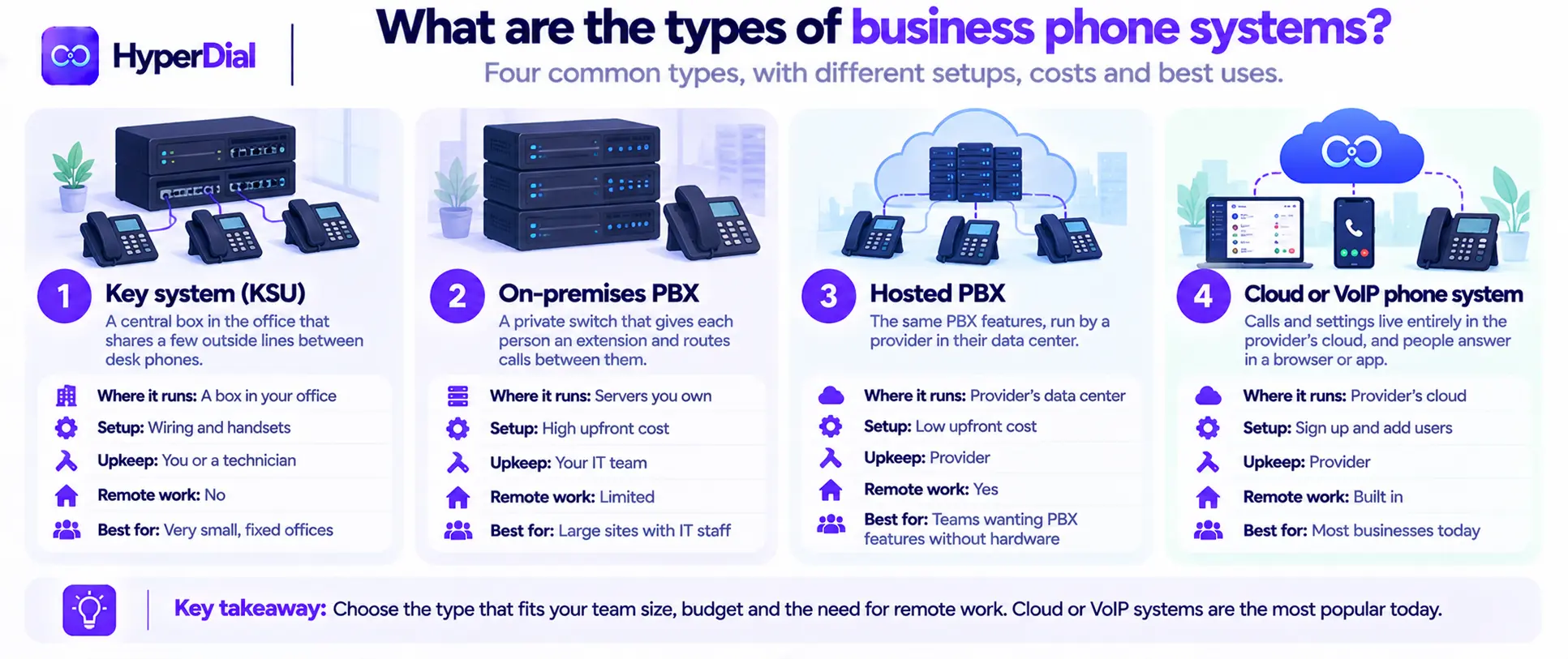
The four main types of business phone systems are key systems (KSU), on-premises PBX, hosted PBX and cloud or VoIP phone systems. They differ mainly in where the equipment lives and who looks after it:
Table 1: Types of business phone systems compared
| Type | Where it runs | Setup | Upkeep | Remote work | Best for |
|---|---|---|---|---|---|
| Key system (KSU) | A box in your office | Wiring and handsets | You or a technician | No | Very small, fixed offices |
| On-premises PBX | Servers you own | High upfront cost | Your IT team | Limited | Large sites with IT staff |
| Hosted PBX | Provider's data center | Low upfront cost | Provider | Yes | Teams wanting PBX features without hardware |
| Cloud or VoIP system | Provider's cloud | Sign up and add users | Provider | Built in | Most businesses today |
Key system (KSU): a central box in the office that shares a few outside lines between desk phones. It's simple, but it's tied to one building and has few modern features.
PBX (private branch exchange): a private switch that gives each person an extension and routes calls between them. An on-premises PBX gives you full control, but you buy and maintain the equipment.
Hosted PBX: the same PBX features, run by a provider in their data center. You pay a subscription instead of buying hardware.
Cloud or VoIP phone system: calls and settings live entirely in the provider's cloud, and people answer in a browser or app. Most hosted PBX services today are cloud systems in practice, so the two terms often overlap.
Is a cloud phone system the same as VoIP?
A cloud phone system uses VoIP, but the two words aren't quite the same thing. VoIP is the technology that carries voice over the internet. A cloud phone system is the full service built on top of it, with numbers, routing, apps and reports.
You can also answer cloud calls without any handset at all. A softphone is a phone app on a computer or mobile that works like a desk phone. A virtual landline gives you a landline-style number with no physical line.
What features should a business phone system have?
A business phone system should cover the basics every team needs, then add tools that match how you work. Start with the essentials, and treat the rest as upgrades you can add later.
Essential features most teams need:
- Local and toll-free numbers so customers can reach you easily.
- Call routing and business hours so calls ring the right people at the right time.
- A phone menu (IVR) to send callers to sales, support or billing.
- Voicemail, hold and transfer for everyday call handling.
- Apps for laptop and mobile so people can answer anywhere.
- Call logs showing answered and missed calls.
Advanced features for growing teams:
- Call recording and transcription for training and quality checks.
- Queues and callbacks so busy periods don't leave callers waiting.
- Outbound dialing with power or predictive modes for sales teams.
- Messaging on the same number, like texts or WhatsApp.
- AI agents that answer overflow or after-hours calls.
- CRM and helpdesk integrations so call history sits with customer records.
A phone menu is often the first upgrade a growing team makes. Our guide to what IVR is explains how to design one callers don't hate.
What are the benefits of a business phone system?
The main benefit of a business phone system is that customers reach the right person faster, and your team sees every call. That one change improves service, sales and planning at the same time.
These are the benefits most businesses notice first:
- A professional image: one business number, a greeting and a menu make even a small team look established.
- Fewer missed calls: calls move to the next free person instead of ringing out.
- Work from anywhere: people answer on laptops and mobiles, at home or on the road.
- Privacy for staff: nobody hands out a personal mobile number.
- Easy growth: adding a person or a new city number takes minutes, not new wiring.
- Clear data: call reports show peak hours, missed calls and team workload.
The privacy point matters more than it seems. When a rep leaves, the customer relationship stays on the business number instead of walking out on their personal phone.
How do you choose the right business phone system?
You choose the right business phone system by matching it to where your customers are, how your team works and how fast you expect to grow. Use this checklist before you sign up:
- Numbers: does it offer the number types and countries your customers need?
- Devices: can people answer in a browser, on mobile and on desk phones if you need them?
- Routing: can you set hours, holidays, queues and backups per team?
- Growth: can you add users and numbers yourself, without a support ticket?
- Pricing: is the cost per user clear, and are numbers and minutes listed separately?
- Security: does it offer role-based access, an audit log and encryption?
- Integrations: does it connect to the CRM or helpdesk you already use?
- Trial: can you test call quality and setup before you commit?
Watch out for two common mistakes. Teams often buy for today's size and outgrow the system within a year. Others skip checking their internet connection, even though a steady connection matters more than raw speed for call quality.
Choose a cloud phone system if your team works in more than one place, you plan to grow, or you don't have in-house IT.
Consider an on-premises PBX if you run a large single site with an IT team and strict rules about where equipment must sit.
How do you set up a business phone system?
You set up a cloud business phone system by choosing your numbers, adding your team and setting your call rules. Follow these three steps:
- Choose or port your numbers. Pick local or toll-free numbers for the places your customers are, or port the number they already know.
- Add your team and their devices. Invite each person with the right role, and let them answer in a browser, on mobile or both.
- Set routing, hours and a backup, then test. Decide who answers, when, and what happens when everyone is busy, then call your own number to check.
The most common mistake happens at step 1: cancelling your old phone service before the number moves. Your old number should keep working until the transfer is complete. HyperDial's guide on how to port a number covers the documents you'll need.
How does HyperDial work as a business phone system?
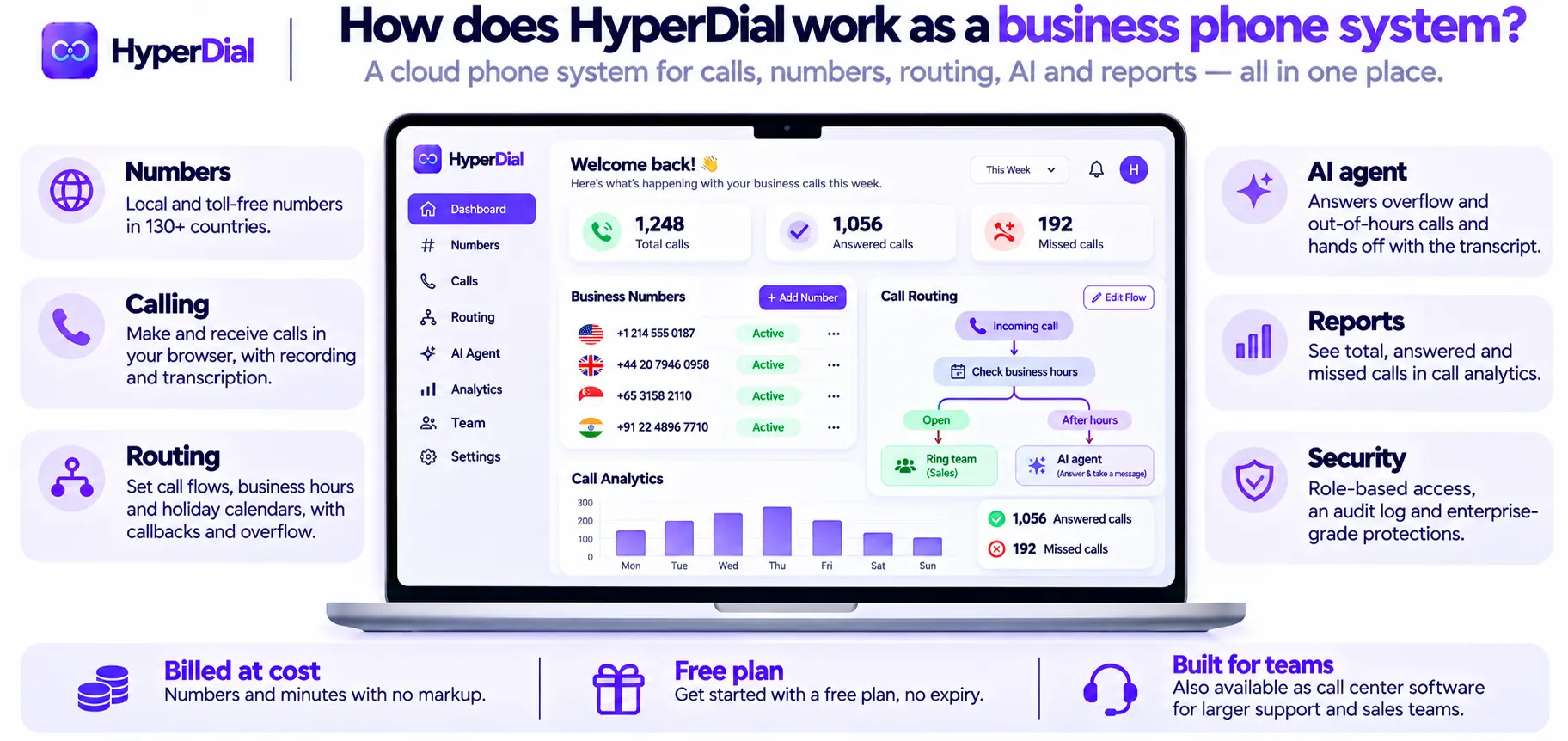
HyperDial is a cloud business phone system that runs calls, numbers, routing, messaging and reports in one place. People answer in a browser with a headset or on their phone, with no desk phone to set up. Here's how its main parts map to the features above:
- Numbers: local phone numbers and toll-free numbers in 130+ countries, held in one account.
- Calling: voice calling in the browser, with recording and transcription, and around 100 kbps per call.
- Routing: call routing with business hours and holiday calendars per queue and region, plus callbacks and overflow rules.
- AI agent: the HyperDial AI agent answers overflow and out-of-hours calls and hands off with the full transcript.
- Reports: call analytics shows total, answered and missed calls.
- Security: the security page covers role-based access and an audit log.
Numbers and minutes are billed at cost, with no markup, and there's a free plan with no expiry. Larger support and sales teams can also look at HyperDial's call center software.
What should you do next?
Write down where your customers call from, how many people answer calls and what you'd like to see in your call reports. Then compare two or three cloud business phone systems against the checklist above and test one with a real call. When you're ready, compare plans on the pricing page or try HyperDial free.
Sources


