
What is IVR? How is it used in Contact Center
Every time a caller hears “Press 1 for sales,” an IVR is at work. Here’s how it can answer every call for your business, even when no one is free to pick up.
What is IVR?
IVR is an automated phone system that talks to callers and lets them choose options with their keypad or voice. The letters stand for interactive voice response. "Interactive" means the caller takes part. "Voice response" means the system answers with a recorded or computer voice.
You've used an IVR if you've ever heard a message like this: "Thanks for calling. For orders, press 1, and for billing, press 2." That menu is the IVR. It works like a receptionist that never takes a break.
Businesses of every size use IVR. A small shop might use a simple menu with two options. Big call centers might use a menu that checks your account and tells you your balance. Then it sends you to an agent who speaks your language.
What does an IVR call mean?
An IVR call is a phone call where a recorded voice and menu answer you, instead of a live person. Most IVR calls are incoming: you call a business and hear its menu.
Some IVR calls are outgoing. A business can use IVR to call you with an automated message, like an appointment reminder or a delivery update. These calls often ask you to press a key to confirm, cancel or talk to someone. If you get a call like this, it's an outbound IVR call.
How does an IVR system work?
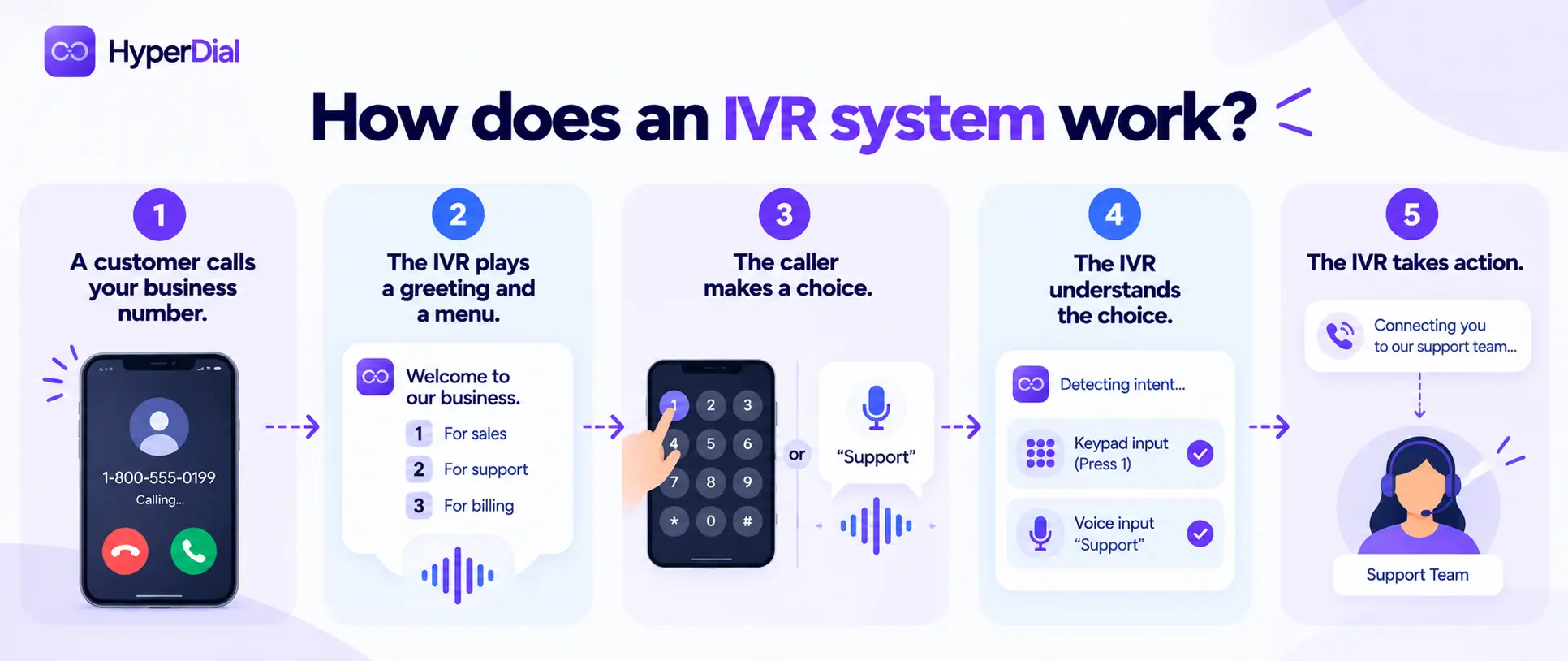
An IVR system works by playing a menu, listening to the caller's choice, and then taking the right action. Here's what happens on a typical call:
- A customer calls your business number. The IVR answers right away, even if your team is busy.
- The IVR plays a greeting and a menu. For example: "For sales, press 1. For support, press 2."
- The caller makes a choice. They press a number on their keypad or say what they need.
- The IVR understands the choice. It reads the keypad tone or turns the spoken words into text
- The IVR takes action. It sends the call to the right team, plays information, or takes a message.
Callers can talk to an IVR in two ways:
- Keypad (touch-tone): each key on a phone makes its own tone, called DTMF (dual-tone multi-frequency). The IVR hears the tone and knows which key was pressed. These keypad tones follow the ITU's push-button phone standard.
- Voice (speech recognition):the caller says a word or a short phrase, like "billing" or "track my order." The IVR turns the speech into text and picks the right option.
With HyperDial, the IVR is part of call routing. Callers can say why they're calling instead of pressing keys, and the call goes to the right queue.
What is an IVR menu?
An IVR menu is the list of options a caller hears when the IVR answers. A good menu is short, clear and puts the most common reasons for calling first. Here's a simple example for a small business:
- Press 1 to track an order.
- Press 2 for billing and payments.
- Press 3 to talk to sales.
- Press 0 to reach a person.
A menu can also have sub-menus. For example, "Press 2 for billing" might lead to a second menu with "Press 1 to pay a bill" and "Press 2 to ask about a charge." Keep sub-menus to a minimum, because every extra layer adds time for the caller.
What are the main IVR features?
The main IVR features help callers reach the right place fast and help your team handle more calls. Look for these when you compare phone systems:
- Phone menu: a recorded greeting with options callers choose from.
- Call routing: sends each call to the right person, team or queue.
- Business hours: plays a different message and path after hours or on holidays.
- Call queue and callback: holds callers in line, or lets them hang up and get a call back without losing their spot.
- Language choice: lets callers pick a language, then sends them to an agent who speaks it.
- Self-service: answers simple questions, like store hours or order status, without an agent.
- Reports: show which options callers pick and where they hang up.
On HyperDial, routing and IVR come with these features. You can set hours and holiday calendars for each queue. Callers can ask for a callback, and important calls can skip the line. Calls can also be routed by language, product or region. If no one is free, the call goes to another queue, a callback or the after-hours path, so calls aren't dropped.
What is IVR in a call center?
In a call center, IVR is the first step of almost every call. It greets the caller, finds out why they're calling, and sends them to the agent or team best able to help. This is what people mean by "call center IVR."
Call center IVR does three big jobs:
Sorting calls: it sends billing questions to billing, sales calls to sales, and urgent calls to the front of the line.
Collecting details: it can ask for an order number or account number first, so the agent has it before they say hello.
Handling simple requests: it answers common questions on its own, so agents have more time for harder calls.
Call centers often route calls by skill, such as language, product or region. HyperDial also has sticky routing, which sends a returning caller to the same agent they spoke with last time. See how support teams use this to answer calls faster.
What are the benefits of IVR?
The biggest benefit of IVR is that every caller gets answered and sent to the right place, even when your team is busy. Here are the main benefits:
- No missed calls: the IVR answers every call, day and night.
- Faster help: callers reach the right team without being transferred around.
- A more professional image: even a small business sounds organized.
- Less work for agents: simple questions are answered without a person.
- Better reports: you can see why people call and when.
HyperDial's call analytics show where calls drop. You can also see answer rates and talk time for each queue and agent.
What are the types of IVR?
There are four common types of IVR. They differ in how callers talk to the system and which way the call goes. The table below compares them.
Table 1: Types of IVR compared
| Type | How callers use it | Good for |
|---|---|---|
| Touch-tone IVR | Press keys on the keypad | Simple menus with a few options |
| Speech IVR | Say a word or short phrase | Callers on the go, longer option lists |
| AI voice agent | Talk naturally, like to a person | Questions, booking, after-hours calls |
| Outbound IVR | Get an automated call and press a key | Reminders, confirmations, alerts |
Many businesses mix these types. For example, they might use a touch-tone menu for the main line and an AI voice agent after hours.
What is the difference between IVR and an AI voice agent?
The difference is how much the caller can say. A classic IVR offers fixed options, like "press 1 or press 2." An AI voice agent understands normal speech, asks follow-up questions, and can finish tasks like booking a meeting.
Use a classic IVR when callers have a few clear reasons to call. An AI voice agent is better when callers ask many different questions, or when you want calls fully answered after hours. HyperDial's AI voice agents sit behind your existing numbers and routing. When a question gets too hard, or the caller asks for a person, the agent hands the call to your team. Your team also gets the full call transcript.
What are IVR best practices?
The best IVR is short, clear and always gives callers a way to reach a person. Follow these tips when you build your menu:
- Keep the main menu short: offer a few options, ideally no more than five.
- Put the most common option first: most callers should only listen to one or two choices.
- Always offer a way out: let callers press 0 or say "agent" to reach a person.
- Offer languages if your callers need them: put the language choice at the very start.
- Tell callers what to expect: share the wait time, and offer a callback if the wait is long.
- Review your menu often: check which options people use, and remove the ones they don't.
How do you set up an IVR for your business?
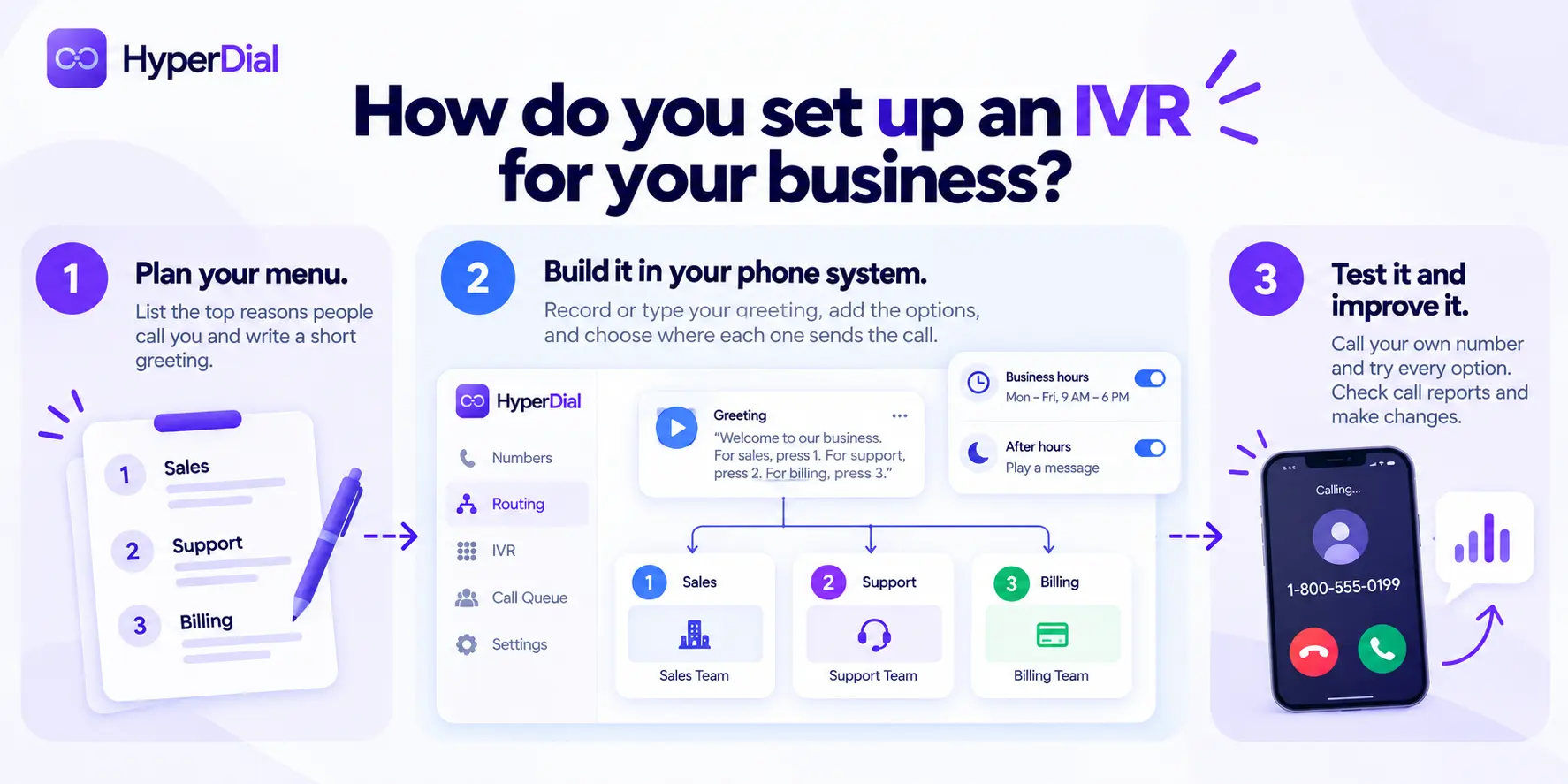
You can set up an IVR in your phone system without any special hardware. It takes three steps:
- Plan your menu. List the top reasons people call you, and turn each one into an option. Write a short greeting.
- Build it in your phone system. Record or type your greeting, add the options, and choose where each one sends the call. Set your business hours and after-hours path.
- Test it and improve it. Call your own number and try every option. Then check your call reports and change the menu as you learn.
The most common mistake happens at step 1: businesses add too many options. Start with three or four, and add more only if callers need them.
On HyperDial, your team can change the IVR without help from engineers. Every change is saved as a new version, so you can undo a mistake in one click. Calls already in progress finish on the old version. The getting started guide walks through your first setup.
What should you do next?
Write down the top three reasons people call your business. Turn them into a short menu with a greeting and a "press 0 for a person" option. Then build it in your phone system and test it yourself. To get started today, try HyperDial free and set up your first IVR on the Base plan.


