
What is a virtual landline, and how does it work?
Paying for a phone line that keeps you stuck at your desk? See how a virtual landline gives you a local business number that rings wherever you work, and how to set one up in three steps.
Think about the last time you moved office, or worked from home for a week. With a traditional landline, the number lives on a wire in one building, so it stays behind when you leave. A virtual landline flips that around: the number stays the same, and you take it with you.
That's why so many small businesses, remote teams and growing companies use one. This guide explains what a virtual landline is, how it works, how it differs from a real landline and simple call forwarding, and how to get one in three steps.
In this guide, you'll learn:
- What a virtual landline is, in plain English
- How calls reach you without a physical line
- How it compares with a traditional landline and call forwarding
- The benefits, and the honest limits
- How to get a virtual landline in three steps
What is a virtual landline?
A virtual landline is a geographic phone number, the kind with a local area code, that runs over the internet instead of a physical phone line. You get the familiar local number without the copper wire, the wall socket or the engineer visit.
Phone numbers follow the ITU's E.164 numbering plan, which sets the international format: a country code, then a national number that often starts with an area code. A virtual landline uses exactly the same kind of number as a traditional one. The only difference is where the calls go once they arrive.
You'll hear a few names for the same thing:
- Virtual landline: the most common name for a local number with no physical line.
- Virtual local number: the same idea, focused on the area code.
- Cloud number or VoIP number: a broader term for any number that runs over the internet.
If you want to know more about how local area codes work, our guide to what local phone numbers are covers the basics.
How does a virtual landline work?
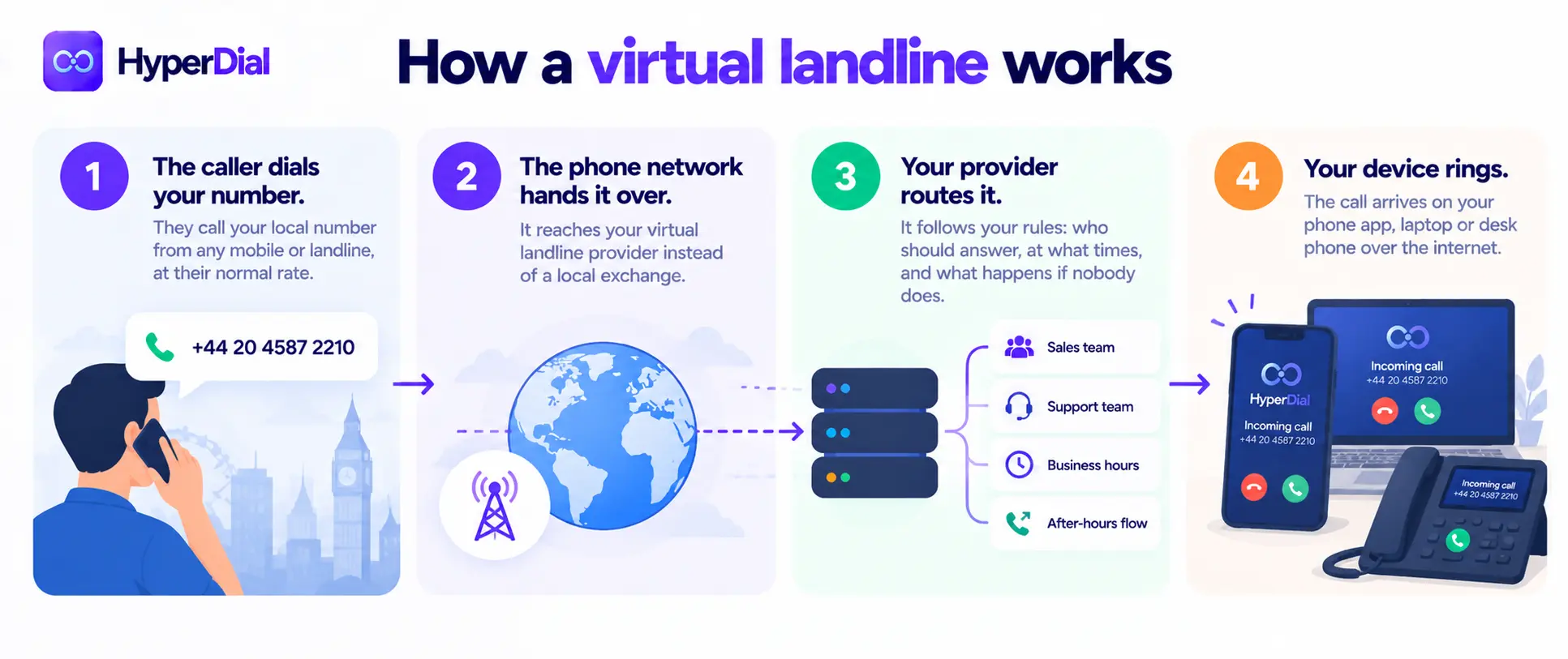
A virtual landline works by sending calls over the internet to whichever device you've signed in on, instead of down a phone line to one building. Here's what happens when someone calls you:
- The caller dials your number. They call your local number from any mobile or landline, at their normal rate.
- The phone network hands it over. It reaches your virtual landline provider instead of a local exchange.
- Your provider routes it. It follows your rules: who should answer, at what times, and what happens if nobody does.
- Your device rings. The call arrives on your phone app, laptop or desk phone over the internet.
Behind the scenes, most internet phone systems use SIP (Session Initiation Protocol), the standard for setting up calls over the internet (IETF RFC 3261). You don't need to know how it works, but it's why your calls can follow you anywhere. Our guide to what VoIP is explains the technology in more detail.
Can you make outgoing calls from a virtual landline?
Yes, most virtual landlines let you make outgoing calls too, so customers see your business number instead of your mobile. You call from the provider's app or browser dialer, and your local number shows as the caller ID.
That's one of the biggest differences from simple call forwarding, which only works one way. HyperDial's local phone numbers can show a local caller ID on every outbound call.
How is a virtual landline different from a traditional landline and call forwarding?
A virtual landline gives you a local number that works anywhere, while a traditional landline works in one building and call forwarding just passes calls on to another phone. This table shows the differences:
Table 1: Virtual landline vs traditional landline vs call forwarding
| What you get | Virtual landline | Traditional landline | Call forwarding |
|---|---|---|---|
| Local number | Yes | Yes | Uses an existing number |
| Physical line needed | No | Yes | Yes, on the original line |
| Answer anywhere | Yes, on any device | No, one location | Yes, on one phone |
| Outgoing calls show the number | Yes | Yes | Usually no |
| Share with a team | Yes | Limited | No |
| Business hours and routing | Yes | Rarely | No |
| Needs internet | Yes | No | No |
The last row matters. A virtual landline depends on your internet connection, while a copper landline doesn't. That's a real trade-off, and the "limits" section below explains how to plan for it.
What are the benefits of a virtual landline?
A virtual landline gives you a local business presence without the cost and limits of a physical line. Here's what changes for most businesses:
- A local number from anywhere: look local to customers even when your team is spread out.
- No hardware or installation: no wall socket, no engineer visit, no desk phone required.
- Keep your number when you move: change office or work from home and the number stays the same.
- Privacy: customers never need your personal mobile number.
- Team-ready: one number can ring several people, in order or as a team.
- Business features: business hours, voicemail, routing, recording and call reports.
Local presence is the benefit that's easiest to underestimate. People are often more comfortable calling a number from their own area, and a local caller ID helps your outbound calls get answered. You can add virtual landlines in several cities, or get a local phone number for another country without opening an office there.
Is a virtual landline the same as a toll-free number?
No, a virtual landline has a local area code, while a toll-free number is free for callers across a whole country. Both can run over the internet and ring the same team. Choose a virtual landline for a local feel, and a toll-free number when you want one free number for everyone. HyperDial offers both: toll-free numbers as well as local ones, and our guide on local vs toll-free numbers compares them.
What are the limits of a virtual landline?
A virtual landline depends on the internet and on a powered device, so it needs a backup plan that a copper line doesn't. These are the honest limits to know:
- It needs a working internet connection: no internet on your side means calls can't reach that device.
- Devices need power: a laptop or phone with a flat battery can't ring.
- Call quality depends on your connection: a stable connection matters more than a fast one.
- Emergency calls work differently: an internet number may not share your physical location automatically, so check your provider's emergency calling rules.
- Some numbers need paperwork: certain areas ask for an address or ID before you can get a local number.
Each of these has a simple fix. Set a backup team or overflow so calls go somewhere else if one device is offline, and keep a mobile app as a second way to answer. HyperDial's voice calling needs only about 100 kbps per call, so most business connections handle it easily.
How do you get a virtual landline?
You get a virtual landline by choosing a local number from a cloud phone provider, setting up the app on your devices, and deciding where calls go. Follow these three steps:
- Choose your number. Pick a local number in the area your customers are in, or bring your existing landline number over with porting so customers keep dialing it.
- Set up your devices. Install the provider's app on your phone and laptop, or use the web dialer, then make a test call in both directions.
- Set your rules. Add business hours, a greeting, voicemail and a backup for when nobody can answer, then share the number on your website and listings.
The most common mistake happens at step 3. People forward the new number to their mobile and skip business hours, so work calls ring all evening. Setting hours and a backup on day one is what keeps a virtual landline working for you.
If you already have a landline number customers know, don't give it up. HyperDial's guide on how to port a number explains how to move it, and your numbers keep working while the port completes.
How does HyperDial work as a virtual landline?
HyperDial gives you local numbers that ring wherever your team works, with the routing and reporting a business needs. Here's what's included:
- Local numbers in 130+ countries: plus toll-free numbers for whole-country reach.
- Rings on any device: desktop app, mobile app or web dialer, alongside your personal number, not instead of it.
- Business hours and voicemail: the work line stops ringing outside your hours.
- Team routing: route by the number dialed, with a calling order and a backup team through call routing.
- Recording and transcripts: calls recorded and transcribed for coaching and records.
- Call reports: call analytics shows total, answered and missed calls.
There are honest limits too. HyperDial needs an internet connection like any virtual landline, number types and paperwork vary by country, and it doesn't replace a copper line where one is required by local rules.
What should you do next?
Decide which area your customers call from, and whether you need one number or one per city. Then pick a local number, set your business hours and a backup, and make a test call. When you're ready, try HyperDial free or compare plans on the pricing page.
Sources


