
What is VoIP? A simple guide to internet phone calls for business
Paying for a phone line your team barely uses? Learn how VoIP makes calls over the internet, what you need to set it up, and how to keep every call clear, all in plain English.

If you've ever made a voice call in a messaging app or joined an online meeting, you've already used VoIP. Business phone systems use the same idea, but with real phone numbers that anyone can call from a mobile or landline. So what is VoIP doing behind the scenes, and is it right for your business?
Under the hood, VoIP relies on a few open internet standards. SIP, the Session Initiation Protocol, sets up and ends each call. RTP, the Real-time Transport Protocol, carries the actual voice. Because these standards are shared, a VoIP call can reach any phone in the world, not just other internet users.
In this guide, you'll learn:
- What VoIP is, and how a VoIP call works step by step
- What you need to use VoIP, including how much internet speed
- The types of VoIP phones and systems, and what a VoIP number is
- The benefits, downsides and security basics of VoIP
- How VoIP compares to a landline, and how to set it up in three steps
What is VoIP?
VoIP is a way of making phone calls that sends your voice over the internet as small packets of data. It's also called internet calling, IP telephony or cloud calling. The person you call doesn't need VoIP: your provider connects the call to the regular phone network, so it rings on any mobile or landline.
A traditional landline keeps a dedicated circuit open between two phones for the whole call. VoIP doesn't. It breaks your voice into packets, sends them across the same internet you use for email and web browsing, and rebuilds them on the other end. That's why VoIP can run on almost any device that connects to the internet.
How does VoIP work?
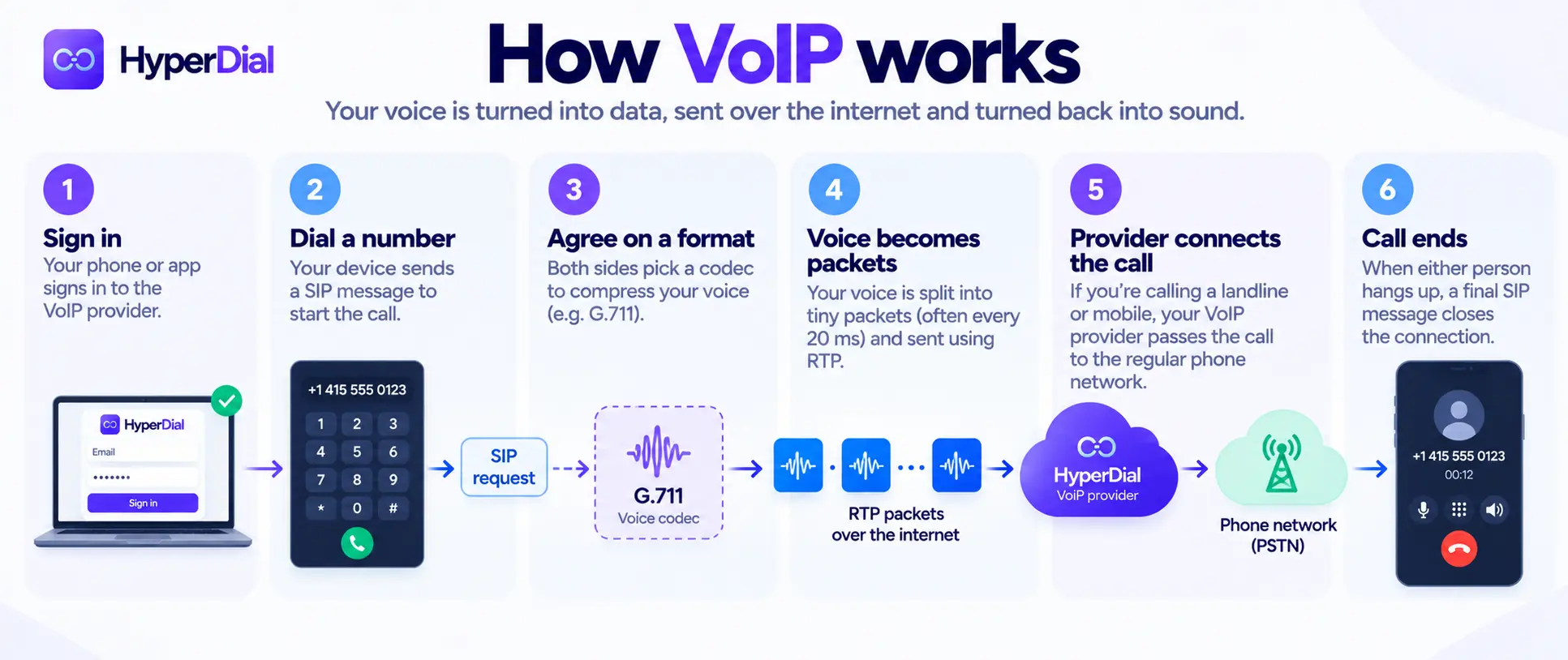
VoIP works by turning your voice into digital data, sending it across the internet, and turning it back into sound on the other end. All of this happens in a fraction of a second. Here's what happens on each call:
- Your phone or app signs in. It tells your VoIP provider it's online and ready to make and take calls.
- You dial a number. Your device sends a SIP message asking to start a call with that number.
- Both sides agree on a format. They pick a codec, the method used to compress your voice. A common one is G.711, an ITU standard for digital voice.
- Your voice becomes packets. Your device cuts your voice into tiny pieces, often every 20 milliseconds, and sends them using RTP.
- The provider connects the call. If you're calling a landline or mobile, the provider passes the call to the regular phone network.
- The call ends. When either person hangs up, a final SIP message closes the connection.
None of this is visible to you. You just dial, talk and hang up, the same as any other phone call.
What do you need to use VoIP?
To use VoIP, you need a stable internet connection, a device to call from, and a VoIP provider that gives you a phone number. Here's the full list:
- An internet connection: stability matters more than raw speed.
- A device: a laptop, a web browser, a smartphone, or a desk phone made for VoIP.
- A headset: optional, but it makes calls much clearer than built-in speakers.
- A VoIP provider: the company that gives you a number and connects your calls.
- A phone number: a new number, or your current number moved over.
How much internet speed does VoIP need?
VoIP needs very little internet speed: about 100 kbps for each call happening at the same time. HyperDial, for example, says around 100 kbps per call is plenty, as noted on its voice calling page. The table below shows what that adds up to for a team, in each direction.
Table 1: Example internet needs for VoIP calls
| Calls at the same time | Speed needed (each way) |
|---|---|
| 1 | About 100 kbps |
| 5 | About 0.5 Mbps |
| 10 | About 1 Mbps |
| 25 | About 2.5 Mbps |
Most office and home internet plans have far more speed than this. The bigger problem is usually an unstable connection, busy Wi-Fi or a VPN, which cause choppy calls even on fast internet.
What are the types of VoIP?
There are two ways to look at VoIP types: the device you call from, and the kind of system behind it. Most small and mid-size businesses use a cloud system with apps and browser calling, and add desk phones only where needed.
VoIP devices:
- Softphones: apps on your computer or phone. Our guide to what a softphone is explains them in detail.
- Browser calling: you call from a web browser tab, with nothing to install.
- Mobile apps: you call from your smartphone over Wi-Fi or mobile data.
- IP desk phones: desk phones that plug into your internet network.
- Phone adapters (ATAs): small boxes that let an old phone work with VoIP.
The table below compares the main kinds of VoIP systems.
Table 2: Types of VoIP systems
| Type | Where it runs | Who manages it | Best for |
|---|---|---|---|
| Cloud (hosted) VoIP | The provider's servers | The provider | Most small and mid-size teams |
| On-premise IP PBX | Hardware in your office | Your IT team | Large firms with IT staff |
| SIP trunking | Links your own phone system to the internet | Shared | Firms keeping an existing system |
What is a VoIP number?
A VoIP number is a real phone number that rings on your VoIP app, browser or phone instead of a fixed phone line. It follows the same global numbering rules as any other number, set by the ITU's E.164 numbering plan, so anyone can call it from any phone.
VoIP numbers come in several types:
- Local numbers: use a city or regional area code. HyperDial offers local phone numbers in more than 130 countries.
- Toll-free numbers: free for callers, because the business pays. See HyperDial's toll-free numbers.
- Virtual numbers: not tied to one device or place. Our guide on how to get a virtual phone number walks through it.
- International numbers: local numbers in other countries, so customers there can call you easily.
- Ported numbers: numbers you already have, moved to your VoIP provider.
What are the benefits of VoIP?
The main benefits of VoIP are lower costs, the freedom to work anywhere, and more features than a landline. Here's why businesses switch:
- Lower cost: no phone lines to install, and calls often cost less, especially long distance.
- Work from anywhere: your business number rings wherever you sign in.
- Fast to grow: add a user or a number in minutes, with no new wiring.
- More features: call routing, recording, transcripts, IVR menus and CRM sync come built in.
- Numbers in other countries: get local numbers in new markets without opening an office.
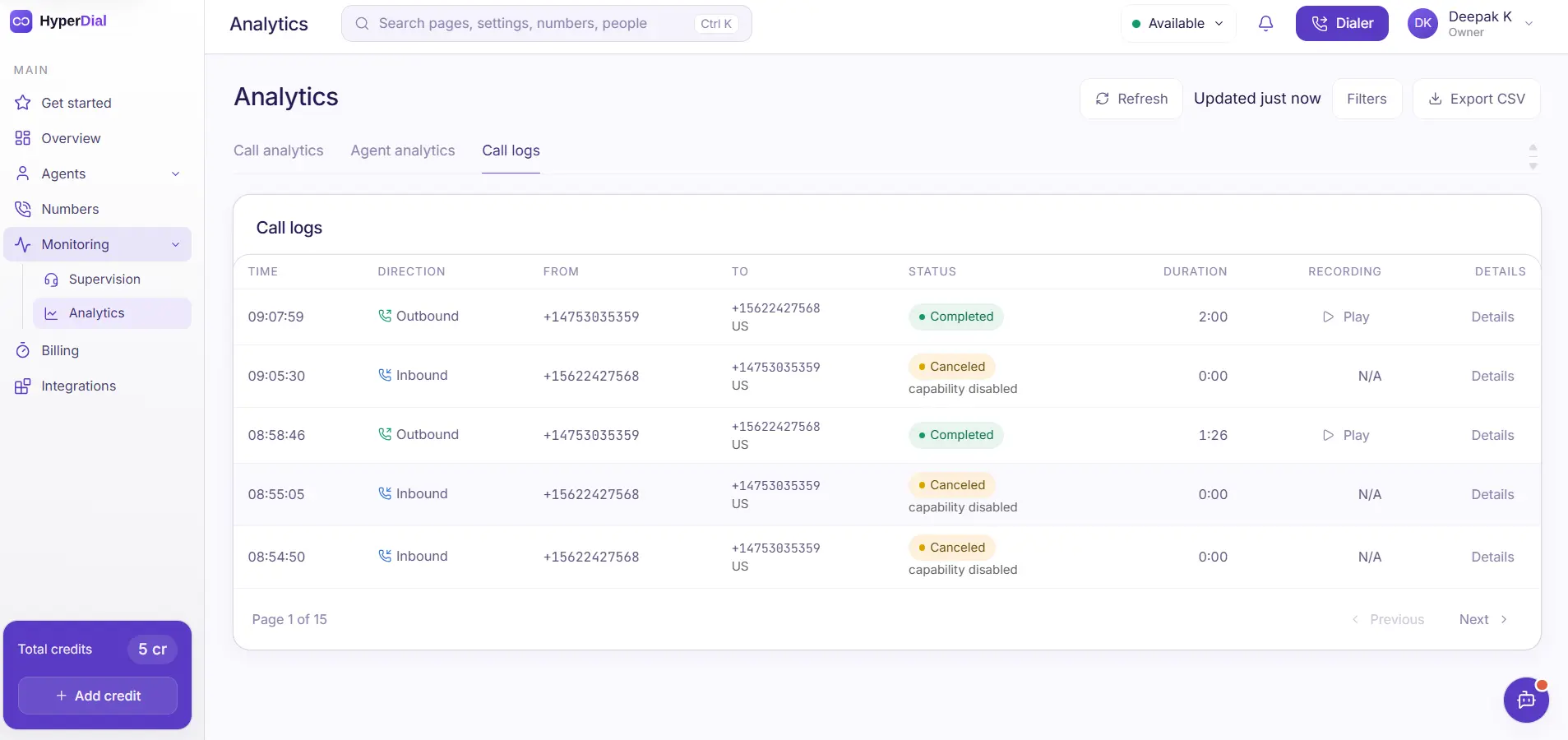
- Better reports: see who called, who answered and how long calls lasted.
What are the disadvantages of VoIP?
The main disadvantages of VoIP are that it needs internet and power, and that call quality depends on your network. Here's what to plan for:
- Internet outages: if your internet goes down, so do your calls, unless you have a backup.
- Power outages: routers, laptops and desk phones need power to work.
- Call quality: busy Wi-Fi, VPNs and weak connections can make calls choppy.
- Emergency calls: because VoIP can move with you, keep your address up to date with your provider for emergency calls.
- Security risks: weak passwords and fake caller IDs can lead to fraud if you're not careful.
- Firewall settings: some office firewalls block call audio until IT opens the right ports.
Most of these have simple fixes: a backup mobile data connection, a headset, a wired connection and good passwords. HyperDial's guide to fixing one-way audio covers the most common network problems.
What is the difference between VoIP and a landline?
The main difference is that VoIP sends calls over the internet, while a landline uses a dedicated phone line to a fixed place. Here's how they compare.
Table 3: VoIP vs landline
| VoIP | Landline | |
|---|---|---|
| How calls travel | Over the internet as data | Over a dedicated phone line |
| Where it works | Anywhere with internet | One fixed location |
| Devices | Laptop, browser, phone, desk phone | A connected desk phone |
| Setup | Sign up and sign in | A technician installs the line |
| Adding a line | Minutes, in an app | New wiring or a new line |
| Features | Routing, recording, CRM, IVR | Basic calling, extras cost more |
| Works in a power cut | Only with backup power | Often, on traditional copper lines |
Choose VoIP if your team works from more than one place, you want calls linked to your CRM, or you want to add numbers and users quickly.
Keep a landline if you need one fixed line that must work in a power cut, like an alarm or a lift phone.
Is VoIP secure?
VoIP can be very secure when your provider encrypts calls and you protect your accounts well. Encryption keeps people from listening in, and good account habits stop fraud. Here's what to look for:
- Encrypted call setup: SIP messages sent over TLS, so no one can read or change them.
- Encrypted voice: audio protected with SRTP, defined in RFC 3711.
- Strong logins: long passwords and two-factor authentication on every account.
- Access controls: only the right people can hear recordings or change settings.
- Fraud alerts: warnings about unusual calls, such as sudden international calling.
HyperDial encrypts calls, recordings and transcripts with TLS 1.3 in transit and AES-256 at rest, as explained on its security page.
How do you set up VoIP for your business?
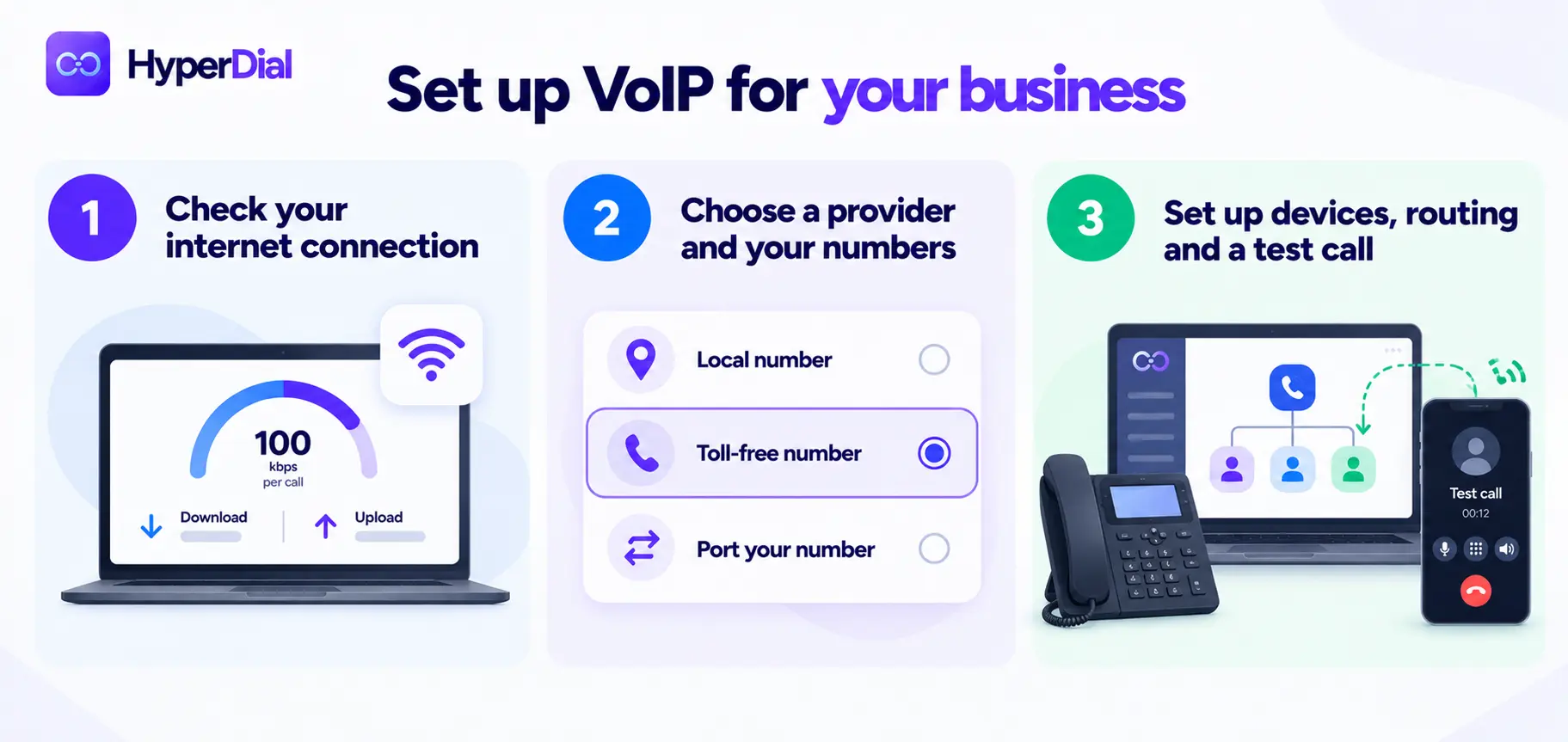
You set up VoIP by checking your internet, choosing a provider and numbers, and then setting up your devices and call routing. Most small teams can do it in a day. Follow these three steps:
- Check your internet connection. Run a speed test during working hours and make sure you have about 100 kbps for each call you'll make at the same time.
- Choose a provider and your numbers. Pick new local or toll-free numbers, or move your current number to the new provider.
- Set up devices, routing and a test call. Sign in on each device, choose who answers which calls, and make test calls to a mobile and a landline.
The most common mistake happens at step 3: teams test only from home, then find on day one that the office firewall blocks call audio. Always make a test call from every network your team will use.
How does HyperDial use VoIP?
HyperDial is a cloud VoIP phone system that runs in your web browser, so your team needs only a browser and a headset to make and take calls. There's no desk phone to set up and no app to install on each computer. Here's what's included:
- Calling from the browser: about 100 kbps per call, with a stable connection mattering most.
- Numbers in 130+ countries: local and toll-free numbers, with free porting for the numbers you have.
- Recording and transcripts: every call is recorded, transcribed and scored, with retention set per campaign.
- CRM sync every 30 seconds: outcomes and notes reach your CRM before the next call.
- Call routing: send each number to a queue, an IVR, a team or one agent.
- A built-in dialer: power, predictive or one call at a time, as covered in our guide to what a dialer is.
There are honest limits too. Like every VoIP service, HyperDial needs a stable internet connection, and office firewalls must allow its call traffic. SOC 2 Type II is still in progress, as its security page states.
What should you do next?
Run a quick speed test during your busiest hour, then count how many calls your team makes at the same time. If you have about 100 kbps for each one, you're ready for VoIP. To see how HyperDial runs business calls in the browser, compare plans on the pricing page or try HyperDial free.
Sources
- IETF: RFC 3261, SIP: Session Initiation Protocol (June 2002)
- IETF: RFC 3550, RTP: A Transport Protocol for Real-Time Applications (July 2003)
- ITU-T: G.711, Pulse code modulation (PCM) of voice frequencies
- ITU-T: E.164, The international public telecommunication numbering plan
- IETF: RFC 3711, The Secure Real-time Transport Protocol (SRTP)


