
VoIP vs Landline: Which is Better for Your Business?
Your landline isn’t just a phone, so before you switch to VoIP, find out what’s still plugged into it.
That said, we don't tell every business to rip out every line. The switch goes wrong in predictable ways, and almost always because of something nobody checked before cancelling. This guide is the honest version. It covers what actually differs, where landlines still win, and the checks we'd run on your building before you move a single number.
Every figure in this guide links to its source, and we last checked them on 10 November 2026.
What is a landline?
A landline is a phone service that carries calls over a fixed line, usually copper wire, from your building to the phone company's exchange. You'll also hear it called POTS, short for plain old telephone service. It plugs into the public switched telephone network (PSTN), the worldwide network that connects every phone company.
The thing to understand about a landline is that it's tied to a place. Your number rings at a wall jack at one address, and that's where it gets answered. Offices with more than a few people usually have a PBX (private branch exchange) in a cupboard somewhere. That box shares a handful of outside lines between desk phones and handles transfers. If you've ever waited a week for an engineer to add an extension, you've met its main weakness.
What is VoIP?
VoIP, short for Voice over Internet Protocol, is a way of making calls by turning your voice into digital data and sending it over the internet. Your provider then hands the call to the regular phone network, so you can call any landline or mobile as normal.
In practice, business VoIP rarely means a box in your office anymore. It usually means a cloud phone system, where the provider hosts your numbers, call routing and recordings. Your team logs in from a browser, a mobile app or an IP desk phone. Our guide to what VoIP is goes deeper on how the technology works.
What is the difference between VoIP and a landline?
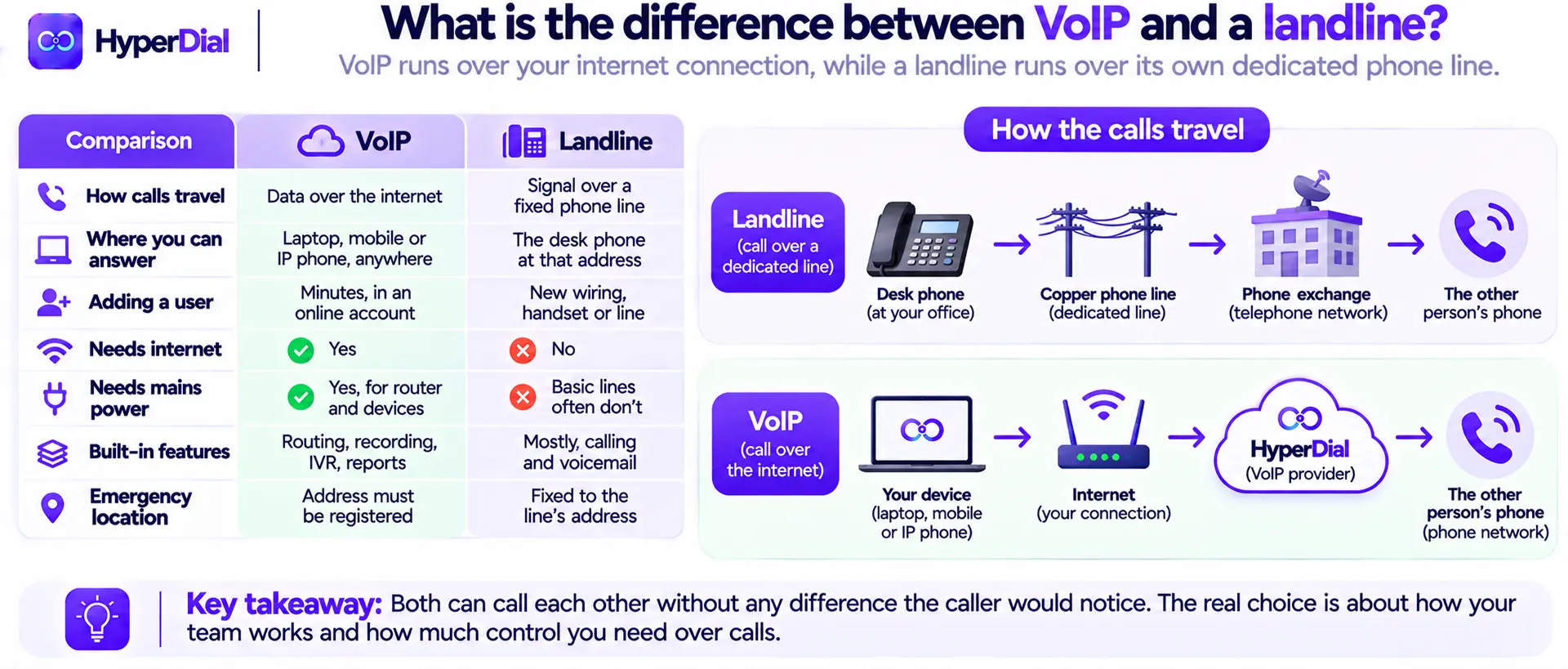
The main difference between VoIP and a landline is that VoIP runs over your internet connection, while a landline runs over its own dedicated line. Everything else in this table follows from that one fact:
Table 1: VoIP vs landline at a glance
| VoIP | Landline | |
|---|---|---|
| How calls travel | Data over the internet | Signal over a fixed phone line |
| Where you can answer | Laptop, mobile or IP phone, anywhere | The desk phone at that address |
| Adding a user | Minutes, in an online account | New wiring, handset or line |
| Needs internet | Yes | No |
| Needs mains power | Yes, for router and devices | Basic lines often don't |
| Built-in features | Routing, recording, IVR, reports | Mostly calling and voicemail |
| Emergency location | Address must be registered | Fixed to the line's address |
Your customers won't hear the difference either way, because both connect to the same phone network. The real question is how your team works. If everyone sits at the same desks all day, a landline does the basics fine. Once people work from home on Fridays, the landline is the thing holding you back.
Is VoIP as reliable as a landline?
VoIP can be as reliable as a landline day to day, but it fails in different places. A well-run provider spreads calls across data centers, so the service itself rarely goes down. When we look into a reliability complaint, the cause is nearly always inside the building. Think busy Wi-Fi, an old router or one internet line with no backup.
Landlines aren't as bulletproof as people remember, either. Lines get cut by roadworks, water gets into old cabling, and a repair can take days. During that time, the number is simply dead. A VoIP number keeps working wherever your team is, so if the office goes offline, calls can still ring on staff mobiles.
[AUTHOR EXPERIENCE: one real example, in two or three sentences, of an outage or reliability problem you've seen on either side, and what fixed it.]
How much internet speed does VoIP need?
VoIP needs a steady connection more than a fast one, at roughly 100 kbps for each call happening at the same time. The most common voice format, set out in the ITU's G.711 standard, uses 64 kbit/s of audio, and packet headers add the rest. Do the maths for your busiest moment: ten people on calls at once need about 1 Mbps in each direction, which almost any business connection handles.
Speed is rarely the problem. Jitter and packet loss are, and they show up as robotic voices and words dropping out. Our guide to what jitter is explains how to spot and fix it.
Is VoIP cheaper than a landline?
VoIP is usually cheaper than a landline for businesses, mostly because adding a person costs a login rather than a new line. With landlines, cost climbs every time you hire, open a site or call abroad. VoIP cost tracks users, numbers and minutes instead.
We'd rather not quote a percentage saving, because prices vary too much by country and provider for one number to mean anything. Instead, put your last three phone bills next to a VoIP quote and compare these lines:
- Setup: wiring, handsets and a PBX for landlines, against headsets for VoIP.
- Per-user cost: a new line per landline user, against a software seat for VoIP.
- Calls: long-distance and international rates, which are often lower over VoIP.
- Features: recording, routing and reports, often extra or missing on landlines.
- Maintenance: engineer visits for landline faults, against provider-managed updates for VoIP.
Read the small print on both sides. VoIP plans sometimes charge per feature, and landline contracts often carry early-exit fees that wipe out a year of savings. HyperDial bills numbers and minutes at cost with no markup, as shown on its pricing page.
What still needs a landline?
Some equipment still needs a traditional landline, and this is the part most switch guides skip. These devices often signal over a phone line rather than the internet, and they tend to be forgotten because nobody thinks of them as "phones":
- Alarm and fire panels that call a monitoring center.
- Lift and elevator emergency phones.
- Card payment terminals on older dial-up connections.
- Fax and franking machines.
- Door entry and gate systems that ring a phone line.
Our advice is simple: before you cancel anything, walk the building. Look in the comms cabinet, beside the front door and in the lift. Any small box with a phone cable running into it needs a conversation with its supplier first. Most can move to an internet or mobile connection, but only the supplier can confirm it.
There's a second reason to plan ahead. Carriers in many countries are retiring their copper networks, so ask yours whether a switch-off date applies to your lines. It's much better to move on your own timetable than on theirs.
[AUTHOR EXPERIENCE: one real example of a device that was missed during a switch, such as an alarm or lift line, and what it taught you.]
Which should your business choose: VoIP vs landline or both?
Most businesses should choose VoIP for everyday calls, and keep a landline only where something specific depends on it. Here's how we'd decide:
Choose VoIP if your team works from home, several sites or on the road, and needs one business number everywhere.
Choose VoIP if you hire or lose people often and want new users set up in minutes.
Choose VoIP if you want calls recorded, routed and logged in your CRM without anyone typing notes.
Keep a landline if your internet is genuinely unreliable and you can't add a backup connection.
Use both if alarms, lift phones or other equipment still run on a line, or one critical number needs a basic fallback.
Using both is normal, not a compromise. A lot of businesses run calls on VoIP for months while one line stays for the alarm panel, until the alarm company upgrades it.
How do you switch from a landline to VoIP?
You switch from a landline to VoIP by checking what depends on your lines, setting up VoIP and moving your numbers. Then you test everything before you cancel anything. Follow these three steps:
- Check your lines and connection. List every number, what each one is for, and anything plugged into it. Confirm your internet can carry your busiest hour of calls.
- Set up VoIP and port your numbers. Create users and call routing first. Then ask the new provider to move your existing numbers across, so customers keep dialing the same ones.
- Test every number, then cancel the old service. Make calls in and out on each number and check voicemail and routing. Only then end the landline contract.
The mistake we see most happens at step 3: someone cancels the landline the day the new system works, before the number transfer has finished. Cancelling can release the number, and customers hear a dead line. Keep the old service running until every number rings on VoIP, even if that means paying for an extra month. Our guide to what number porting is explains how the transfer works.
How does HyperDial handle the move from landline to VoIP?
HyperDial runs business calling in the browser and the mobile app. A team can move off landlines without buying desk phones or installing a phone system. Numbers, routing and reports all sit in one account.
Here's what that looks like:
- Calling: HyperDial's voice calling works in the browser with a headset, with no softphone to install, and needs around 100 kbps per concurrent call.
- Numbers: local phone numbers in 130+ countries, including US local numbers in any area code, plus toll-free numbers.
- Keeping your number: HyperDial's guide on how to port a number covers moving existing numbers across.
- Routing: call routing sets business hours, overflow and callbacks, and never drops a call silently.
- Reliability: paid plans carry a 99.9% uptime target, with live status published at status.hyperdial.io.
We'll be straight about the limits too. HyperDial doesn't supply desk phones or copper lines. If an alarm or lift phone depends on a landline, keep that line or move the device with its supplier.
What should you do next?
Grab your last phone bill and walk the building. Write down every number, what it's for, and anything with a phone cable plugged into it. Then move one team or one number to VoIP first and live with it for a week. When you're ready, compare plans on the pricing page or try HyperDial free.
Sources


