
What is Cloud Telephony? How it Works for Business Teams
Cloud telephony moves your phone system off office hardware and into the cloud. This guide shows how a call actually travels, what you still look after, and how to switch without losing a single call.
The provider looks after the servers, upgrades and connections to the phone network. Your team looks after the internet connection, the headsets and how calls should flow. This guide explains how it works, what it replaces, and how to switch without dropping a single call.
What is cloud telephony?
Cloud telephony is a hosted phone service that runs your business calling from a provider's data centers instead of a phone system in your building. Some people call it a cloud phone system, a hosted PBX or cloud calling.
It's easiest to understand as four layers stacked together:
Numbers: the local, toll-free or mobile numbers customers dial, held in your online account.
The cloud platform: the provider's software that answers, routes, queues, records and reports on every call.
Devices: where your team actually talks, such as a browser with a headset, a mobile app or a desk phone.
Integrations: the links to your CRM, helpdesk and other tools, so calls are logged without copy and paste.
An older office phone system, called a PBX (private branch exchange), keeps the middle layer in a box on site. Cloud telephony moves that box into the provider's cloud. Everything else about the call can feel the same to the customer.
How does cloud telephony work?
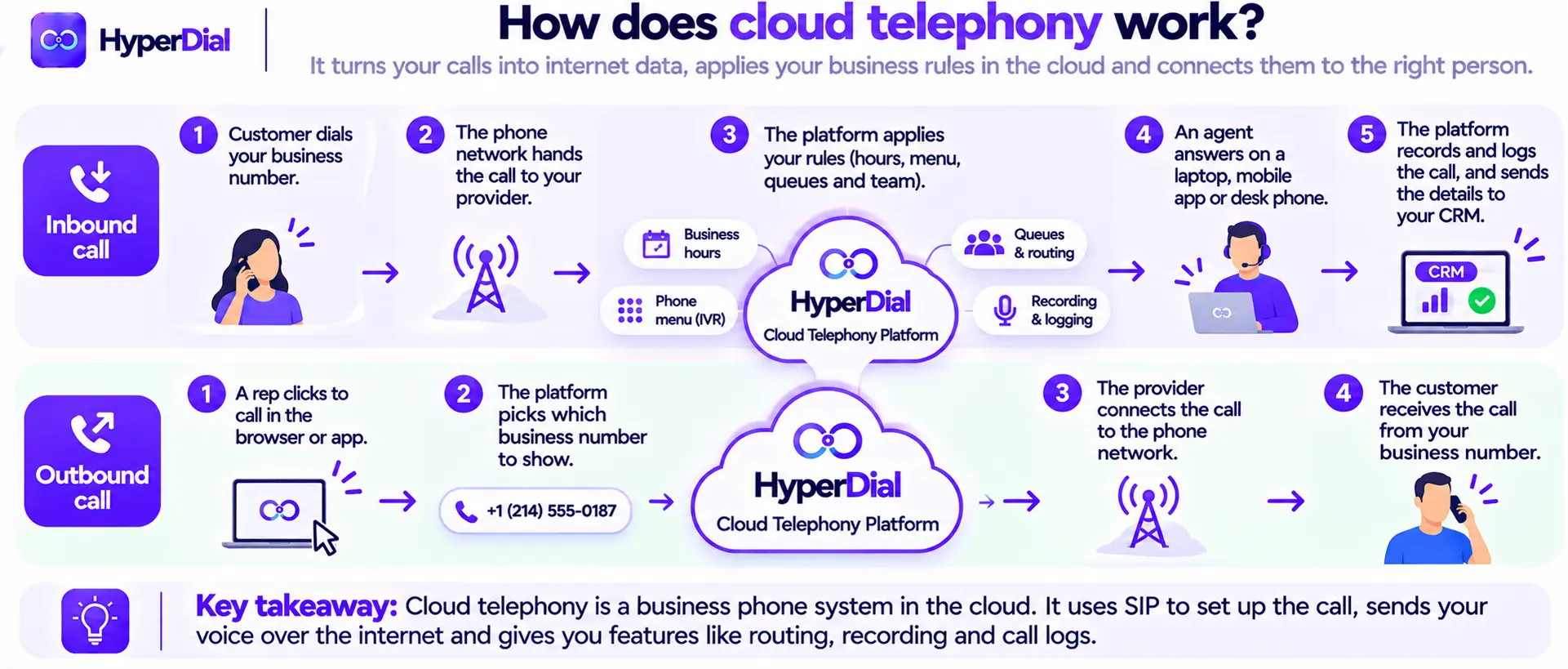
Cloud telephony works by turning each call into small packets of data and sending them over the internet to the provider's platform. There, your routing rules apply before the call reaches a person. Calls are set up using SIP, the Session Initiation Protocol described in the IETF's RFC 3261 standard. Your voice then travels as digital audio.
An inbound call follows these steps:
- The customer dials your business number from any phone.
- The phone network hands the call to your provider, which recognizes the number as yours.
- The platform applies your rules: business hours, the phone menu, queues and which team should answer.
- An agent answers on a laptop, mobile app or desk phone, wherever they are.
- The platform records and logs the call, and sends the details to your CRM.
Outbound calls run the same path in reverse. A rep clicks to call in the browser, the platform picks which business number to show, and the provider connects the call to the phone network. Our guide to what VoIP is explains how voice travels as data in more depth.
What is the difference between cloud telephony and VoIP?
VoIP is the technology that carries voice over the internet, while cloud telephony is the complete business phone service built on top of it. All cloud telephony uses VoIP, but not every VoIP app is a business phone system. Related terms add even more layers:
Table 1: Cloud telephony and related terms
| Term | What it means | Includes |
|---|---|---|
| VoIP | Voice sent over the internet as data | Calling only |
| Cloud telephony | A hosted business phone system | Numbers, routing, IVR, recording, reports |
| Hosted PBX | Another name for the cloud phone system | Extensions, transfers, menus |
| UCaaS | Phone, video and chat as one cloud service | Cloud telephony plus meetings and messaging |
| Cloud contact center | Cloud telephony built for call teams | Queues, dialers, live monitoring, AI agents |
The labels overlap, and providers use them loosely. Compare what's actually included rather than the name on the box.
How is cloud telephony different from a traditional office phone system?
Cloud telephony differs from a traditional office phone system mainly in who owns the equipment and where your team can take calls. Here's the side-by-side view:
Table 2: Cloud telephony vs a traditional office phone system
| Cloud telephony | Traditional office system | |
|---|---|---|
| Where it runs | The provider's data centers | A box in your office |
| Upfront cost | Low, mostly a subscription | Hardware and installation |
| Who maintains it | The provider | Your IT team or a contractor |
| Where staff can answer | Anywhere with internet | At the office desk phone |
| Adding a new user | Minutes, in an online dashboard | New lines, wiring or hardware |
| Biggest risk | A weak internet connection | Hardware failure at one site |
A traditional system can still make sense for a single site with fixed needs, recently paid-for hardware, or unreliable internet. Many businesses move in stages, starting with sales or support teams, so nothing changes overnight.
What features does cloud telephony include?
Cloud telephony includes the features of an office phone system plus tools that need software to work well. These are the ones most business teams use every day:
- Business numbers: local and toll-free numbers in the countries you serve, all in one account.
- Call routing and IVR: rules that send each caller to the right team, with an optional phone menu.
- Queues and callbacks: callers wait in line or ask for a callback when everyone is busy.
- Recording and transcription: a searchable record of what was said on each call.
- Dialers: tools that let sales reps call through lists without dialing each number by hand.
- Reports: answered and missed calls, busy hours and results by team or campaign.
Many platforms now add AI on top, such as agents that answer overflow calls or summaries after each call. Treat AI as an extra layer, not a replacement for good routing. Our guide to what IVR is covers phone menus in more detail.
What does your business still look after with cloud telephony?
With cloud telephony, your business still looks after the internet connection, the devices, and how calls should flow. The provider runs the platform, but a few things stay in your hands:
- A stable connection: steadiness matters more than speed for clear calls.
- Good headsets: cheap ones cause more audio complaints than the network does.
- Firewall settings: office networks must let call traffic through.
- Number paperwork: some countries ask for address or identity documents before issuing a number.
- Your call flows: who answers, when, and what happens when nobody can.
As a guide, HyperDial's voice calling needs around 100 kbps per concurrent call. If staff report one-way audio after you switch, a firewall setting is usually the cause. Our guide on how to fix one-way audio walks through the checks.
How do you move your business to cloud telephony?
You move to cloud telephony by mapping your current setup, building and testing it in the cloud, then moving your numbers across once everything works. Follow these three steps:
- Map your numbers, users and call flows. List every number you own, who answers each one, your business hours and what callers hear today.
- Set up the cloud system and port your numbers. Create users and routing rules, then request a transfer of your existing numbers to the new provider.
- Test every path, then switch over. Make test calls in and out on every number, check recordings and reports, and only then retire the old system.
The most common mistake happens at step 2: cancelling the old phone service before the number transfer finishes. That can leave customers calling a dead line. Keep the old service running until every number rings in the new system. Our guide to what number porting is explains how the transfer works.
When is cloud telephony the right choice for a business team?
Cloud telephony is the right choice when your team works from more than one place, changes size often, or needs calls linked to other tools. Use this quick guide:
Choose cloud telephony if staff work from home, several offices or on the road.
Choose cloud telephony if you hire or scale down often and want to add users in minutes.
Choose cloud telephony if you need numbers in several countries or regions without local offices.
Choose cloud telephony if you want every call logged in your CRM and visible in reports.
Wait or go hybrid if your site has unreliable internet, or your office system was bought recently and still meets your needs.
How does HyperDial deliver cloud telephony?
HyperDial is a cloud telephony platform for sales and support teams that runs numbers, voice, routing, AI agents and reports in one account. Reps need only a browser and a headset.
Here's what each layer looks like:
- Numbers: local phone numbers in 130+ countries, including US local numbers in any area code, and toll-free numbers, billed at cost.
- Voice: browser calling with no softphone to install, recording by default, and a 99.9% uptime target on paid plans.
- Routing: call routing by number dialed or caller region, with overflow rules and callbacks.
- Integrations: HyperDial integrations with Salesforce, HubSpot, Zoho CRM, Zendesk and Freshdesk, plus webhooks and a REST API.
- Security: HyperDial's security uses TLS 1.3 in transit and AES-256 at rest, with role-based access and an audit log.
Data residency is chosen when the account is set up. SOC 2 Type II is in progress, and HyperDial says it will publish the report once it's issued.
What should you do next?
List the numbers you use, the people who answer them and the tools your team works in every day. Then test a cloud system with one team before moving everyone across. When you're ready, compare plans on the pricing page or try HyperDial free.
Sources


