
How to Port a Toll-Free Number Without Downtime
Your toll-free number is printed on everything, so here’s how to move it to a new provider without a single caller noticing.
The paperwork is the easy part. Porting moves the number, but not the phone menu, routing or reports behind it, so the real work is rebuilding those before cutover day. This guide walks through the steps we'd follow, the details that get toll-free ports rejected, and what to test once the number moves.
Every fact in this guide links to its source, and we last checked them on 11 November 2026.
What does porting a toll-free number mean?
Porting a toll-free number means moving the same number from one phone provider to another, so callers keep dialing the digits they already know. Your printed materials, website and ads all stay correct, and the caller still doesn't pay for the call.
Number portability is a standard part of how phone numbering works. The ITU describes the models countries use in its E.164 Supplement 2 on number portability, last updated in June 2020. Toll-free numbers usually stay within the country that issued them, so each national rule set decides the exact process. Our guide to what number porting is explains how a transfer works behind the scenes.
Why do businesses port toll-free numbers?
Businesses port toll-free numbers to change provider without changing the number customers already know. A toll-free number printed on packaging, vans and years of invoices is worth more than any saving from starting fresh.
The reasons we hear most come down to a few things:
- Better call handling, such as phone menus, queues and callbacks the old provider can't offer.
- Clearer costs, especially when inbound minutes are bundled or marked up.
- One account for everything, instead of toll-free with one provider and local numbers with another.
- Reporting, so you can see answered and missed calls on the line customers rely on.
- Consolidation, after a merger or when several teams each bought their own numbers.
What do you need before you port a toll-free number?
Before you port a toll-free number, you need proof that you control it and details that match your current provider's records exactly. Gather these before you submit anything:
A recent bill: from the current provider, showing the account number and service address.
The exact account holder name: spelled precisely as it appears on the provider's record, including "Ltd" or "Inc".
A signed letter of authorization (LOA): the form that lets the new provider act for you. Many providers generate it for you to sign.
Contract status: confirmation that the number isn't mid-contract, under a port freeze or carrying an unpaid balance.
A full number list: every toll-free number on the account, including ones only printed on old campaigns.
One toll-free detail catches people out. The company that bills you isn't always the company that controls the number. That's common if you bought it through a reseller or an old phone system vendor. Ask your current provider directly who holds the number, before you submit the request.
How do you port a toll-free number?
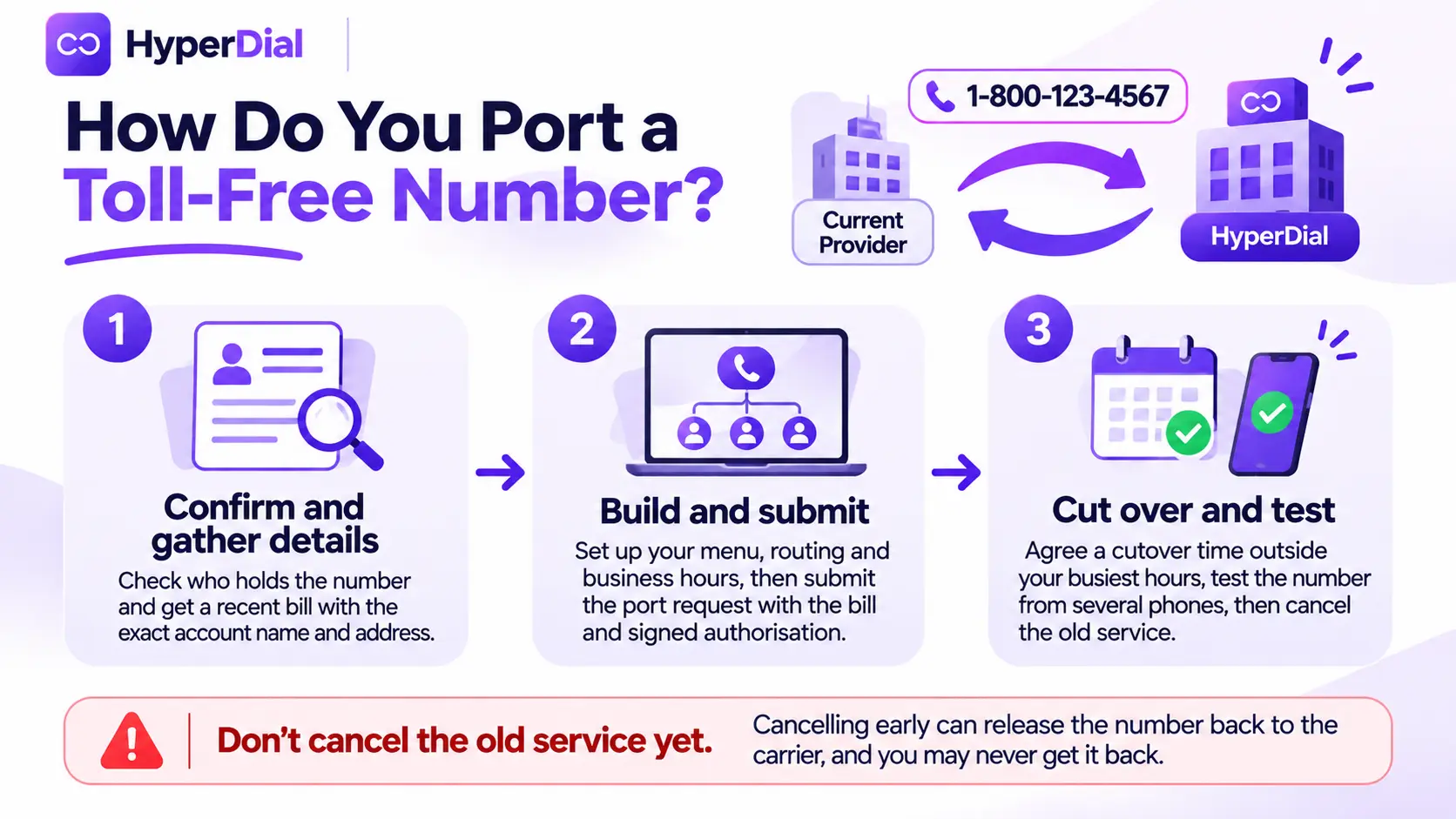
You port a toll-free number by checking who holds it, building your call flow on the new system and submitting the request. Then you cut over in a quiet window and test before cancelling anything. Follow these three steps:
- Confirm who holds the number and gather your details. Ask your current provider who controls the number. Pull a recent bill and note the exact account name and address.
- Build your call flow, then submit the port. Set up the menu, routing and business hours on the new system first. Then submit the port request with the bill and signed letter of authorization.
- Cut over in a quiet window, test, then cancel. Agree a cutover time outside your busiest hours and test the number from several phones afterwards. Only then end the old service.
The mistake we see most happens at step 3: cancelling the old account as soon as the new system works. If the port hasn't completed, cancelling can release the number back to the carrier, and you may never get it back. HyperDial's porting guide is blunt about this. Cancelling before the port completes releases the number to the carrier's pool, after which it can no longer be ported.
Why do toll-free ports get delayed or rejected?
Toll-free ports get delayed or rejected mostly because a detail on the request doesn't match the current provider's records. HyperDial's own porting guide says a port is rejected far more often for a mismatched detail than for anything technical, and that matches what we see.
These are the usual culprits:
- A name or address that doesn't match the bill, even by a missing "Ltd".
- An out-of-date bill that shows an old address or account number.
- An unsigned or incomplete letter of authorization.
- An unpaid balance or contract term the old provider won't release.
- Numbers missing from the request, so some move and others stay behind.
If a port is rejected, don't start again from scratch. Ask for the exact rejection reason, fix that one detail and resubmit. A rejection caused by one mismatched detail usually clears once that detail is fixed.
What should you test after your toll-free number moves?
After your toll-free number moves, test it from several different phones, because toll-free calls are routed through each caller's network. One successful test call from your own desk proves very little. Run through these checks on cutover day:
- Call from a mobile and a landline, on different networks if you can.
- Confirm the call is still free for the caller.
- Walk every path in the phone menu, including after-hours and holiday messages.
- Leave a voicemail and check it reaches the right person.
- Check the number appears in your reports with answered and missed calls.
Keep the old provider's support number handy for the first day. If something doesn't route, it's faster to fix while both sides still remember the request.
How does HyperDial handle toll-free number porting?
HyperDial lets you port toll-free numbers in every country where it offers them, from the Numbers menu, with the letter of authorization generated for you. Porting into HyperDial is free, and the number keeps ringing at your current provider until the scheduled cutover.
Here's how it works in practice:
- Request: go to Numbers, then "Port a number", and enter the number or paste a list. Upload the bill and sign the generated letter, as shown in HyperDial's porting guide.
- Cutover: the switch happens at an agreed window, takes a few seconds, and is scheduled with you.
- Timing: toll-free ports usually take a few days longer than geographic ones. The guide lists typical times for each market.
- Routing: HyperDial's toll-free numbers can point at a queue, a phone menu or a team, and you can change where they ring without changing the number.
- Billing: numbers and inbound minutes are billed at cost on every plan, including the free Base plan.
Local numbers sit in the same account, including US local numbers in any area code. Toll-free and local lines then share one set of routing and reports.
What should you do next?
Find a recent bill for your toll-free number and check the exact account name on it. Ask your current provider who controls the number, then list every number on the account. With that in hand, build your call flow on the new system and book a quiet cutover. When you're ready, compare plans on the pricing page or try HyperDial free.
Sources


