
Unanswered Calls: Why They Happen and How to Fix Them
Every time your business phone rings out, someone who wanted to talk gets unanswered calls. Maybe they had a question before buying. Or they needed help with an order. Either way, they reached out, and nobody was there.
Getting through on the phone is often a customer's first test of your business, and many businesses fail it. In a 2024 study of 85 small businesses across 58 industries by 411 Locals, only 37.8% of incoming calls were answered by a live person. That means more than 6 in 10 callers never reached a person.
Customers still want to call, too. In Invoca's 2026 survey of 693 US consumers, 41% said they prefer calling when they have a problem, more than any other channel. The same survey found that 79% will switch to a competitor that responds faster. So a few missed calls a day can quietly turn into lost sales and unhappy customers.
The good news is that most unanswered calls follow a pattern. They pile up at the same busy hours, on the same lines, or after the same routing step. Once you can see the pattern, you can fix it.
In this guide, you'll learn:
- What counts as an unanswered call, and how it differs from a missed or abandoned call
- The most common reasons business calls go unanswered
- How to track unanswered calls, and which numbers to watch
- Simple ways to reduce unanswered calls and follow up on the ones you miss
What is an unanswered call?
An unanswered call is an inbound call that rings a person or team but isn't picked up. The caller may hang up, go to voicemail, or get passed to someone else. In every case, nobody answered when they first called.
People often mix up a few similar terms. The table below shows what each one means.
Table 1: Unanswered, missed, abandoned and dropped calls
| Term | What it means | Who ends the call |
|---|---|---|
| Unanswered call | Rings but nobody picks up | Caller or system |
| Missed call | Nobody answered, from the team's side | Caller or system |
| Abandoned call | Caller hangs up before reaching anyone | Caller |
| Dropped call | Call cuts off after it connects | Network or system |
Most phone systems count unanswered and missed calls the same way. The key difference is with abandoned calls: those happen while the caller is still waiting, often in a queue or a phone menu.
Why do business calls go unanswered?
Business calls usually go unanswered because too many calls arrive at once, nobody is free, or the call goes to the wrong place. Here are the most common causes:
- Too many calls at peak times: calls bunch up at certain hours, and there aren't enough people free to answer.
- Your team is busy on other channels: reps answering email, chat or WhatsApp can miss the phone.
- Calls come in after hours: customers call at night or on weekends, when nobody is working.
- Calls ring only one person: if that person is busy or away, the call has nowhere else to go.
- A confusing phone menu: callers give up when the options don't match what they need.
- Long hold times: callers hang up when they wait too long in a queue. In Invoca's 2026 consumer survey, 75% of US consumers said they have hung up after being on hold for too long.
Most of these are routing and staffing problems, not people problems. That's why tracking matters: it shows you which of these causes is costing you the most calls.
What do unanswered calls cost your business?
Unanswered calls cost you sales, customer trust and useful information about what callers need. The cost is easy to miss, because a call that never connects leaves no conversation behind. Here's what you lose:
- Sales: a caller who was ready to buy may buy from someone else instead, since 79% of US consumers say they'll switch to a faster competitor.
- Customer trust: existing customers feel ignored when they can't reach you.
- Time: missed calls create callbacks, follow-up messages and repeat calls.
- Marketing spend: if you paid for an ad that made the phone ring, an unanswered call wastes that money.
- Insight: you never learn what the caller wanted, so you can't spot common questions or problems.
How do you track unanswered calls?
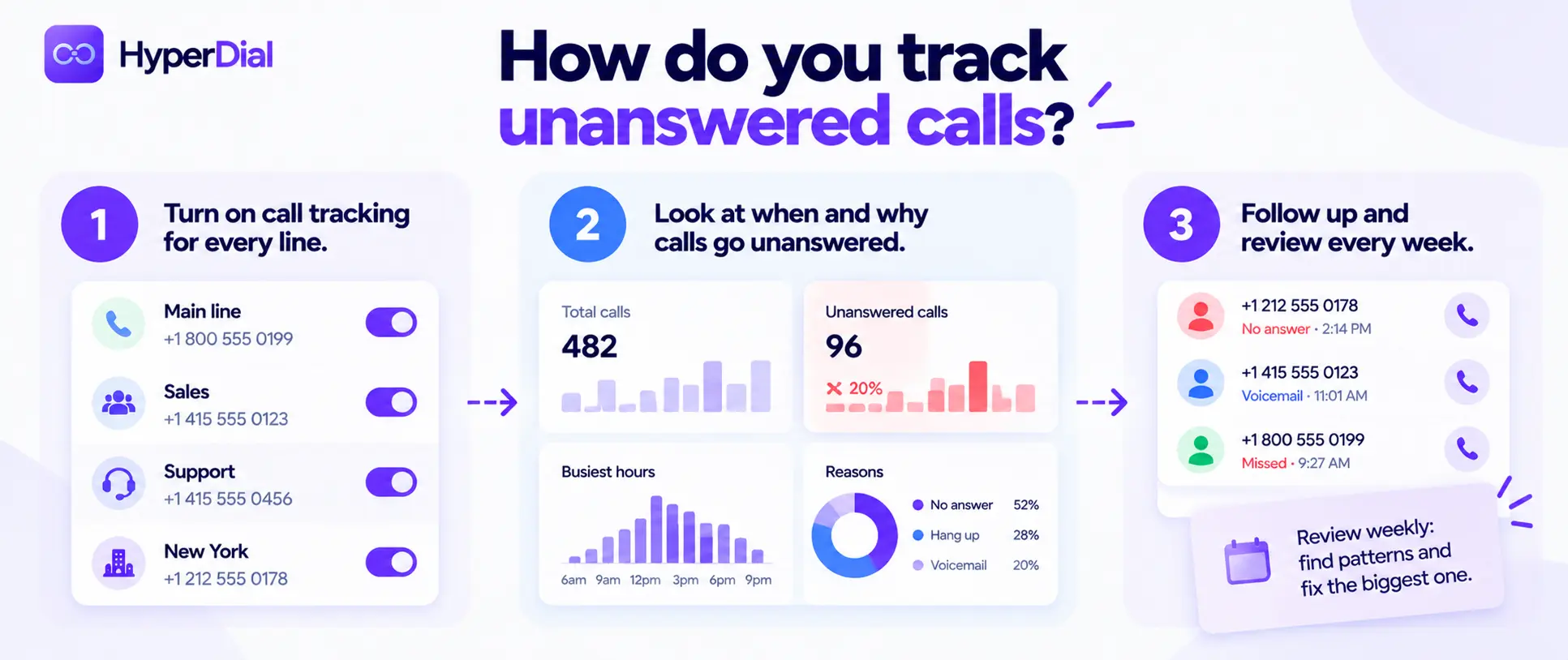
You track unanswered calls by recording every inbound call, then checking when and why the unanswered ones happen. Most business phone systems log this for you. Follow these three steps:
- Turn on call tracking for every line.Make sure your phone system logs every inbound call, including calls that ring out, go to voicemail or hang up in the queue.
- Look at when and why calls go unanswered.Check the busiest hours and days, which lines or teams miss the most calls, and whether callers hang up while waiting or nobody was free.
- Follow up and review every week.Call back each missed caller, then spend 15 minutes a week looking for patterns and fixing the biggest one.
The most common mistake happens at step 1: teams only count calls that reached a person. Calls that hang up in a phone menu or queue then disappear from the numbers, so the problem looks smaller than it is.
Which numbers should you watch?
A few simple numbers show you how many calls you miss and why. Watch these each week:
- Unanswered call rate: the share of inbound calls nobody picked up.
- Abandonment rate: the share of callers who hung up while waiting.
- Average wait before hang-up: how long callers wait before they give up.
- Busiest hours: the times of day and days of the week with the most missed calls.
- Callback rate: the share of missed calls your team called back.
- Time to callback: how long it takes your team to return a missed call.
How do you work out your unanswered call rate?
Your unanswered call rate is the number of unanswered calls divided by the total number of inbound calls, times 100. For example, if your business got 1,000 inbound calls last month and 120 went unanswered, your rate is 12%.
Track this number every week, not just once. A single bad day can be noise, but a rate that keeps going up tells you something has changed.
How do you reduce unanswered calls?
You reduce unanswered calls by making sure every call has somewhere to go, even when your first choice is busy. Start with the fix that matches your biggest cause:
- Staff for your busiest hours: move shifts so more people are free when most calls come in.
- Ring a team, not one person: set a calling order, plus a backup team if the first group is busy.
- Add overflow rules: send calls to another team or queue instead of letting them ring out.
- Offer callbacks instead of long holds: let callers keep their place in line and get a call back.
- Keep your phone menu short: give callers a few clear choices that match why they call. Our guide to what IVR is explains how to set one up well.
- Set business hours and an after-hours plan: decide what happens to calls at night and on weekends.
- Give phone calls their own owner: if reps also handle chat and email, make sure someone is always watching the phone.
HyperDial's call routing covers most of these fixes in one place: calling order, backup teams, overflow, business hours and queue callbacks.
How do you follow up on missed calls?
You follow up on missed calls by calling back quickly and keeping a record of every attempt. Even a good routing setup will miss some calls, so a clear follow-up habit matters. These steps help:
- Call back as soon as you can: speed matters. A Harvard Business Review study of online sales leads found that firms that responded within an hour were nearly 7 times as likely to qualify the lead as those that waited even an hour longer.
- Send a short text or WhatsApp message if they don't pick up: let them know you tried and how to reach you.
- Log every missed call in your CRM: treat it as an open task until someone talks to the caller.
- Check voicemail often: if callers leave a message, reply the same day.
Keeping calls, texts and WhatsApp messages in one place makes this easier. HyperDial's omnichannel inbox puts voice, WhatsApp, SMS, email, web chat and social messages on one thread for each customer, so your team can see every attempt.
How does HyperDial help you answer more calls?
HyperDial helps you answer more calls by showing where calls are missed and making sure no call rings out with nowhere to go. Here's what it includes:
- Call analytics: HyperDial's analytics shows total, answered and missed calls, plus a heatmap of your busiest hours.
- A live floor view: managers can see who is on a call, who is free, and what the queue is doing right now.
- Backup teams and overflow: each team has a calling order and a backup team, and overflow rules name where a call goes instead of dropping it.
- Queue callbacks: callers keep their place in line and get a call back instead of waiting on hold.
- An AI agent for nights, weekends and overflow: HyperDial's AI agent answers when no one is free, tells callers it's an AI, and hands off to a person with the transcript attached.
- Exports, webhooks and an API: you can send your call data to your own reports or tools.
There are limits to know about. The AI agent only runs from playbooks a manager has approved, and sensitive calls, like complaints, can be routed away from it. For support teams, the customer support page shows how these pieces work together.
What should you do next?
Start by checking last month's calls: how many went unanswered, and at what times? Fix the biggest cause first, whether that's staffing, routing or after-hours cover, then call back every missed caller. To see how HyperDial tracks and reduces unanswered calls, compare plans on the pricing page or try HyperDial free.
Sources
- 411 Locals: How well do small businesses handle phone calls? (2024 study, 85 businesses, 58 industries)
- Invoca: The B2C Buyer Experience Report 2026 (693 US consumers, May 2026)
- PR Newswire: New Invoca study finds consumers won't wait (June 9, 2026)
- Harvard Business Review: The Short Life of Online Sales Leads (March 2011)
- eCFR: 16 CFR 310.4, FTC Telemarketing Sales Rule, abusive telemarketing acts (abandoned calls)


