
What Should You Check Before Porting an Existing US Business Number?
Porting moves your number, not your setup. Rebuild the menus, texting and 911 address before you switch.
Porting means moving your number to a new phone company while keeping the same digits. It works for US local numbers, mobile numbers and toll-free numbers. This guide gives you a simple checklist for all three, so you don't lose calls or the number itself.
Every fact in this guide links to its source. We last checked them on 18 November 2026.
Key takeaways
- Local, mobile and toll-free numbers can all be ported, but each has its own catch.
- Your number moves, but your setup doesn't. Menus, texting and your 911 address need redoing.
- Details must match exactly, or the request gets rejected.
- Never cancel your old service first. You could lose the number.
Which US business numbers can you port?
You can port almost any US business number: local, mobile or toll-free. You can keep your number when you switch between landline, internet and mobile phone companies. That's according to the FCC's guide to keeping your phone number. There's one condition for local numbers: you usually need to stay in the same area.
Each number type works a little differently. This table shows the main differences:
Table 1: Porting the three types of US business number
| Number type | Who you deal with | What to watch for |
|---|---|---|
| Local number | The company that runs your line | Staying in the same area |
| Mobile number | Your mobile carrier | You'll usually need a transfer PIN |
| Toll-free number | The company listed in the toll-free database | A reseller may not control it |
Toll-free numbers have their own national database, run by a company called Somos. The company that controls each toll-free number in it is called a RespOrg. You can take a toll-free number with you too, as the FCC's toll-free guide confirms.
What does porting actually move?
Porting moves the number itself, and nothing else. Everything you built around the number stays with your old phone company, so you need to set it up again.
These are the things that don't move on their own:
- Call menus and routing: your "press 1 for sales" menu, business hours and who rings first.
- Voicemail and greetings: old messages and recorded greetings stay behind.
- Texting registration: US business texting needs its own sign-up, called 10DLC for local numbers. Toll-free numbers need a separate check.
- Your 911 address: internet phone services need a registered address for emergency calls, under the FCC's 911 rules for internet calling.
- Call recordings and history: download anything you need to keep before you leave.
Our guide on what number porting is explains the basics in more detail.
What should you check before you port?
Check these ten things before you send your request. Most failed or delayed ports come from one of them:
Table 2: Checklist before porting a US business number
| Check | Why it matters | Where to find it |
|---|---|---|
| Number type and area | Rules differ for local, mobile and toll-free | Your bill |
| Who controls the number | The company you pay may be a reseller | Ask your provider |
| Exact account name and number | One small mismatch gets the port rejected | A recent bill |
| Service address | It must match the provider's records | A recent bill |
| Transfer PIN | Mobile carriers usually need one | Your carrier's app or support |
| Contract or port freeze | Locks can delay the move | Your contract |
| Number is still active | A cancelled number can be lost | Call it and check it rings |
| Texting setup | It has to be registered again | Your current provider |
| Menus and 911 address | They don't move with the number | Your current system |
| Every number to move | Missing one splits your setup | Your bills and website |
The transfer PIN catches people out with mobile numbers. FCC rules for mobile number port-outs require mobile carriers to use secure ways to confirm it's really you. In practice, that usually means a PIN from your carrier's app or support team.
Toll-free numbers need extra care if cancelled. Under the FCC's toll-free number rules, a cancelled toll-free number stays out of use for 45 days to 4 months. After that, it goes back into the general pool.
How do you port a US business number without losing calls?
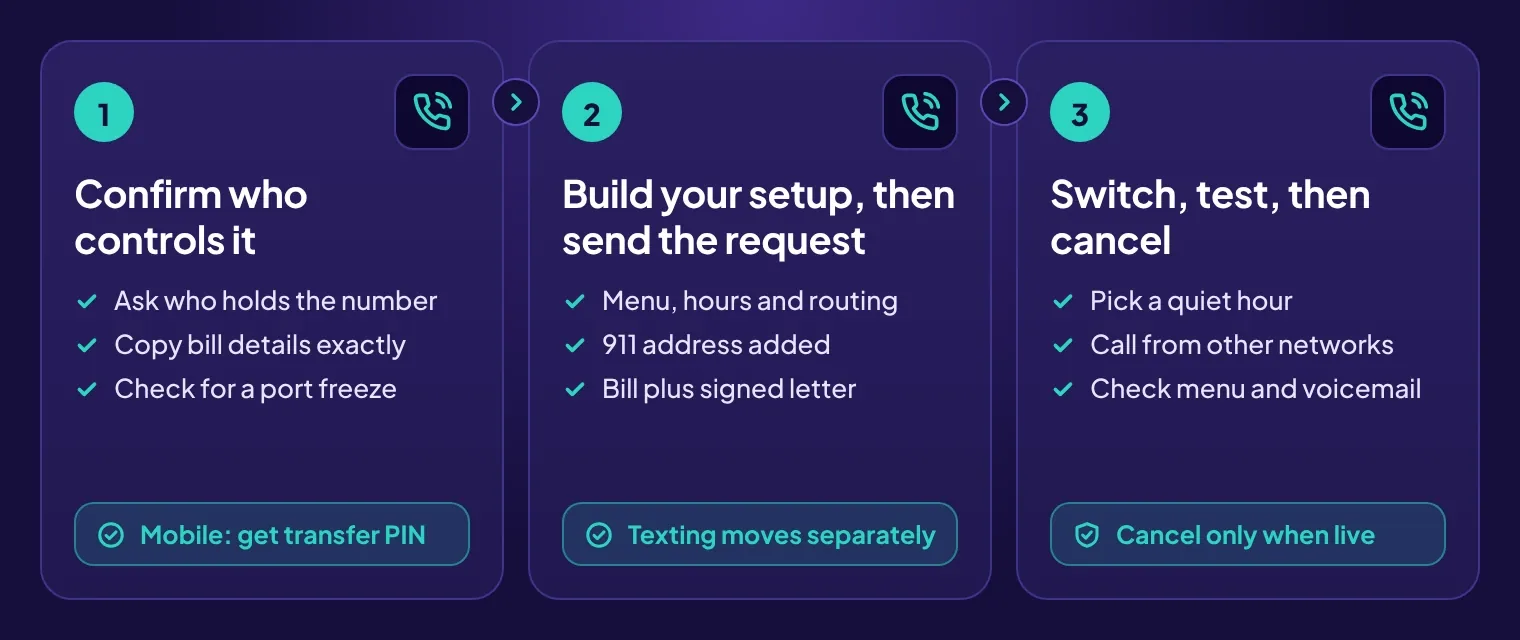
You port a US business number without losing calls by preparing first and building your new setup early. Then keep the old service live until the switch. These three steps keep your number ringing the whole time.
Step 1: Confirm who controls the number and gather your details
Ask your current phone company who controls your number. For a toll-free number, ask which RespOrg it sits with. Then pull a recent bill and copy the account name, account number and service address exactly, including spelling.
If it's a mobile number, ask your carrier for a transfer PIN. Check your contract for a port freeze too. HyperDial's porting guide says to confirm the number isn't mid-contract or under a port freeze before you submit.
Step 2: Build your new setup, then send the request
Set up your call menu, business hours and routing on the new system before the number arrives. Add your 911 address and plan your texting registration. That way, calls work the moment the switch happens. Our guide on call routing strategies shows how to plan this.
Next, send the port request with your bill and a signed letter of authorization. This letter gives the new company permission to move your number. If you text customers, ask how texting will move, because it's registered separately.
Step 3: Switch in a quiet hour, test, then cancel
Agree a switch-over time outside your busiest hours. When it happens, call the number from a landline and from mobiles on different networks. Check the menu, routing and voicemail all work, and send a test text if you use texting.
The most common mistake is cancelling the old service too early. Even the FCC's porting guide warns against ending your current service before the move. HyperDial's porting guide adds that a cancelled number is released and can no longer be ported. Only cancel once the new company confirms the number is live.
How long does it take to port a US business number?
Porting a US business number usually takes from one business day to a couple of weeks. It depends on the number type and how complex the move is. Don't treat any date as final until the companies involved confirm it.
FCC rules on porting timelines say a simple port must be completed within one business day. More complex ports must be done within four business days. These clocks only start once the request is accurate and complete.
HyperDial's porting guide says most US and Canadian numbers take 3 to 7 working days. Toll-free ports usually take a few days longer. The biggest delays come from mistakes, because a wrong detail sends the request back and the clock starts again.
Why do US number ports get rejected?
US number ports usually get rejected because of a small mismatch, not a technical problem. HyperDial's porting guide agrees: ports are "rejected far more often for a mismatched detail than for anything technical." Check for these before you submit:
- Wrong account name: it doesn't exactly match the provider's records.
- Wrong account number: a typo, or a number from an old bill.
- Wrong service address: the address on file differs from the one you entered.
- Missing transfer PIN: common with mobile numbers.
- Wrong company: the request went to a reseller, not the company that controls the number.
Each fix usually takes minutes. But each one restarts the request, so get them right the first time.
How does HyperDial help you port a US business number?
HyperDial moves existing US local and toll-free numbers with no break in service. Here's how it works, as described on HyperDial's US numbers page and porting guide:
- No gap in service: your number keeps ringing at your current provider until the agreed switch-over.
- A named engineer: one person owns your move from the first form to switch-over.
- Quick switch-over: the switch itself takes a few seconds and is scheduled with you.
- Many numbers at once: paste a list to move several numbers in one request.
- Letter done for you: HyperDial creates the letter of authorization for you to sign.
- Texting sign-up handled: HyperDial files 10DLC texting registration from day one.
Porting is free on annual plans, as the pricing page shows. Once your numbers arrive, HyperDial's numbers let you point each one at any team or menu without raising a ticket. One honest limit: HyperDial's terms say its service doesn't support emergency calls, so keep another way to reach 911.
What should you do next?
Check what type each of your numbers is and who controls it. Pull a recent bill, get a transfer PIN for any mobile numbers, and list every number you want to move. Build your new setup first, send the request, and keep the old service running until the move is confirmed. To start, visit HyperDial's US numbers page, compare plans on the pricing page or book a demo.
Sources
- FCC, Porting: Keeping your phone number when you change providers
- FCC, What is a toll-free number and how does it work?
- 47 CFR 52.35, Porting intervals (Cornell LII)
- 47 CFR 52.37, Number porting authentication (Cornell LII)
- 47 CFR 52.103, Toll free number status (Cornell LII)
- 47 CFR 9.11, Interconnected VoIP 911 (Cornell LII)


