
Can Multiple Employees Use the Same Phone Number? A Guide to Shared Business Phone Numbers
Want your whole team answering one business number without missed calls or mixed-up callbacks? Learn how to set up a shared number that just works.
Maybe this sounds familiar. You started with one number on the website, and it rang one phone. Now three people answer calls, one of them works from home, and customers keep asking who they spoke to last time. You don't want to print five numbers on your website, but you can't keep passing one phone around either.
The good news is that one number no longer means one phone or one call. This guide explains how sharing really works, the honest pros and cons, and how to set it up so nobody misses a call or steps on a teammate's conversation.
In this guide, you'll learn:
- What a shared business phone number is, and how it differs from a phone line
- The ways a team can share one number
- The pros and cons of sharing, for calls and texts
- How to set up a shared number in three steps
- How to keep a shared number organized as your team grows
What is a shared business phone number?
A shared business phone number is a single number that several employees use to make and take calls for the business. Customers only need to know one number, and the phone system decides who answers.
This works because a modern phone number isn't tied to a physical line. Every number follows the ITU's E.164 numbering plan, which defines the number as an address: a country code plus a national number. On a cloud phone system, that address can point at a whole team instead of one desk phone.
Three terms often get mixed up, so here's what each one means:
- Number: the address customers dial. One number can ring many people.
- Concurrent calls: how many calls can happen at the same time. This depends on your plan and setup, not on how many numbers you have.
- Seat or user: one employee with their own login to the phone system.
Keeping these apart makes the rest simple. You can have one number, five users and several calls running at once.
How do multiple employees share the same phone number?
Multiple employees share the same phone number through routing rules that decide which person, or group, each call goes to. The most common methods are below:
Table 1: Ways a team can share one phone number
| Method | How it works | Best for |
|---|---|---|
| Calling order | Rings people one after another | Small teams with a lead |
| Team ringing | Rings a group of people | Front desks and sales teams |
| Queue | Callers wait for the next free person | Busy support lines |
| Menu or IVR | Callers choose or say what they need | Several departments |
| Shared main line plus direct lines | Main number for all, own numbers for some | Teams with named contacts |
HyperDial's call routing handles inbound calls by team, with each team's calling order and a backup team. It can also route by skills such as language, product, region and seniority. Priority queues mean high-intent callers don't wait behind everyone else.
Can two people be on separate calls using the same number?
Yes, on a cloud phone system two or more people can be on separate calls using the same number at the same time. The number is just the address, so it can carry several conversations at once.
How many depends on your plan and setup, so check how many concurrent calls you can run before your busiest hour. If every agent is busy, a good system doesn't drop the caller. HyperDial's overflow rules name where a call goes next, and callers can hold their place and get a callback instead of waiting on the line.
What number do customers see when employees call out?
When employees call out from a shared number, customers see that same business number. That means any callback comes back to the team, not to one person's personal phone.
Some teams also show a number local to the person they're calling. HyperDial's local phone numbers can show a local caller ID on outbound calls, chosen by a campaign rule.
What are the pros and cons of sharing one phone number?
Sharing one phone number makes you easier to reach and simpler to run, but it can feel less personal and blur who owns each customer. Here are the main pros:
- One number to remember: customers always know how to reach you.
- Better availability: someone can answer while others are busy, on a break or away.
- A consistent brand: every call and text comes from the same business number.
- No personal numbers: employees never have to hand out their own mobiles.
- It survives staff changes: when someone leaves, the number and its customers stay.
And here are the cons to plan around:
- Less personal: regular customers may want one named contact.
- Unclear ownership: without rules, nobody is sure who calls a customer back.
- Overlapping replies: two people can answer the same text.
- Privacy between staff: not everyone should hear every call or read every message.
- Capacity limits: too few concurrent calls means busy signals at peak times.
Every one of those cons has a fix: routing, ownership rules, roles and the right plan. The setup steps below cover each one.
Can a team share one number for texting?
Yes, a team can share one number for texting, but it needs more care than calls because two people can reply to the same message. The fix is to keep every message in one thread per customer, so everyone sees what's already been said.
HyperDial's messaging puts texts and WhatsApp messages on the same thread as the call, linked to the same contact your reports use. A few habits help too:
- Sign your texts with your first name, so customers know who they're talking to.
- Claim the conversation before you reply, so nobody doubles up.
- Agree on reply times for your business hours, and an after-hours message.
Should employees share one number or have their own?
Employees should share one number when customers just need someone who can help, and have their own numbers when customers need a specific person. Many businesses use both. Here's a quick way to decide:
Choose one shared number if most callers want "the team", like a front desk, support line or booking line.
Choose individual numbers if customers have a named contact, like an account manager, recruiter or sales rep.
Choose both if you want one main number on your website plus direct lines for the people customers ask for by name.
Whichever you choose, keep every number in the business's name. That way, the number and its customers stay with you when someone leaves, as HyperDial's business phone numbers page shows with numbers you can repoint at any time.
How do you set up a shared business phone number?
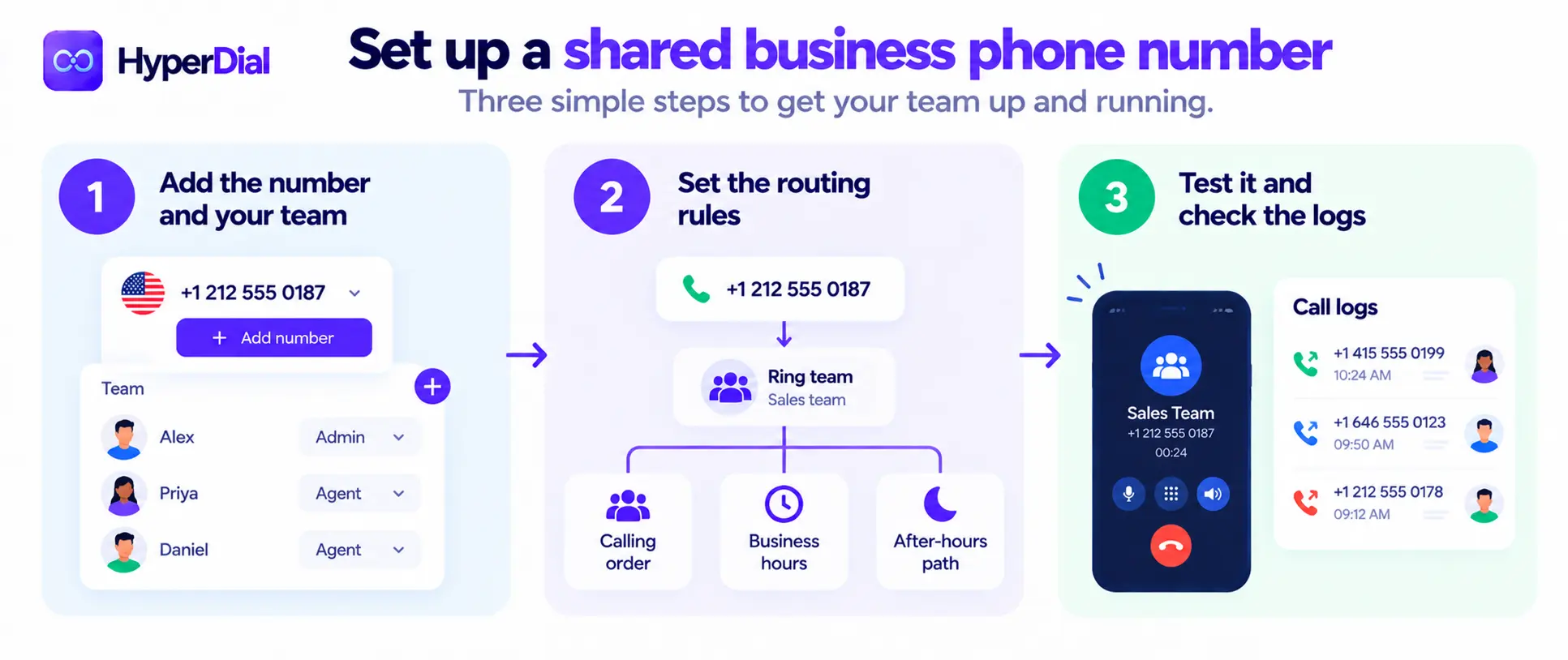
You set up a shared business phone number by adding your team to one phone system, routing the number to them, and testing it before customers call. Follow these three steps:
- Add the number and your team. Pick a local or toll-free number, then invite each employee and give them a role and a team. In HyperDial, go to Settings → Team, select Invite agent, choose a role, and optionally assign a number and a team.
- Set the routing rules. Choose how calls reach the team, such as a calling order or a queue, then add a backup team, business hours and an after-hours path.
- Test it and check the logs. Make a test call to confirm audio works both ways, call during a busy moment to check overflow, then look at the call log to see who answered.
The most common mistake happens at step 2: teams set who answers but not who calls back. Decide now that whoever takes the first call owns the follow-up, or assign callbacks to one person each day.
HyperDial only bills a seat once an invited employee accepts, as explained in the help article on inviting an agent.
How do you keep a shared phone number organized?
You keep a shared phone number organized with clear roles, clear hours and one record of every call and message. These habits keep things tidy as your team grows:
- Use roles: give each person only the access they need.
- Set business hours: decide when the number rings and what callers hear after hours.
- Keep one call log: so anyone can see who called, who answered and who still needs a callback.
- Record calls where allowed: so managers can coach and settle disputes.
- Train new joiners: share a short greeting script and your callback rules.
Roles are worth a closer look. In HyperDial, an Agent makes and receives calls and sees their own conversations only. A Manager also sees the team's recordings, transcripts and reports, and an Admin has full access, including billing and numbers. That keeps a shared number shared, without everyone reading everything.
Call logs do the rest. Our guide to call logs shows what to track, and call analytics shows total, answered and missed calls for the whole team.
How does HyperDial help teams share one number?
HyperDial lets your whole team work from one business number, whether they're in the office or at home. Here's what's included:
- Local and toll-free numbers: toll-free numbers can be routed to a queue, IVR, team or agent, just like local ones.
- Team routing: calling order, backup teams, skills routing and priority queues.
- No dropped callers: overflow rules and callbacks when everyone is busy.
- Roles and access: Agent, Manager and Admin roles, plus an audit log on the security page.
- One thread per customer: calls, texts and WhatsApp in one place.
- Works anywhere: desktop app, mobile app or the web dialer.
There are honest limits too. The number of calls you can run at once depends on your plan, so check it against your busiest hour. HyperDial also can't decide your callback rules for you, and those rules matter more than any feature.
What should you do next?
Write down who should answer your main number, in what order, and who calls customers back. Then pick a backup for busy moments and set your business hours. When you're ready to put your team on one number, try HyperDial free or compare plans on the pricing page.
Sources


