
What is Direct Inward Dialing (DID), and How Does it Work?
Want customers to reach the right person without menus or transfers? Learn what direct inward dialing (DID) is, how it works, and exactly how many direct numbers your team really needs.
Picture a customer calling your main number. They sit through a menu, get transferred twice, and finally reach the person they wanted in the first place. With direct inward dialing, they could have dialed that person straight away.
The idea is simple. What trips people up is everything around it: how DIDs differ from extensions and virtual numbers, how they work on internet phone systems, and how many you actually need. This guide covers all of it, in plain English.
In this guide, you'll learn:
- What a DID number is, and what it isn't
- How direct inward dialing works, the old way and the cloud way
- When a business needs DID numbers
- How to set up DID numbers in three steps
- How many DIDs to get, and the mistake to avoid
What is a DID number?
A DID number is a regular phone number that points at one destination inside a business phone system, such as a person, a team or a call flow. To the caller, it looks like any other number, with a country code, an area code and a local number.
The difference is what happens inside. Without DIDs, everyone shares one main number. With DIDs, each number carries its own instructions, so the phone system knows exactly where to send each call.
You'll see a few names for the same idea:
- DID (direct inward dialing): the most common term.
- DDI (direct dial-in): the same thing, the name used in many regions.
- Direct line or direct dial: what most people call it in everyday speech.
A DID isn't a special kind of number. Every phone number follows the ITU's E.164 numbering plan, which sets the international format: a country code plus a national number, up to 15 digits in total. "DID" describes how a number is used, not what it is.
How does direct inward dialing work?
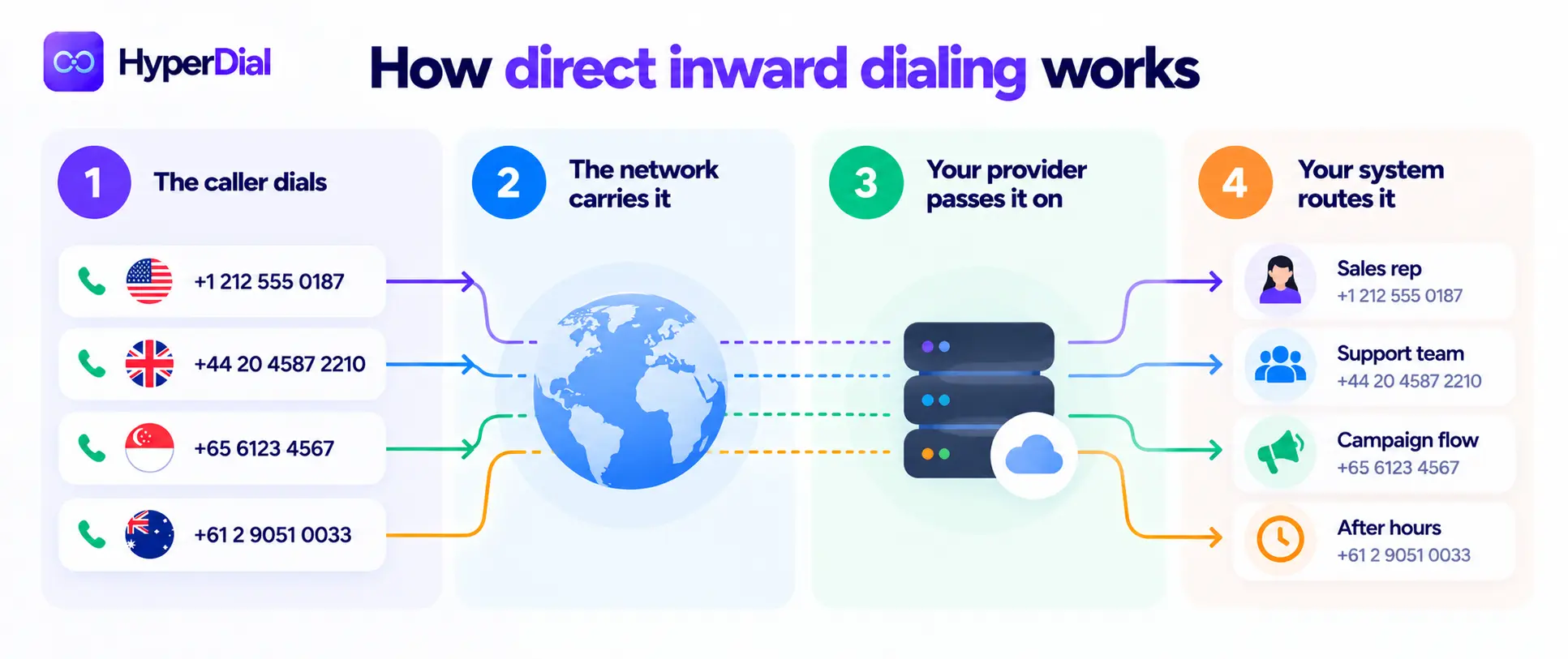
Direct inward dialing works because the phone provider passes along the number the caller dialed, so your phone system can route the call to the right place. Here's the journey of one call:
- The caller dials. A customer dials your DID number from any phone.
- The network carries it. It travels across the phone network to your provider.
- Your provider passes it on. The provider hands the call to your phone system, along with the number that was dialed.
- Your system routes it. It looks up that number and rings the person, team or call flow it belongs to.
How did DID work on traditional phone systems?
On older systems, a business rented a small bundle of phone lines and connected them to an on-site PBX (private branch exchange, the box that ran the office phones). The phone company assigned a block of numbers to those lines and sent the last few digits with each call. Those digits told the PBX which desk phone to ring.
Direct inward dialing gave a business dozens of direct numbers without renting a line for each one. The catch was hardware: adding numbers or moving people meant calling the phone company and reprogramming the PBX.
How does DID work on VoIP and cloud phone systems?
On VoIP and cloud phone systems, DIDs work the same way without the hardware. Calls arrive over the internet using SIP (Session Initiation Protocol), the standard most internet phone systems use to set up calls, defined in IETF RFC 3261. The dialed number travels with each call, and software does the routing.
There are two common setups:
- SIP trunking: your own phone system connects to a provider over a trunk, a virtual line that carries many calls and many DIDs at once.
- Cloud phone system: the provider runs the whole system for you, and you assign each number in an app.
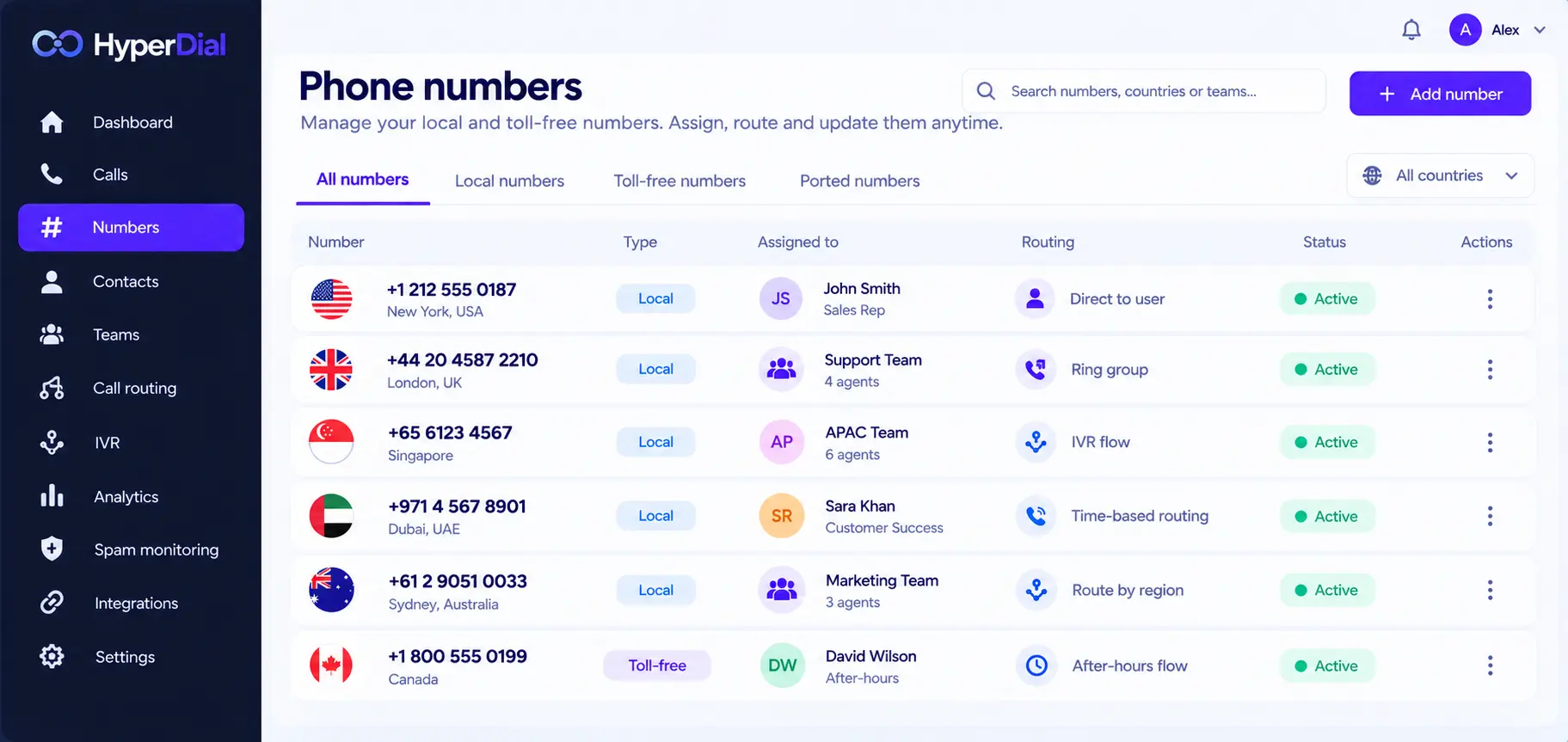
With a cloud system, you can add a number, point it somewhere new or hand it to a different person in minutes. In HyperDial, you can point any number at any flow and change it without a support ticket, as shown on the business phone numbers page.
How is DID different from extensions, virtual numbers and call forwarding?
DID gives each destination its own full phone number, while extensions, virtual numbers and call forwarding solve related but different problems. This table shows how they compare:
Table 1: DID compared with similar phone features
| Feature | What the caller dials | Reaches the person directly? | Best for |
|---|---|---|---|
| DID number | A full phone number | Yes | Direct lines to people or teams |
| Extension | Main number, then digits | After a prompt | Internal calls, small offices |
| Virtual number | A full phone number | Depends on its routing | Numbers not tied to a phone line |
| Call forwarding | Any number | Sent on to another phone | Redirecting calls for a while |
| Toll-free number | A free-to-call number | Depends on its routing | One number for a whole country |
The overlap is real. A virtual number that rings one person is a DID in practice, and toll-free numbers can be routed the same way. "DID" is about the job the number does: getting a caller straight to the right place. If you want to know how virtual numbers work, our guide on how to get a virtual phone number explains it.
What is the difference between DID and DOD?
DID handles incoming calls, and DOD (direct outward dialing) handles outgoing ones. DOD lets someone call out of the business phone system without dialing a prefix or going through an operator. Most modern systems do both, and many show the person's own DID as the caller ID when they call out.
Why do businesses use direct inward dialing?
Businesses use direct inward dialing because it gets callers to the right person faster and makes each number easy to manage and measure. Here's what changes:
- Faster answers: callers skip menus and transfers.
- A more personal feel: customers and partners reach their contact directly.
- Less work for the front desk: fewer calls need to be answered and passed along.
- Clear tracking: a separate number per campaign or market shows where calls come from.
- Room to grow: add numbers as you hire, without new lines or hardware.
- Remote-friendly: a DID rings wherever its owner signs in, at home or in the office.
That tracking point is easy to miss. Give your ad campaign, your website and your printed brochure their own DIDs, and your call reports will show which one actually brings in calls.
When does a business need DID numbers?
A business needs DID numbers when callers regularly ask for a specific person or team, or when it wants to track calls by source. Not every business does, so here's a quick way to decide:
Choose DID numbers if customers have a named contact, like an account manager, a lawyer, a recruiter or a sales rep.
Choose campaign DIDs if you run several campaigns or markets and want to see which one drives calls.
Choose one main number with routing if most callers just want someone who can help, and any free agent will do.
Choose a mix if you have both: a main line for general questions, and direct lines for the people customers ask for by name.
How do you set up DID numbers?
You set up DID numbers by deciding who needs a direct line, getting the numbers from your phone provider, and pointing each one at its destination. Follow these three steps:
- Map who needs a direct line.List the people, teams and campaigns that should have their own number, and note the area or region each one serves.
- Get the numbers.Order local or toll-free numbers from your provider, or port numbers you already have, so customers keep dialing the numbers they know.
- Point each number and test it.Assign every DID to a person, team or call flow, set business hours and a backup for when nobody answers, then call each number once to check it rings the right place.
The most common mistake happens at step 3. A DID rings one person, that person goes on leave or moves on, and calls to their number go nowhere. Give every DID a backup, such as a team, and reassign numbers when people change roles.
HyperDial's call routing routes calls by the number dialed, follows business hours and holiday calendars, and names a backup team for every queue.
How many DID numbers do you need?
Start with one DID for each person customers call by name, plus one for each team, campaign or market you want to track. A five-person sales team running two ad campaigns would need seven numbers.
Don't buy more than you'll use. Every number is one more thing to route, monitor and pay for. You can always add more later, and in a cloud system that takes minutes.
What else can DID numbers be used for?
DID numbers can also give a direct number to things that aren't people, such as a fax line, a call flow or an AI agent. These are the most common uses:
- Fax lines: fax machines and fax services use DIDs so each fax reaches the right inbox.
- Call flows: a DID can lead to a short menu, a queue or a booking flow instead of a person.
- AI agents: a DID can ring an AI agent that answers simple questions and hands the call to a person with the transcript.
- Local presence: DIDs with local area codes in each region you serve make your business feel local to callers there.
How does HyperDial handle DID numbers?
In HyperDial, every number works as a direct line, so you can give each person, team or flow its own number and change where it points at any time. Here's what that looks like:
- Local and toll-free numbers: local phone numbers in 130+ countries, plus toll-free numbers.
- Any number, any flow: point a number at a person, team, queue or AI agent, and change it without a ticket.
- Routing by number dialed: send calls by the number dialed, the caller's region, or both.
- Backups built in: overflow rules and backup teams, so a call is never dropped silently.
- Porting with a named engineer: one engineer owns your port from the first form to the cutover call, and porting is free on annual plans.
- Paperwork handled: KYC and registration filed on your behalf where a region requires it.
There are honest limits too. HyperDial doesn't list fax support, and number types and paperwork vary by country. You can check what each market offers on the business phone numbers page.
What should you do next?
List the people and campaigns callers ask for by name, and count how many direct lines you actually need. Then pick numbers in the areas you serve and point each one at its owner, with a backup. When you're ready, try HyperDial free or compare plans on the pricing page.
Sources


