
What is the Difference Between a Local Phone Number and a DID Number?
Stop mixing up “local number” and “DID”: one tells callers where you are, the other tells your phone system where to send the call, and the best business numbers do both.
So the two aren't opposites. Most local numbers you buy from a cloud phone provider are also DID numbers, and a DID can just as easily be toll-free. This guide explains both terms, where they overlap, and which one to ask for when you set up business numbers.
What is a local phone number?
A local phone number is a phone number tied to a specific city or region through its area code. Callers in that area recognize it as nearby, and they usually pay their normal local rate to call it.
Businesses use local numbers mainly for trust and reach. A number from a customer's own area looks like a nearby business, which helps on both inbound calls and outbound sales calls. It also lets a company look present in a city without having an office there. Our guide to what local phone numbers are covers how area codes work in more detail.
What is a DID number?
A DID number is a phone number that rings a specific person, team or call flow in a business phone system. Callers skip the main line and the operator. DID stands for direct inward dialing, and some regions call it DDI, for direct dial-in.
Here's the key idea: "DID" describes how a number is used, not a special kind of number. Every phone number follows the ITU's E.164 numbering plan, with a country code and a national number of up to 15 digits in total. A DID is simply one of those numbers, set up so your phone system knows where to send each call. Our explainer on what direct inward dialing is walks through how it works step by step.
What is the difference between a local phone number and a DID number?
The main difference between a local phone number and a DID number is that one describes location and the other describes routing. Comparing them side by side makes that clear:
Table 1: Local phone number vs DID number
| Local phone number | DID number | |
|---|---|---|
| The question it answers | Where is this business? | Where does this call go? |
| Defined by | The area code | How the phone system routes it |
| What callers notice | A familiar, nearby number | Reaching the right person first time |
| Can it be toll-free? | No, by definition it's geographic | Yes, a DID can be local or toll-free |
| Who pays for the call | The caller, at local rates | Depends on the number type |
| Best for | Local presence and outbound calls | Direct lines for people, teams and campaigns |
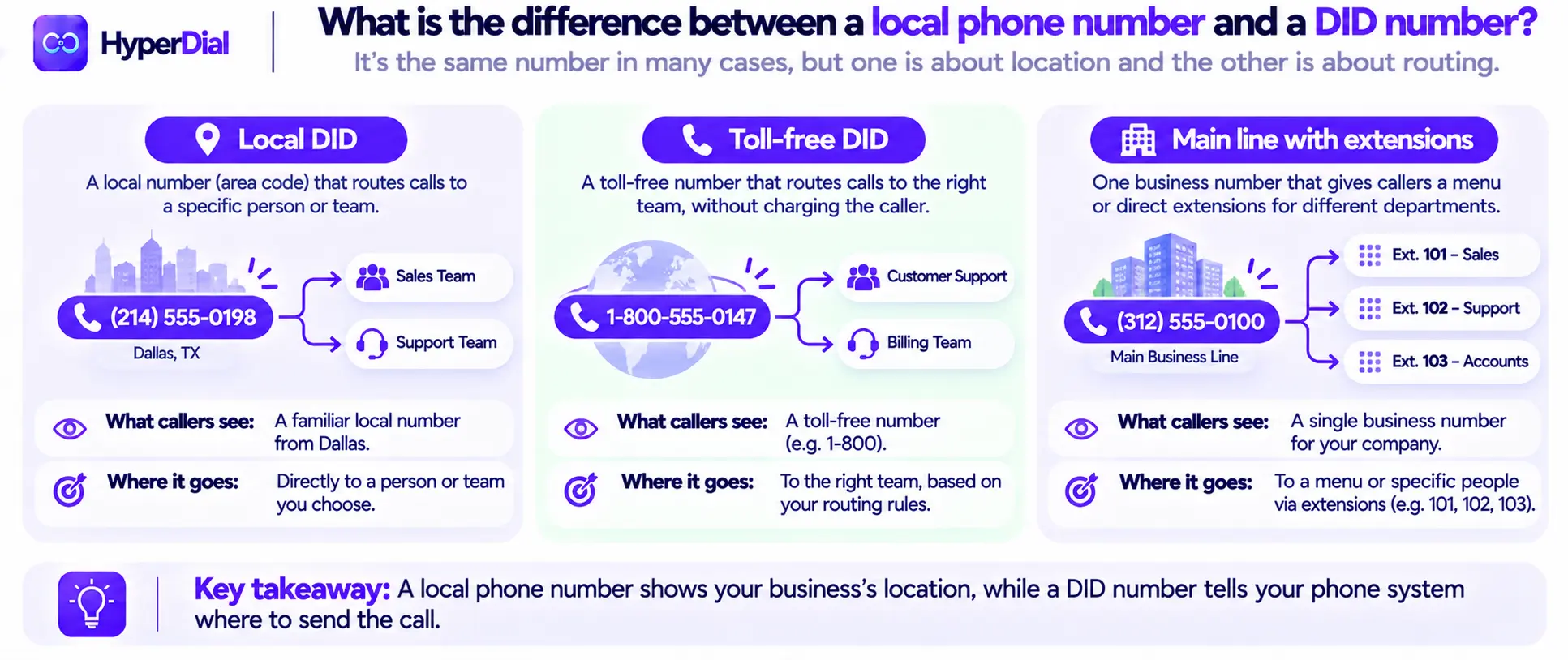
In practice, the two labels often describe the same number. When a cloud provider sells you a number with a city area code and lets you point it at one team, you've bought a local DID. The terms only split at the edges. A toll-free DID isn't local, and an old office landline ringing one desk phone is local but not a DID.
Can a DID number be toll-free?
Yes, a DID number can be toll-free, because "DID" only describes routing, not who pays. A toll-free DID is free for the caller and still rings a specific person, team or flow directly. Many businesses use a toll-free DID for national support and local DIDs for sales. HyperDial's toll-free numbers can be routed the same way as its local numbers.
Which should your business use: a local number, a DID or both?
Most businesses should use local DIDs: numbers with a nearby area code that ring the right team directly. The better question is which mix of number types fits each job. Use this quick guide:
Choose a local DID if your customers are in one city or region, or your team makes outbound calls that need a familiar area code.
Choose a toll-free DID if you serve customers nationwide and want calls to be free for them, such as a support line.
Choose one main number with extensions if you're a small team and callers rarely need a specific person.
Use several DIDs if different people, departments or campaigns each need their own direct number.
That last case is common as teams grow. Our guide on separate phone numbers for sales and support explains when splitting numbers pays off.
How do you get a local DID number for your business?
You get a local DID number by choosing the area and number type, assigning it to the right destination, and testing it. Follow these three steps:
- Choose the area code and number type. Pick the city or region your callers are in, and decide whether you need a local number, a toll-free number or both.
- Complete any checks and assign the number. Provide the documents that market requires, then point the number at a person, a team, a queue or a phone menu.
- Set caller ID and test both directions. Choose which number shows when your team calls out, then make a test call in and a test call out.
The most common mistake happens at step 2: assigning a DID to one person instead of a team. When that person leaves, customers who saved the number reach nobody. Point direct numbers at a team or flow you can reroute in seconds, even when one person answers most calls.
How does HyperDial handle local and DID numbers?
HyperDial lets every number work as a DID: each local or toll-free number can point at its own person, team or call flow. You can change where a number rings at any time from your account.
Here's how the pieces fit together:
- Local numbers: HyperDial's local phone numbers cover 130+ countries and ring on your team's laptops and phones.
- Routing per number: the business phone numbers page explains that you can point any number at any flow and change it without a ticket.
- Local caller ID: sales teams can dial from a number that matches the region they're calling, as shown on HyperDial's outbound calling page.
- Paperwork: KYC and registration steps are filed on your behalf where a region requires them.
Numbers and minutes are billed at cost and itemized, with no per-region surcharge on the platform fee.
What should you do next?
List the people, teams and campaigns that need a direct number, and the regions your callers are in. Then choose local DIDs for regional reach and a toll-free DID if you serve customers nationwide. When you're ready, compare plans on the pricing page or try HyperDial free.
Sources


