
Communication channels for business: types, examples and how to choose
Using the wrong channel can cost you the customer. Find out which one to use for every message.
What are communication channels in business?
A Business Communication Channels is any tool or method a company uses to share information. That includes talking to customers, partners and its own team. A phone call is a channel, an email is a channel, and so is a chat window on your website.
There are two big groups. Internal channels are how your team talks to each other, like team chat or meetings. External channels are how you talk to people outside the business, like customers and suppliers. Many tools, like phone and email, are used for both.
Picking channels matters because each one has strengths. A long email is great for details but slow for an urgent problem. Phone calls are fast but leave no written record unless you record them.
What are the types of communication channels?
Communication channels are usually grouped in three ways: how formal they are, who they reach, and how fast people reply. The table below shows each type with an example.
Table 1: Types of communication channels
| Type | What it means | Example |
|---|---|---|
| Formal | Official messages with set rules | Company email, contracts |
| Informal | Casual, everyday talk | Team chat, quick calls |
| Internal | Between people on your team | Team meetings, team chat |
| External | With customers and partners | Support calls, WhatsApp |
| Real-time | Both people talk at the same time | Phone calls, video calls, live chat |
| Not real-time | People reply when they can | Email, text messages |
Most businesses need a mix. For example, a customer might start with a real-time call and then get the details in a formal email afterward.
What are the most common business communication channels?
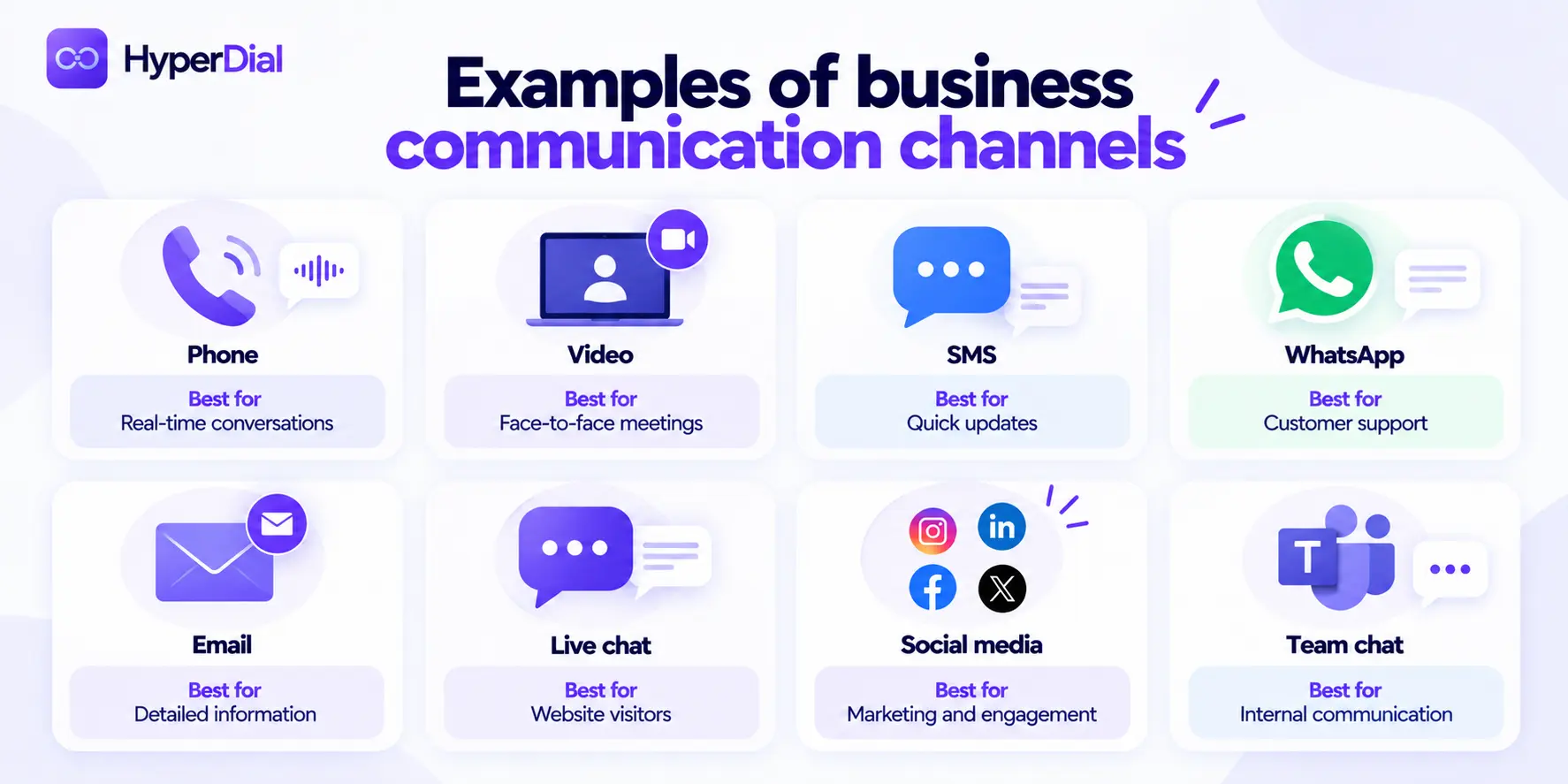
The most common business communication channels are phone calls, video calls, text messages, WhatsApp, email, live chat, social media messages and team chat apps. Here's what each one is good for.
When should you use phone calls?
Phone calls are best for urgent problems, sales talks and anything that needs a quick back-and-forth. Hearing a real voice also builds trust faster than text. Calls take more time from your team, though, so use a phone menu (IVR) to send each caller to the right person. HyperDial's voice calling lets your team answer on a laptop or phone, with recording and transcripts.
When should you use video calls?
Video calls are best for meetings, product demos and conversations where seeing each other helps. They work well for remote teams and for showing a customer how something works. Keep them for planned talks, since most customers won't want a surprise video call.
When should you use text messages (SMS)?
Text messages are best for short updates people need to see quickly. Think order updates, appointment reminders and delivery times. Most people read texts within minutes, so SMS works when timing matters. Keep texts short, and only text people who agreed to hear from you.
When should you use WhatsApp?
WhatsApp is best for customers who already use it every day, which is common in many countries. It works for support, order updates and sending photos or documents. Businesses need the customer's permission first. Meta's WhatsApp opt-in rules say the customer must agree to get WhatsApp messages from your business by name. HyperDial's SMS and WhatsApp messaging keeps these chats on the same thread as calls.
When should you use email?
Email is best for long details, documents and anything people need to keep, like quotes, contracts and receipts. It's not great for urgent problems, because replies can take hours or days. Use clear subject lines so people can find your email later.
When should you use live chat?
Live chat is best for quick questions from people already on your website, like "Do you ship to my city?" Visitors get an answer without leaving the page or picking up the phone. HyperDial's web chat can answer common questions and hand harder ones to a person, with the chat history attached.
When should you use social media messages?
Social media messages are best for customers who find you on Instagram, Facebook or similar apps. Many people send a quick question there instead of calling. Reply fast, because these messages are often public-facing and shape how people see your brand.
When should you use team chat apps?
Team chat apps are best for quick talk inside your team, like questions, updates and sharing files. They cut down on internal email. Keep big decisions in a place that's easy to find later, so they don't get lost in a busy chat.
Which communication channel should you use for each task?
The best channel depends on the task: how urgent it is, how much detail it has, and whether you need a record. Use this table as a simple guide.
Table 2: The best channel for common business tasks
| Task | Best channel | Why |
|---|---|---|
| Urgent customer problem | Phone call | Fast and personal |
| Order or delivery update | SMS or WhatsApp | Seen quickly, short |
| Quote or contract | Easy to keep and share | |
| Quick question on your website | Live chat | Answer without leaving the page |
| Product demo | Video call | Show, don't just tell |
| Team update | Team chat | Quick and informal |
| After-hours calls | Phone menu or AI voice agent | Callers still get help |
For after-hours calls, HyperDial's AI voice agents can answer, book meetings and hand the call to your team the next day.
How do you choose the right communication channels for your business?
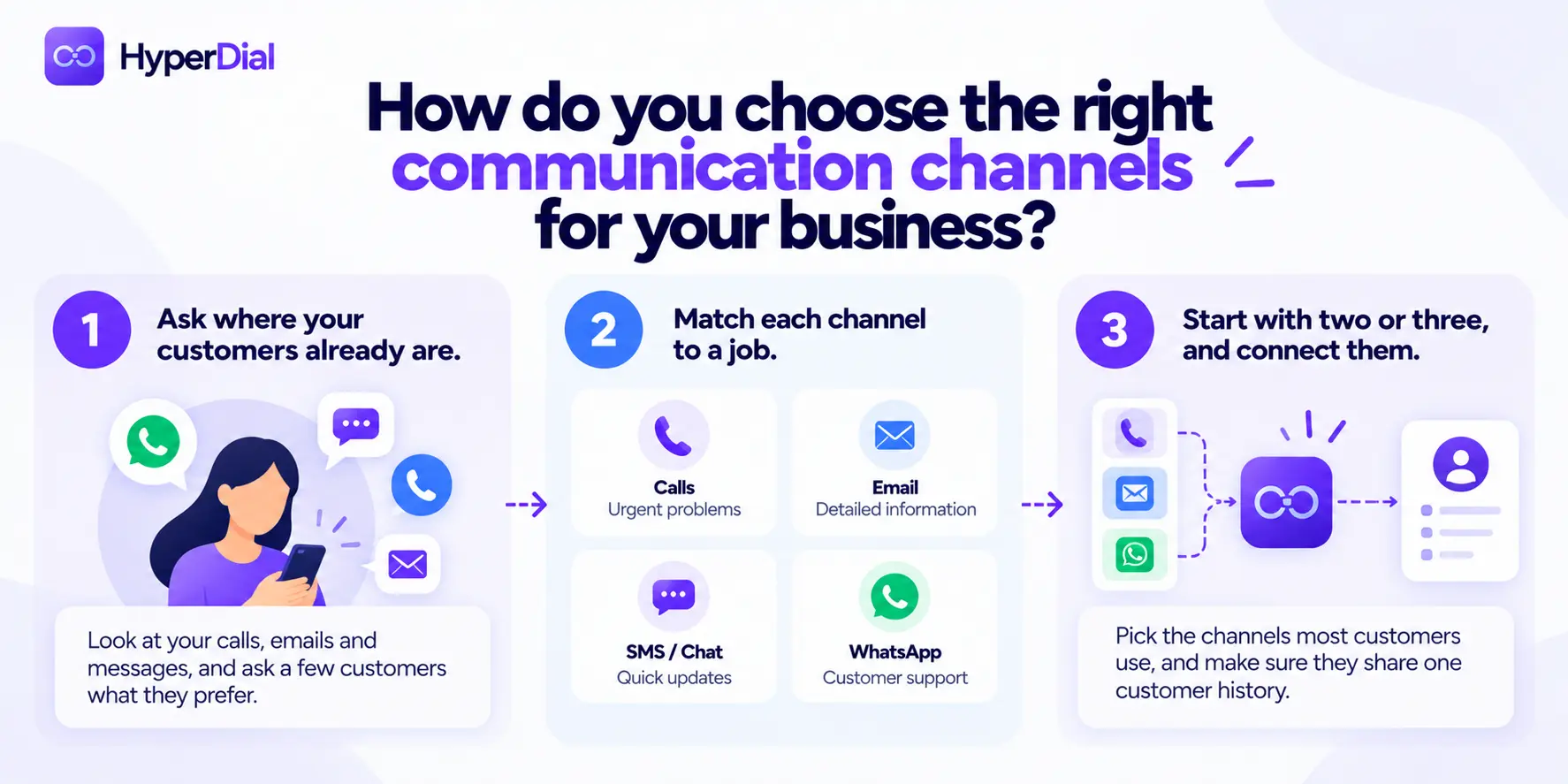
You choose the right channels by starting with your customers, not with every tool out there. It takes three steps:
- Ask where your customers already are. Look at how people contact you today. Check your calls, emails and messages from the last month, and ask a few customers what they prefer.
- Match each channel to a job. Use calls for urgent problems, email for details and texts or chat for quick updates. Don't use one channel for everything.
- Start with two or three, and connect them. Pick the channels most customers use, and make sure they share one customer history before you add more.
The most common mistake happens at step 3. Businesses add too many channels at once, and each one keeps its own separate history. Then customers have to repeat themselves every time they switch from a call to a message.
Why should your communication channels be connected?
Your channels should be connected so every conversation with a customer is in one place. When channels are separate, a customer who emails and then calls has to explain everything again. Connected channels let whoever answers see the whole story.
This idea is called omnichannel communication. It means all your channels share one customer history. Our guide on what omnichannel means explains it in more detail.
HyperDial's omnichannel inbox puts calls, WhatsApp, SMS, email, web chat and social messages on one thread for each customer. Your team can also sync conversations with the tools they already use, listed on HyperDial's integrations page.
What are the best practices for business communication channels?
The best practice is to be fast, clear and consistent on every channel you offer. Follow these tips:
- Set reply times: tell customers how fast you'll reply on each channel, and stick to it.
- Give the same answers everywhere: a customer should get the same price and policy by phone, email or chat.
- Get permission first: only text or message people who agreed to hear from you, and make it easy to opt out.
- Make it easy to reach a person: bots and phone menus are helpful, but always offer a way to talk to someone.
- Review your conversations: look at what customers ask most, and fix the gaps.
- Track what works: check which channels get the most use and the fastest replies.
HyperDial's conversation intelligence turns calls into transcripts and summaries, so you can see what customers ask most.
What should you do next?
List the ways customers contact you today, and pick the two or three channels they use most. Match each one to a job, then connect them so every conversation lives in one place. To bring calls, texts and chats together, try HyperDial free and see every customer conversation on one thread.


