
Can One Business Account Manage Phone Numbers in Multiple Countries?
Selling in more than one country doesn’t have to mean a phone provider for each one. See how one account can run all your international numbers, and what still changes from country to country.
This short guide explains how that works, what still changes from country to country, and how to keep a multi-country setup tidy as you grow.
How can you manage phone numbers in multiple countries from one account?
You manage phone numbers in multiple countries from one account by using a cloud phone system that holds numbers from each country's numbering plan. Every phone number starts with a country code under the ITU's E.164 international numbering plan, and each country runs its own national numbering plan inside that code.
Your provider gets the numbers from each country. The account then sits on top, so every number rings the same app and appears in the same reports. HyperDial's local phone numbers cover 130+ countries, so a team selling into several markets holds one account rather than one vendor per country.
What changes from country to country?
The account stays the same, but each country sets its own rules for the numbers inside it. These are the things that usually differ between markets:
Table 1: What varies when you add numbers in another country
| What varies | Example of the difference | Why it matters |
|---|---|---|
| Number types | Local, toll-free or mobile | Not every type exists everywhere |
| Documents | ID, address or business registration | Missing papers delay activation |
| Activation time | Minutes in some, days in others | Plan launches around it |
| Porting rules | Easy in some, strict in others | Affects keeping old numbers |
| Texting | Allowed, limited or registered | Not every number can text |
These differences are why one account works best when your provider tells you each country's requirements before you buy. HyperDial lists what each market needs upfront and files KYC and registration steps on your behalf where a region requires them, as explained on its business phone numbers page.
How do you set up phone numbers in multiple countries?
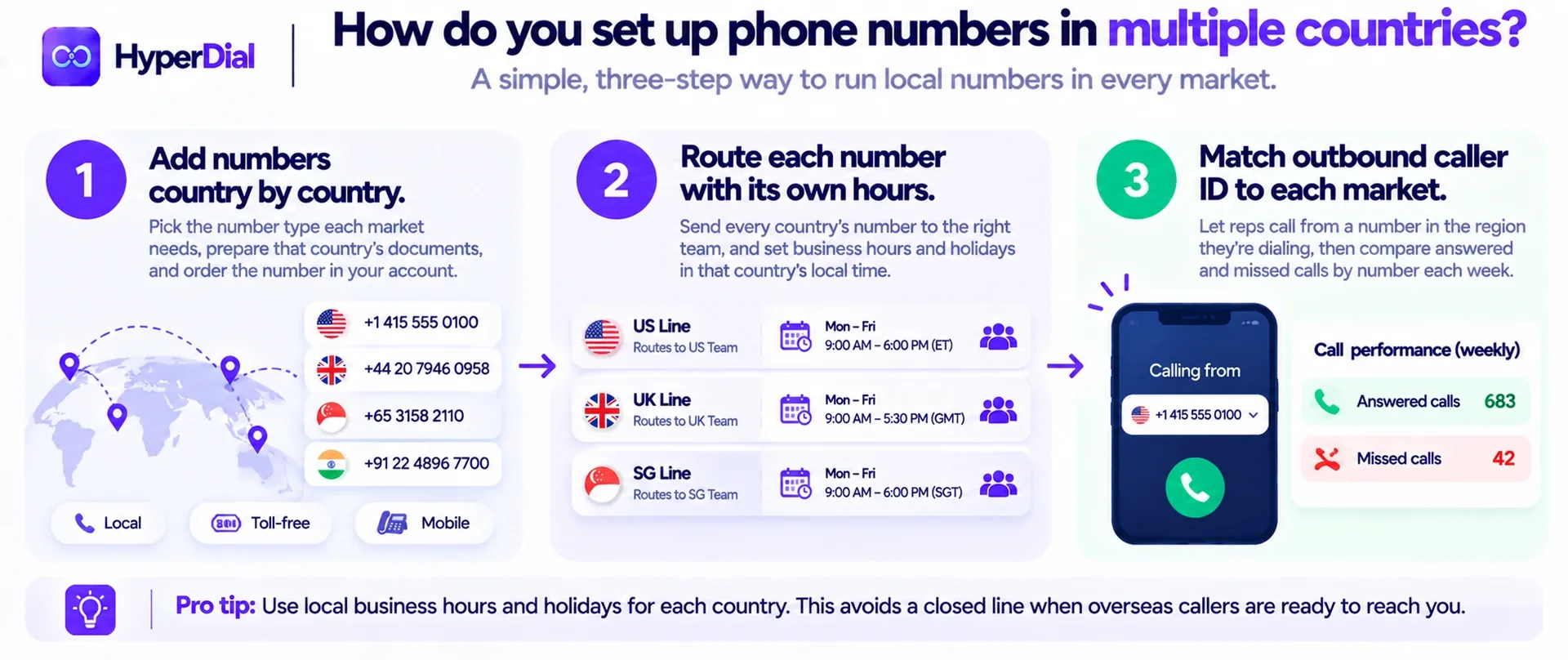
You set up phone numbers in multiple countries by adding them one market at a time, routing each one to the right people, and choosing which number your team calls out from. Follow these three steps:
- Add numbers country by country. Pick the number type each market needs, prepare that country's documents, and order the number so it lands in your existing account.
- Route each number with its own hours. Send every country's number to the team that serves it, and set business hours and holidays in that country's local time.
- Match outbound caller ID to each market. Let reps call from a number in the region they're dialing, then compare answered and missed calls by number each week.
The most common mistake happens at step 2: teams copy one set of business hours to every country, so overseas callers hit a closed line in the middle of their working day. HyperDial's call routing keeps business hours and holiday calendars per queue and per region, and can route by the number dialed, the caller's region, or both.
How should you organize numbers across countries?
You should organize numbers so anyone can tell at a glance which market and team each one serves. A few simple habits help:
- Name numbers clearly, with the country name plus "Sales" or "Support."
- Give each region its own team or queue, even if it's one person today.
- Keep one support number per market that customers can see on your local website.
- Review reports by number so you can see which markets are growing.
Why use one account instead of a provider per country?
One account is simpler because your team, routing and reports live in one place. Separate providers mean separate apps, bills and logins for every market. Here's what one account gives you:
- One app for your team, so a rep can answer calls from any market.
- One set of routing rules you can change without a support ticket.
- One bill, with numbers and minutes listed by country.
- One place to compare markets by calls answered and missed.
HyperDial bills numbers and minutes at cost and itemizes them, with no per-region surcharge on the platform fee, as shown on its business phone numbers page.
When might you need more than one account?
You might need more than one account when separate legal companies must keep separate billing, data or admin control. One account suits one company selling into many countries. Use this quick guide:
Choose one account if one company runs every market and the same managers need to see all of them.
Choose separate accounts if each country is a separate legal entity with its own finance team or data rules.
Ask your provider first if a country requires the number holder to be a local company, since that can decide whose name goes on the number.
What should you do next?
List the countries where your customers already call from or where you plan to sell next. Check what each one needs for a number, then add them to one account and route each to the right team. When you're ready, compare plans on the pricing page or try HyperDial free.
Sources


